Releases: AdguardTeam/AdGuardVPNForWindows
2.6

Disclaimer: AdGuard VPN for Windows is not an open-source project. We use Github as an open bug tracker for users to see what developers are working on.
This update enhances AdGuard VPN with three core improvements. First, there is a new startup window toggle. Second, the application now opens 10 times faster. Third, we’ve improved network stability.
New toggle for startup behavior
We’ve all been there: you reboot your computer, expecting a fresh start, but instead face a parade of apps restarting. AdGuard VPN now offers a cleaner startup with the new Open main window at system startup toggle. If you switch it off, the app will still run in the background, maintaining full protection without interruptions.

To check the new settings, go to Settings → App settings → System startup → Open main window at system startup. This feature is part of our ongoing effort to adapt AdGuard VPN to you, not the other way around.
Reopen time optimization
Although closing AdGuard VPN by clicking the X button worked flawlessly, we noticed that reopening the application from the desktop icon took a bit longer than it should. This micro delay is history. Now, when you click the desktop icon now, AdGuard VPN opens in just 0.2–0.3 seconds instead of 2–2.5 seconds.
We’ve also enhanced the VPN client to provide stronger stability, smarter adaptability, and optimized efficiency. Now the VPN handles network interference more effectively, keeping your connection stable when it matters most.
Changelog
Fixes
- After waking the computer from sleep mode with the VPN active and the Kill Switch feature enabled, the Internet connection is lost until manually reconnecting to the VPN #774
- Can’t add a non-punycode top-level internationalized domain name in Exclusions #831
- App crashes when attempting to add default applications that already exist in the Exclusions list #853
- The app starts maximized #771
- Typo and missing corner rounding in the notification window #713
VPN client (AdGuard VPN protocol implementation)
- VPN client updated to v0.16.37 #905
AdGuard VPN for Windows direct download link:
2.6 beta 2
Disclaimer: AdGuard VPN for Windows is not an open-source project. We use Github as an open bug tracker for users to see what developers are working on.
We've all been there: you reboot your computer, expecting a fresh start, but instead face a parade of apps restarting. AdGuard VPN now offers a cleaner startup with the new Open main window at system startup toggle. If you switch it off, the app will still run in the background maintaining full protection without interruptions.
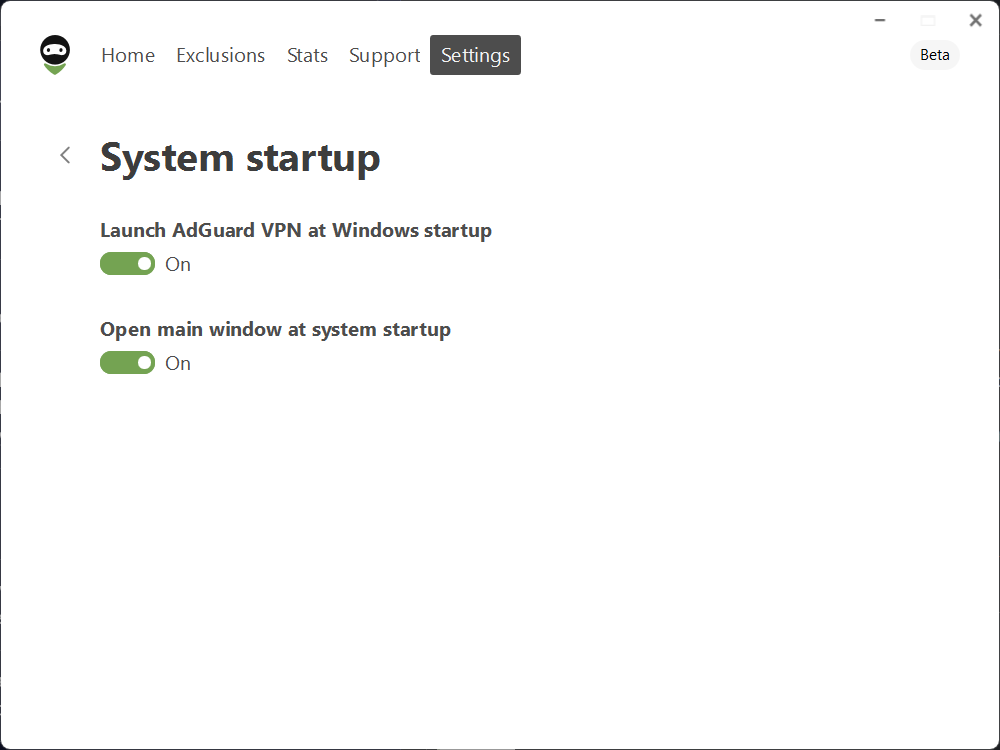
To check the new settings, go to Settings → App settings → System startup → Open main window at system startup. This feature is part of our ongoing effort to adapt AdGuard VPN to you, not the other way around.
We’ve also enhanced the VPN client to provide stronger stability, smarter adaptability, and optimized efficiency. Now VPN handles network interference more effectively, keeping your connection stable when it matters most.
Changelog
Fixes
- Can’t add non-punycode top-level internationalized domain name in Exclusions #831
- App crashes when attempting to add default applications that already exist in the Exclusions list #853
VPN client (AdGuard VPN protocol implementation)
- VPN client updated to v0.16.26
#893
AdGuard VPN for Windows direct download link:
2.6 beta 1
Disclaimer: AdGuard VPN for Windows is not an open-source project. We use Github as an open bug tracker for users to see what developers are working on.
In this update, we've reengineered AdGuard VPN launch to provide instant and flawless access to the app.
Launch time optimization
While closing AdGuard VPN by clicking the X button worked flawlessly, we noticed that reopening the application from the desktop icon took a fraction longer than it should. This micro delay is history. When you click the desktop icon now, AdGuard VPN opens in just 0.2–0.3 seconds instead of 2–2.5 seconds — nearly instantaneous and significantly faster than before.
Other
This release also includes updated WFP and TDI drivers, as well as an updated VPN client for a faster and more reliable in-app experience.
Changelog
Fixes
- After waking the computer from sleep mode with the VPN active and Kill Switch feature enabled, the Internet connection is lost until manually reconnecting to the VPN #774
- Typo and missing corner rounding in the notification window #713
- The app starts maximised #771
VPN client (AdGuard VPN protocol implementation)
- VPN client updated to v0.15.42 #856
AdGuard VPN for Windows direct download link:
2.5.1
Disclaimer: AdGuard VPN for Windows is not an open-source project. We use Github as an open bug tracker for users to see what developers are working on.
The version 2.5.1 brings post-quantum cryptography, updated drivers and improvements to the app launch process to AdGuard VPN for Windows. Sounds impressive, but what does that actually mean?
Protecting you from quantum computers
If you’ve been keeping up with the latest AdGuard releases, you may have noticed that we’ve been gradually adding post-quantum cryptography to our products. If this concept is new to you, don’t worry, it’s not science fiction (though it does sound cool enough to be in a blockbuster movie). It’s actually a powerful feature that adds an extra level of security to your browsing.
Here’s the deal: when you use a VPN, protecting your traffic is critical. At AdGuard, we go the extra mile to encrypt your data so you can stay anonymous and your browsing habits remain your business. Post-quantum cryptography takes this to the next level, ensuring that even the most advanced quantum computers won’t stand a chance at decrypting your traffic.
Other improvements
This release also includes updated WFP and TDI drivers, along with an updated VPN client that brings a faster and more reliable experience within the app – we’ve worked hard to boost the overall stability and made some major improvements to the app launch process and, as a result, AdGuard is now launched in record time, and the annoying UI bugs are gone.
Changelog
Fixes
- Failed to launch version 2.5 on Windows 8.1 #802
- A shortcut to the app appears after the update, even if it has been deleted #804
VPN client (AdGuard VPN protocol implementation)
- VPN client updated to v0.15.35 #845
AdGuard VPN for Windows direct download link:
2.5.1 RC
Disclaimer: AdGuard VPN for Windows is not an open-source project. We use Github as an open bug tracker for users to see what developers are working on.
Bug fixes? Check. Small improvements? Check. This RC is here to make sure everything's perfect before the grand finale.
Changelog
Fixes
- A shortcut to the app appears after the update, even if it has been deleted #804
VPN client (AdGuard VPN protocol implementation)
- VPN client updated to v0.15.29 #842
AdGuard VPN for Windows direct download link:
2.5.1 beta 2

Disclaimer: AdGuard VPN for Windows is not an open-source project. We use Github as an open bug tracker for users to see what developers are working on.
Meet the second beta of AdGuard VPN v2.5.1 for Windows! Not much has changed since the first beta – we've fixed a few bugs and made some improvements for a better user experience.
Changelog
VPN client (AdGuard VPN protocol implementation)
- VPN client updated to v0.15.19 #822
AdGuard VPN for Windows direct download link:
2.5.1 beta 1
Disclaimer: AdGuard VPN for Windows is not an open-source project. We use Github as an open bug tracker for users to see what developers are working on.
The version 2.5.1 brings post-quantum cryptography to AdGuard VPN for Windows. Sounds impressive, but what does that actually mean?
If you’ve been keeping up with the latest AdGuard releases, you may have noticed that we’ve been gradually adding post-quantum cryptography to our products. If this concept is new to you, don’t worry, it’s not science fiction (though it does sound cool enough to be in a blockbuster movie). It’s actually a powerful feature that adds an extra level of security to your browsing.
Here’s the deal: when you use a VPN, protecting your traffic is critical. At AdGuard, we go the extra mile to encrypt your data so you can stay anonymous and your browsing habits remain your business. Post-quantum cryptography takes this to the next level, ensuring that even the most advanced quantum computers won’t stand a chance at decrypting your traffic.
Changelog
Fixes
- Failed to launch version 2.5 on Windows 8.1 #802
VPN client (AdGuard VPN protocol implementation)
- VPN client updated to v0.15.11 #811
AdGuard VPN for Windows direct download link:
2.5
Disclaimer: AdGuard VPN for Windows is not an open-source project. We use Github as an open bug tracker for users to see what developers are working on.
Some wanted it, some gave up on it, some didn’t believe we could do it, but here it is, AdGuard VPN for Windows finally introduces Saved locations.
If you regularly need to connect to a specific location — maybe for work, or maybe to watch a Netflix show that’s not available in your country, or maybe you’re just used to a certain country — now you can have it at your fingertips.
To save a location, hover your mouse over it and click the bookmark icon. Marked locations will appear in the Saved tab.

On to the less cheery news: AdGuard VPN no longer supports Windows 7. If you need to stay on Windows 7 for any reason, you can use the old versions of AdGuard VPN. You won’t be able to update it to version 2.5 or later. If you reinstall AdGuard VPN on Windows 7, the installer will prompt you to install v2.4 instead, which is the last version supported on this operating system.
We’ve also updated the VPN protocol to ensure that your connection remains fast, stable and secure.
Changelog
Improvements
- Corrected Wintun driver name and added description #716
Fixes
- “Network is lost” message appears on the main screen #784
- High CPU usage with Wintun enabled #693
- High ping and low connection speed #742
- Importing unsupported file removes all website exclusions #610
- The app window opens after the system reboot #771
VPN client (AdGuard VPN protocol implementation)
- VPN client updated to v0.14.40 #776
AdGuard VPN for Windows direct download link:
2.5 beta 1
Disclaimer: AdGuard VPN for Windows is not an open-source project. We use Github as an open bug tracker for users to see what developers are working on.
Some wanted it, some gave up on it, some didn’t believe we could do it, but here it is, AdGuard VPN for Windows finally introduces Saved locations.
If you regularly need to connect to a specific location — maybe for work, or maybe to watch a Netflix show that’s not available in your country, or maybe you’re just used to a certain country — now you can have it at your fingertips.
To save a location, hover your mouse over it and click the bookmark icon. Marked locations will appear in the Saved tab.

On to the less cheery news: AdGuard VPN no longer supports Windows 7. If you need to stay on Windows 7 for any reason, you can use the old versions of AdGuard VPN. You won’t be able to update it to version 2.5 or later. If you reinstall AdGuard VPN on Windows 7, the installer will prompt you to install v2.4 instead, which is the last version supported on this operating system.
We’ve also updated the VPN protocol to ensure that your connection remains fast, stable and secure.
Changelog
Improvements
- Corrected Wintun driver name and added description #716
Fixes
- “Network is lost” message appears on the main screen #784
- High CPU usage with Wintun enabled #693
- High ping and low connection speed #742
- Importing unsupported file removes all website exclusions #610
VPN client (AdGuard VPN protocol implementation)
- VPN client updated to v0.14.40 #776
AdGuard VPN for Windows direct download link:
2.4.1
Disclaimer: AdGuard VPN for Windows is not an open-source project. We use Github as an open bug tracker for users to see what developers are working on.
Speed and application stability are not the only things about this update. In AdGuard VPN v2.4.1 for Windows, we have moved the authorization process to a single window in your browser. Now, simply click Log in or create an account, and you’ll be automatically taken to a browser page where you can log in to the app and to your AdGuard account.
Important: this is the last release to support Windows 7.
We use several libraries for our work, the latest versions of which no longer support Windows 7. And the latest versions are necessary — both for user safety and for the overall functionality of the app.
If upgrading to a newer version of Windows isn’t possible, please stick with version 2.4.1.

The new login process may not be so convenient at first, but here are the benefits of it:
-
It makes it easier for us to maintain the service, and it is a key to reducing issues, allowing us to identify and resolve problems faster and more efficiently.
-
Now you can use the password manager and enable autocomplete in your browser to make the login process faster.
-
We’ve added the Use one-time code instead option. If you don’t want to use your password or you forgot it, we will email you a temporary code to log in to the app. Stay private and safe.

We’ve also fixed some bugs and updated the VPN client. The application now is more stable and smoother.
Changelog
Fixes
- A list of the fastest locations doesn’t load in some cases #744
VPN client (AdGuard VPN protocol implementation)
- VPN client updated to v0.14.23 #741
AdGuard VPN for Windows direct download link: