Having a little issue with settings guide. #107

Replies: 4 comments 1 reply

-
|
I have the same problem as AussiePaul60. The auto popup is quite irritating and "in one's face" all the time. I have to uninstall, restart every time I want to work on my start and end g-codes. Before I can change or type something, the popup blocks everything! This is a very helpful addon but definitely needs some update to solve this problem. |
Beta Was this translation helpful? Give feedback.

-
|
You don't need to uninstall the plugin. Just uncheck in the preference of the plugin the Tooltips option. |
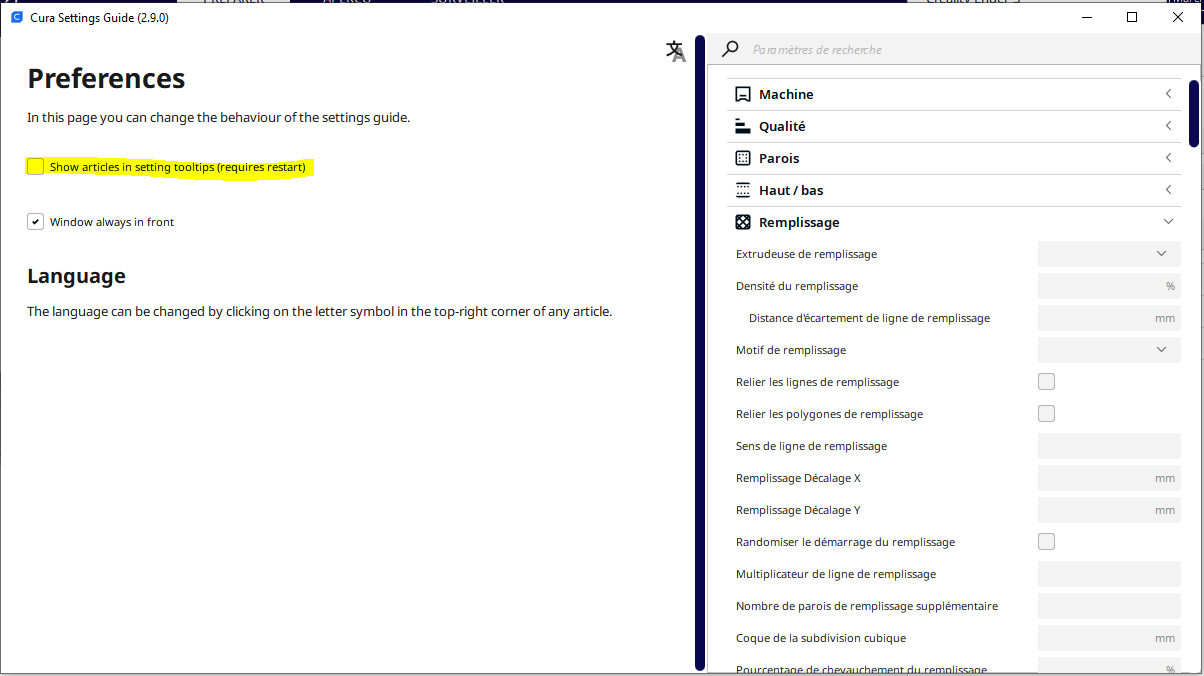
Beta Was this translation helpful? Give feedback.

-
|
I like the plugin and I don't uninstall it. |
Beta Was this translation helpful? Give feedback.
-
|
|
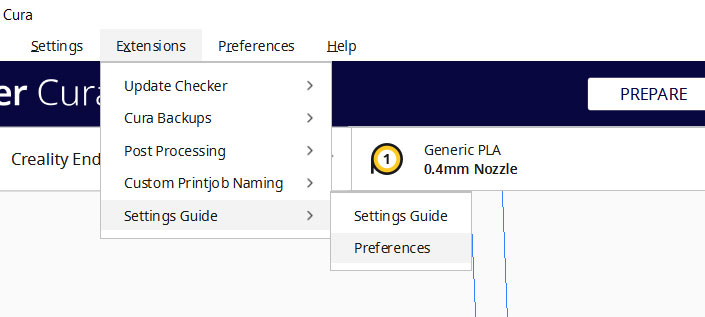
Beta Was this translation helpful? Give feedback.
-
|
After also searching all over the place I discovered that I had to enable the addon in market place first before I could find the menu option again. |
Beta Was this translation helpful? Give feedback.


Uh oh!
There was an error while loading. Please reload this page.
-
I'm new to 3D printing and so I'm finding the Cura settings guide addon very helpful.
But its not reacting to a right click but it pops up automatically whenever my cursor is over a setting for a few seconds.
I had installed it via the marketplace. (2.90)
I removed that and instead installed the 2.91 version from here but it still does the same thing.
Windows 10
Cura 5.1.0 .
The plug in is great.
I just wanted to pass on that there is a problem, perhaps there is a simple soloution that I have not been able to find?
Beta Was this translation helpful? Give feedback.
All reactions