Booking app user directed to profile page displaying another user's profile info #43

Description

Which solution component is affected by this issue?
App
What happened?
One of our Rapid Screening app users (who also happens to be the person running the Facilities Safety Management configuration for our screening program) recently logged into the booking app via the Power Apps app on her Android phone to complete a home screening. She has screened several times prior to this incident without issue.
On this particular occasion, instead of the app taking her directly to the Home screen, she was instead pushed to the Profile screen as if she'd never used the app before. And the profile screen displayed the name and email address of a different user who had only logged into the app once to confirm it was working and set up their profile, but had not yet logged any screening results.
Of note - the "Welcome, ! header at the top of the booking app did list the user's correct name. It was just the profile details that listed a different user's name and email address (see screenshot).
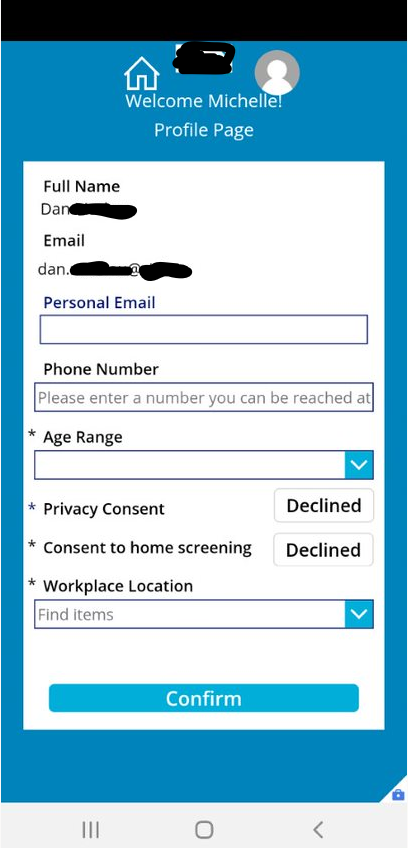
She then closed the app, logged out of the Power Apps app, and logged back in and the app this time loaded the Home screen normally and she was able to open the Profile screen to confirm that her personal information, consent status, and default facility were all listed as expected.
Because she is the primary Facility Safety Management app user, she decided to check in that app to see if she could determine why she saw another user's profile information. She found that the other user now had two entries in the Employee Active Contacts list - one with the user's complete profile information created on Jan 18th, and a new one created on the day she encountered this issue with no profile information logged.
She deactivated the newer profile but flagged this as a concern for my team, who is responsible for supporting the Power Platform and this solution for our company.
This is the only instance we've noted of this behavior and have not been able to replicate it. The user whose profile information was displayed has never used this person's personal Android device and the user who encountered this data does not have access to the other user's credentials, so there could be no caching of a previous user's session or credentials happening here.
We used an integration partner that helped us set this solution up initially. We checked in with them to see if they have ever encountered this issue in past implementations and they had not. This issue occurred several weeks after their engagement with our company had ended so they are not available to provide support and recommended we connect with Microsoft, who in turn directed us to log this issue here.
This is what they had to say about how that aspect of the app works:
- The header that displays the text “Welcome! <>” is using the Canvas App command User(), which returns information about the user authenticated in the current session
- The profile page where the full name/email address are displayed, is displaying information retrieved from the Contacts (Employees) table in Dataverse.
- A variable that gets initialized when the App is loaded is set using the Office365 connector (Office365Users.myProfile().Id), which essentially uses the authentication token to check the graph API and retrieve the Active Directory ObjectID
- The ObjectId is then compared against the contact record (UserId) and it filters out the employee information.
Based on this information, we're unable to determine how the app confused the logged in user with an entirely different user's profile. We've looked through the available documentation to see if there's a way to view session logs but have been unsuccessful.
Steps to reproduce
Unable to reproduce. This has only occurred once that we know of, but because it involved revealing another user of the app, there are now concerns that the app has the potential to provide a user with information as to who else is in the screening program or even worse, provide a user with the past screening results of other users.
Expected behavior
When a user that has already used the booking app once logs into the app in the future, the app should always be able to accurately pull the user's profile from Dataverse and set up the app using their data. It should never under any circumstances display an entirely different user's profile or screening data.
Which version of the components are you using
ConsortiumMemberGlobal 2.0.0.125
Additional environment details
No response