Tree Style Tab context menu icon has the wrong color in dark mode #2

Description

Short description
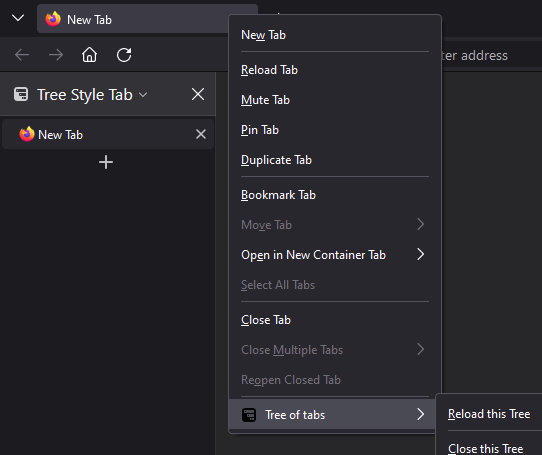
If you right click on a tab in Firefox's default tab bar, the context menu opens. In dark mode, the Tree Style Tab icon at the bottom of the context menu is displayed in black. It doesn't adjust to the dark theme.
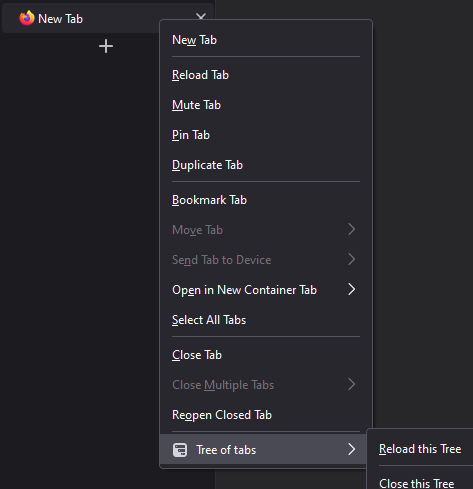
If you right click on a tab in the Tree Style Tab sidebar, the icon is displayed correctly - in white.
Down below you can find screenshots of both context menus in comparison.
Steps to reproduce
- Start Firefox with clean profile.
- Install TST.
- Enable the built-in Dark theme of Firefox.
- Right click on any tab from Firefox's standard tab bar.
- (Right click on any tab form the Tree Style Tab sidebar.)
Expected result
- The Tree Style Tab icon in both context menus (opened in steps 4 and 5) should be white because dark theme is enabled.
Actual result
- The Tree Style Tab icon in the context menu opened from the standard tab bar (step 4) is black although dark theme is enabled. It has no contrast and is barely visible on dark background.
- The Tree Style Tab icon in the context menu opened from the sidebar (step 5) is white because dark theme is enabled.
Screenshots
Context menu - wrong icon color
Context menu - correct icon color
Environment
- Platform (OS): Windows 10 Home (21H1)
- Version of Firefox: 90.0b3 (beta channel)
- Version (or revision) of Tree Style Tab: 3.8.1