Git 的分支管理功能是其最为强大的功能,是 Subversion 等集中式管理工具无法比拟的(见 git 理论篇)
git 的分支快!
git 的分支更灵活
git 有强大的分支管理推荐理论
git checkout -b dev-b 是指创建并切换,相当于
git branch dev
git checkout devgit checkout devgit branch换回 master 分支,把dev的分支合并
git checkout master
git merge dev
合并时加 no-ff,是指不用默认的 Fast Forward 模式,可以在合并后保留分支历史信息
git merge --no-ff -m "merged bug fix 101" issue-101git branch -d devgit 上的分支创建规则没有定论,有多种经验模型,但是总的来说,有 2 个分支是基本的:
- master,主版本
- dev,开发
- 其他
bug 一般在 master 上创建分支
git tag v1.0.0查看标签
git tag打在特定的commit上
git tag v1.0.0 6224937git show v1.1.1Git 自由一套详细的分支模型建议,经过长久以来数以万计的项目验证是一个有效可行的经验模型:
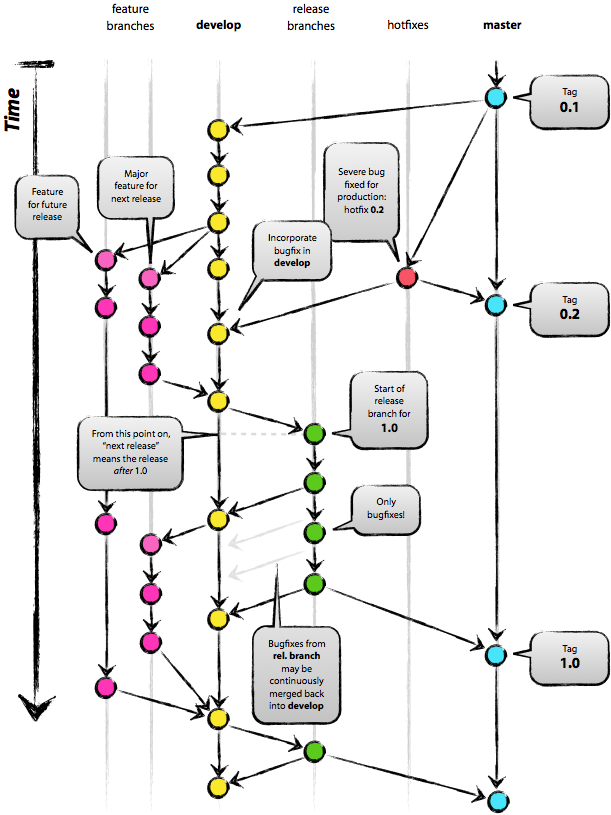
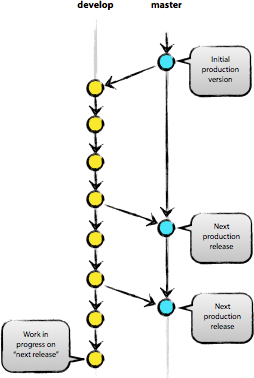
即上面分支建议的核心分支:
-
master分支
-
develop分支
master库认作为主分支,HEAD的源代码存在于此版本中,并且随时都是一个预备生产状态。
origin/develop库认为是主分支,该分支HEAD源码始终体现下个发布版的最新软件变更。有人称这个为“集成分支”,而这是每晚自动构建得来的。
- 功能分支
- 发布分支
- 热修复分支
develop分支的分支版本,最终必须合并到develop分支中。
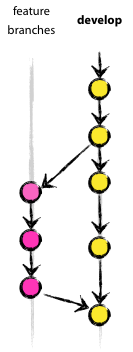
创建一个功能分支
$ git checkout -b myfeature develop
Switched to a new branch "myfeature"
合并功能回 develop
$ git checkout develop
Switched to branch 'develop'
$ git merge --no-ff myfeature
Updating ea1b82a..05e9557
(Summary of changes)
$ git branch -d myfeature
Deleted branch myfeature (was 05e9557).
$ git push origin develop创建一个Release分支
$ git checkout -b release-1.2 develop
Switched to a new branch "release-1.2"
$ ./bump-version.sh 1.2
Files modified successfully, version bumped to 1.2.
$ git commit -a -m "Bumped version number to 1.2"
[release-1.2 74d9424] Bumped version number to 1.2
1 files changed, 1 insertions(+), 1 deletions(-)
bug的修复可能被提交到该分支上(而不是提交到develop分支上)
完成一个 Release 分支
首先,release分支要合并到master上。然后,提交到master上必须打一个标签,以便以后更加方便的引用这个历史版本。
$ git checkout master
Switched to branch 'master'
$ git merge --no-ff release-1.2
Merge made by recursive.
(Summary of changes)
$ git tag -a 1.2
最后,在release分支上的修改必须合并到develop分支上(可能冲突)
$ git checkout develop
Switched to branch 'develop'
$ git merge --no-ff release-1.2
Merge made by recursive.
(Summary of changes)
删除 Release 分支
$ git branch -d release-1.2
Deleted branch release-1.2 (was ff452fe).
可以基于master分支,必须合并回develop和master分支。 分支名约定:hotfix-*
创建修复分支
$ git checkout -b hotfix-1.2.1 master
Switched to a new branch "hotfix-1.2.1"
$ ./bump-version.sh 1.2.1
Files modified successfully, version bumped to 1.2.1.
$ git commit -a -m "Bumped version number to 1.2.1"
[hotfix-1.2.1 41e61bb] Bumped version number to 1.2.1
1 files changed, 1 insertions(+), 1 deletions(-)
关闭的时侯不要忘了更新版本号
$ git commit -m "Fixed severe production problem"
[hotfix-1.2.1 abbe5d6] Fixed severe production problem
5 files changed, 32 insertions(+), 17 deletions(-)
完成一个hotfix分支
Git 加入了原作为插件的 Git Flow 来作为其核心分支模型的创建工具,执行 git flow init,就可以开启完整的分支管理大门:
D:\GitBook\test-git>git flow init
No branches exist yet. Base branches must be created now.
Branch name for production releases: [master]
Branch name for "next release" development: [develop]

How to name your supporting branch prefixes?
Feature branches? [feature/]
Bugfix branches? [bugfix/]
Release branches? [release/]
Hotfix branches? [hotfix/]
Support branches? [support/]
Version tag prefix? []
Hooks and filters directory? [D:/GitBook/test-git/.git/hooks]
然后就可以用 flow feature/release 等命令来创建对应的分支
$ git flow feature start login
$ git flow feature finish login
$ git flow release start v0.1.0