


CLI-first automated short-form video generator for TikTok, Reels, and Shorts.
Status: Early development. Not production-ready yet.
# Node.js >= 20 required
npm install -g @45ck/content-machine

# Verify
cm --help

# Or run without installing
npx -y @45ck/content-machine --helpVerify install (no API keys required):
cm demo -o output/demo.mp4Review your most recent render:
npm run review:latestGenerate a real video (requires API keys):
export OPENAI_API_KEY="..."
export PEXELS_API_KEY="..."

cm generate "Redis vs PostgreSQL for caching" \
  --archetype versus \
  --pipeline standard \
  --output output/video.mp4 \
  --keep-artifacts
More: https://github.com/45ck/content-machine/blob/master/docs/user/QUICKSTART.md
Start here:
- User docs: https://github.com/45ck/content-machine/blob/master/docs/user/README.md
- Docs portal: https://github.com/45ck/content-machine/blob/master/docs/README.md
- Google Gemini provider: https://github.com/45ck/content-machine/blob/master/docs/user/providers/gemini.md
Canonical references (generated; do not edit):
- Repo facts: https://github.com/45ck/content-machine/blob/master/docs/reference/REPO-FACTS.md
- Environment variables: https://github.com/45ck/content-machine/blob/master/docs/reference/ENVIRONMENT-VARIABLES.md
- Glossary (ubiquitous language): https://github.com/45ck/content-machine/blob/master/docs/reference/GLOSSARY.md
Examples and demo gallery:
- Examples: https://github.com/45ck/content-machine/blob/master/docs/user/EXAMPLES.md
- Repo examples (runnable from source):
examples/ - Demo media: https://github.com/45ck/content-machine/tree/master/docs/demo
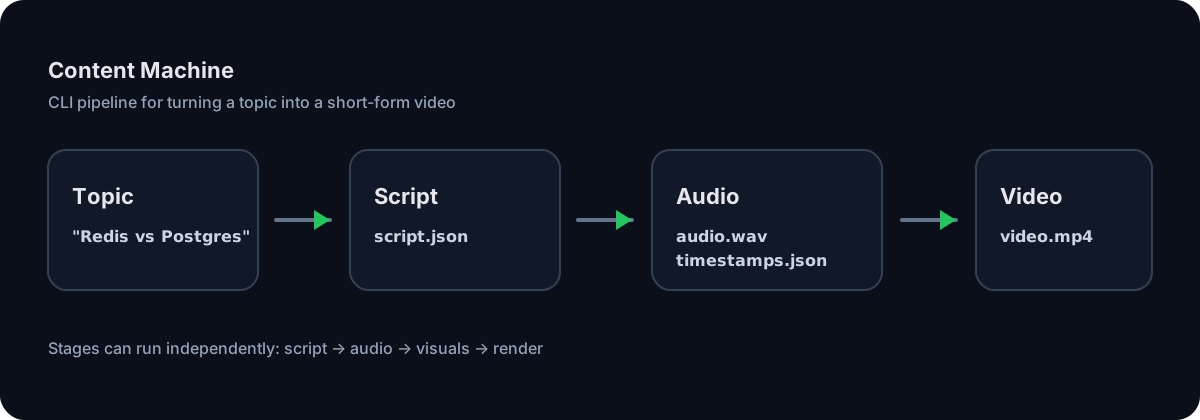
Content Machine is a 4-stage pipeline:
topic -> script.json -> audio.wav + timestamps.json -> visuals.json -> video.mp4
Run end-to-end:
cm generate "Redis vs PostgreSQL" --archetype versus --output output/video.mp4Stage-by-stage usage and full command references live in:
- https://github.com/45ck/content-machine/blob/master/docs/user/CLI.md
- https://github.com/45ck/content-machine/tree/master/docs/reference
These words mean specific things in this repo:
- Script archetype: script format used by
cm script/cm generate - Render template: render preset used by
cm render/cm generate - Pipeline workflow: orchestration preset used by
cm generate
Canonical glossary (generated): https://github.com/45ck/content-machine/blob/master/docs/reference/GLOSSARY.md
Cloning the repo is only needed for development:
git clone https://github.com/45ck/content-machine.git
cd content-machine

nvm install
nvm use

npm install
cp .env.example .env

npm run cm -- --helpMIT.