
A zero-dependency TypeScript framework for building serverless applications on AWS Lambda



Getting Started • Features • Documentation • Examples • Contributing
Anthill Framework provides a modern, decorator-based approach to building REST APIs and Lambda functions on AWS. Designed specifically for serverless architectures, it offers built-in support for caching, middleware pipelines, CORS handling, and more — all with zero external dependencies.
| Feature | Benefit |
|---|---|
| 🪶 Zero Dependencies | Minimal bundle size, faster cold starts, reduced security vulnerabilities |
| ⚡ AWS-Native | Built specifically for API Gateway + Lambda architecture |
| 🔷 100% TypeScript | Full type safety, excellent IDE support, self-documenting code |
| 🎯 Decorator-Based | Clean, declarative syntax inspired by modern frameworks |
| 🚀 Performance-First | Optimized for serverless cold starts and execution time |
npm install @antl4b/anthill-frameworkCreate your first REST API endpoint in just a few lines:
import {
  AwsEvent,
  HttpResponse,
  HttpResponseBodyStatusEnum,
  RestMethodEnum,
  RestController,
  RestHandler,
  anthill,
} from "@antl4b/anthill-framework";

@RestController()
class MyController {
  @RestHandler({ method: RestMethodEnum.Get })
  myHandler(event: AwsEvent): HttpResponse {
    return HttpResponse.success({
      status: HttpResponseBodyStatusEnum.Success,
      payload: "Hello World",
    });
  }
}

const app = anthill();
app.configure({ controllers: [MyController] });

// Export handlers for serverless deployment
export const { myHandler } = app.exposeHandlers();
Test your endpoint:
curl --request GET 'http://localhost:3000/dev/my-handler'
# Response: {"status":"success","payload":"Hello World"}- 🎭 Decorator-Based Architecture — Clean, intuitive syntax with
@RestController,@RestHandler,@LambdaHandler - 🔌 Middleware Pipeline — Extensible request/response processing with built-in CORS, JSON parsing, and more
- 💾 Built-in Caching — Configurable response caching with TTL and size limits
- 📊 Performance Metrics — Built-in time tracking and performance monitoring
- 🔧 Flexible Configuration — Hierarchical configuration inheritance (App → Controller → Handler)
- 📝 Structured Logging — Customizable logging with multiple handlers and formatters
Anthill Framework is built around these core concepts:
| Concept | Description |
|---|---|
| Anthill App | The main entry point that bootstraps and configures your application |
| Controllers | Classes decorated with @RestController or @LambdaController that group related handlers |
| Handlers | Methods decorated with @RestHandler or @LambdaHandler that process requests |
| Middlewares | Reusable components that intercept and process requests before/after handlers |
Understanding how requests flow through Anthill helps you build better applications:
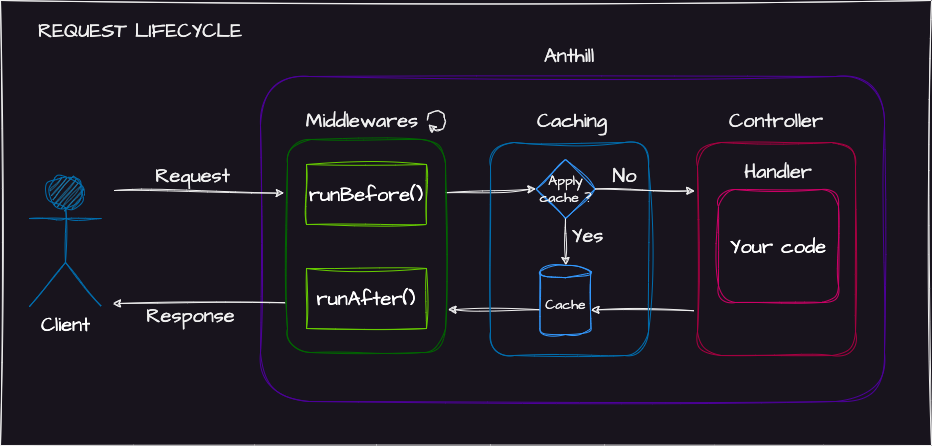
The anthill() function creates your application instance:
const app = anthill();

app.configure({
  controllers: [MyController],
  options: {
    defaultLogLevel: LogLevelEnum.Info,
    displayPerformanceMetrics: true,
  },
});

// Export handlers for serverless deployment
export const { myHandler } = app.exposeHandlers();Anthill uses a hierarchical configuration system. Settings cascade from App → Controller → Handler, with more specific levels overriding general ones:
// App-level: Apply CORS to ALL handlers
const app = anthill();
app.configure({
  controllers: [MyController],
  restHandlerConfig: {
    middlewares: [new CorsMiddleware()],
  },
});
// Controller-level: Apply caching and auth to all handlers in this controller
@RestController({
cacheConfig: { cacheable: true, ttl: 120 },
middlewares: [new HeaderFieldMiddleware(["Authorization"])],
})
class MyController {
// Inherits controller config (120s TTL)
@RestHandler({ method: RestMethodEnum.Get })
myHandler1(event: AwsEvent): HttpResponse {
return HttpResponse.success({ status: HttpResponseBodyStatusEnum.Success });
}
// Handler-level override: Uses 60s TTL instead of 120s
@RestHandler({ method: RestMethodEnum.Get, cacheConfig: { ttl: 60 } })
myHandler2(event: AwsEvent): HttpResponse {
return HttpResponse.success({ status: HttpResponseBodyStatusEnum.Success });
}
}Note
Middleware inheritance is cumulative — middlewares from all three levels execute in order:
App → Controller → Handler (before) and Handler → Controller → App (after).
Anthill delegates routing to AWS API Gateway — the optimal approach for serverless architectures. This provides:
- ✅ Native AWS integration with no overhead
- ✅ Per-handler monitoring and metrics
- ✅ Cost-effective (no routing logic execution time)
Example serverless.yml configuration:
functions:
  create-resource:
    handler: src/index.createResource
    events:
      - http:
          path: /resources
          method: post

  list-resources:
    handler: src/index.listResources
    events:
      - http:
          path: /resources
          method: get

  get-resource:
    handler: src/index.getResource
    events:
      - http:
          path: /resources/{id}
          method: get
Tip
Single-handler Lambdas provide better monitoring and troubleshooting in AWS CloudWatch.

For more information, see the Serverless Framework documentation.
Controllers group related handlers and define shared configuration. Handlers are the methods that process incoming requests.
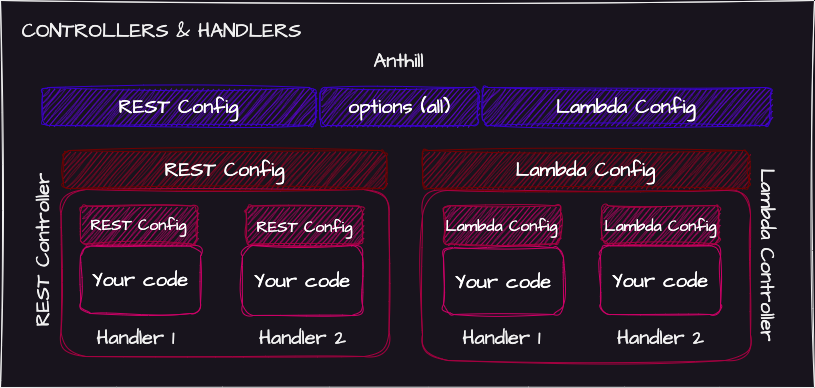
For HTTP/REST APIs using API Gateway:
@RestController()
class UserController {
  @RestHandler({ method: RestMethodEnum.Get })
  getUser(event: AwsEvent): HttpResponse {
    return HttpResponse.success({
      status: HttpResponseBodyStatusEnum.Success,
      payload: { id: 1, name: "John" },
    });
  }
}
Handler Signature:
(event: AwsEvent, context?: AwsContext, callback?: AwsCallback) => Promise<HttpResponse> | HttpResponseHandler Options:
| Option | Type | Description |
|---|---|---|
method |
RestMethodEnum |
HTTP method (GET, POST, PUT, DELETE, etc.) |
name |
string |
Override handler name (useful for naming conflicts) |
middlewares |
Middleware[] |
Handler-specific middlewares |
cacheConfig |
RestHandlerCacheConfig |
Caching configuration |
Warning
Handler names must be unique across your application. Use the name option to resolve conflicts:
@RestHandler({ method: RestMethodEnum.Get, name: "listUsers" })
list(event: AwsEvent): HttpResponse { ... }For non-HTTP Lambda invocations (SQS, SNS, EventBridge, direct invocation, etc.):
@LambdaController()
class ProcessorController {
  @LambdaHandler()
  processEvent(event: any): any {
    // Process the event
    return { processed: true };
  }
}
Handler Signature:
(event: any, context?: AwsContext, callback?: AwsCallback) => Promise<any> | anyNote
Lambda handlers don't support middlewares — they're designed for simple, direct event processing.
Middlewares intercept requests before and after handler execution, enabling cross-cutting concerns like authentication, logging, and validation.
| Method | When | Purpose |
|---|---|---|
runBefore() |
Before handler | Modify request, validate, short-circuit with response |
runAfter() |
After handler | Modify response, cleanup, logging |
Execution Flow:
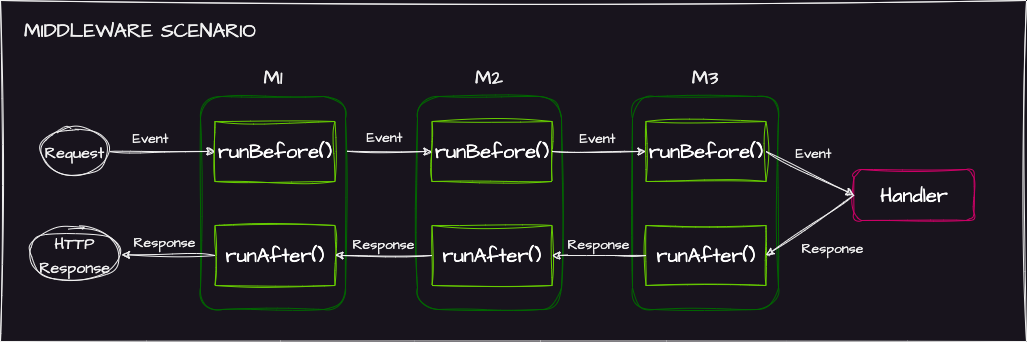
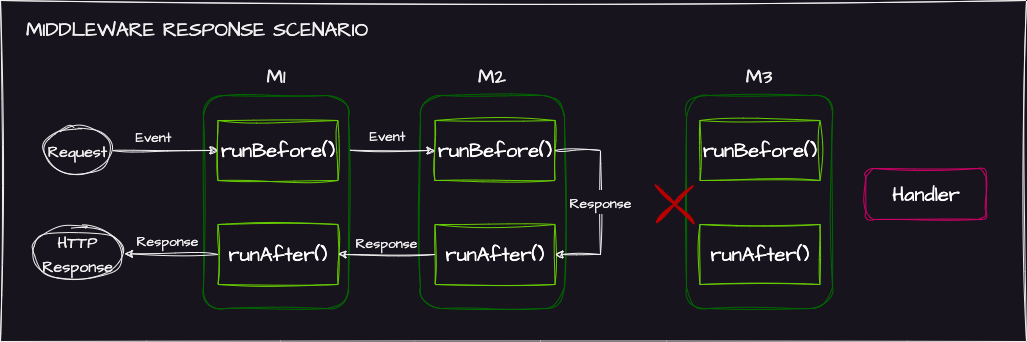
Important
If runBefore() returns an HttpResponse, the handler is skipped and only previously-executed middlewares run their runAfter():
| Middleware | Description |
|---|---|
CorsMiddleware |
Handles CORS headers and preflight requests |
JsonBodyParserMiddleware |
Parses JSON request bodies |
HeaderFieldMiddleware |
Validates required headers |
Browse the middleware directory for all available middlewares.
Extend the Middleware class to create your own:
import {
  AwsContext, AwsEvent, HttpResponse,
  HttpResponseBodyStatusEnum, Middleware, RunBeforeReturnType,
} from "@antl4b/anthill-framework";

export class BlockBeforeDateMiddleware extends Middleware<Date> {
  constructor(openingDate: Date) {
    super(openingDate);
  }

  override runBefore(event: AwsEvent, context?: AwsContext): RunBeforeReturnType {
    if (new Date() < this.payload) {
      return HttpResponse.error({
        status: HttpResponseBodyStatusEnum.Error,
        message: "Service not available yet",
      });
    }
    return event;
  }
}
Usage:
@RestHandler({
  method: RestMethodEnum.Post,
  middlewares: [new BlockBeforeDateMiddleware(new Date("2024-01-01"))],
})
buyTicket(event: AwsEvent): HttpResponse { ... }Built-in response caching reduces latency and Lambda execution costs.
Configuration Options:
const cacheConfig: RestHandlerCacheConfig = {
  cacheable: true,
  ttl: 120,              // Cache duration in seconds
  maxCacheSize: 1000000, // Max cache size in bytes (1MB)
  headersToInclude: ["Origin"], // Headers that affect cache key
};
Cache Key Components:
- Request path
- Path parameters
- Query string parameters
- Specified headers (via
headersToInclude)
Note
While API Gateway offers native caching, Anthill's cache ensures middlewares still execute — useful for logging, analytics, or other side effects.
Important
When maxCacheSize is reached, oldest items are evicted regardless of remaining TTL.
Anthill includes a flexible logging system with configurable levels, formatters, and handlers.
Log Levels: TRACE | DEBUG | INFO | WARN | ERROR
import { Logger, LogLevelEnum, logInfo, logError } from "@antl4b/anthill-framework";

// Set log level
Logger.getInstance().setLogLevel(LogLevelEnum.Debug);

// Use convenience functions
logInfo("Application started");
logError("Failed to connect", error.message);
Custom Formatter:
Logger.getInstance().setformatter((payload: any) => {
  return JSON.stringify({ timestamp: new Date().toISOString(), data: payload });
});
Custom Handler:
Logger.getInstance().addHandler((messages, logLevel, context) => {
  // Send to external service, file, etc.
  externalLogger.log(logLevel, messages.join(" "));
});Monitor execution time with built-in performance tracking utilities.
import { TimeTracker } from "@antl4b/anthill-framework";

const tracker = new TimeTracker();
tracker.startTrackingSession();

tracker.startSegment("database-query");
// ... database operations
tracker.stopSegment("database-query");

tracker.startSegment("processing");
// ... data processing
tracker.stopSegment("processing");

tracker.stopTrackingSession();
tracker.logTrackingSession();
Automatic Tracking:
Enable displayPerformanceMetrics to automatically log handler performance:
app.configure({
  controllers: [MyController],
  options: { displayPerformanceMetrics: true },
});
Output:
myHandler-tracking-session: [xxxxxxxxxxxxxxxxxxxxxxxxxxxxxxxxxxxxxxxxxxxxxxxxxx](1.882 ms)
middleware-runBefore      : .....[xxxx].........................................(0.148 ms)
callable-run              : ..........[xxxxxxxxxxxxxxxxxxxxxxxxxxxxxxxxxxxxxxx].(1.486 ms)
middleware-runAfter       : ..................................................[](0.002 ms)
Explore working examples in the samples directory:
| Sample | Description |
|---|---|
rest-todo-crud |
Complete REST API with CRUD operations |
Contributions are welcome! Here's how you can help:
- Report bugs — Open an issue describing the problem
- Request features — Suggest new functionality via issues
- Submit PRs — Fork the repo and submit pull requests
# Clone the repository
git clone https://github.com/AntL4b/anthill-framework.git
cd anthill-framework

# Install dependencies
npm install

# Run tests
npm test

# Build
npm run buildAnthill Framework is MIT licensed.
Made with ❤️ for the serverless community