Provide pickup color, color similarity comparison, color boundary value calculation and other capabilities。

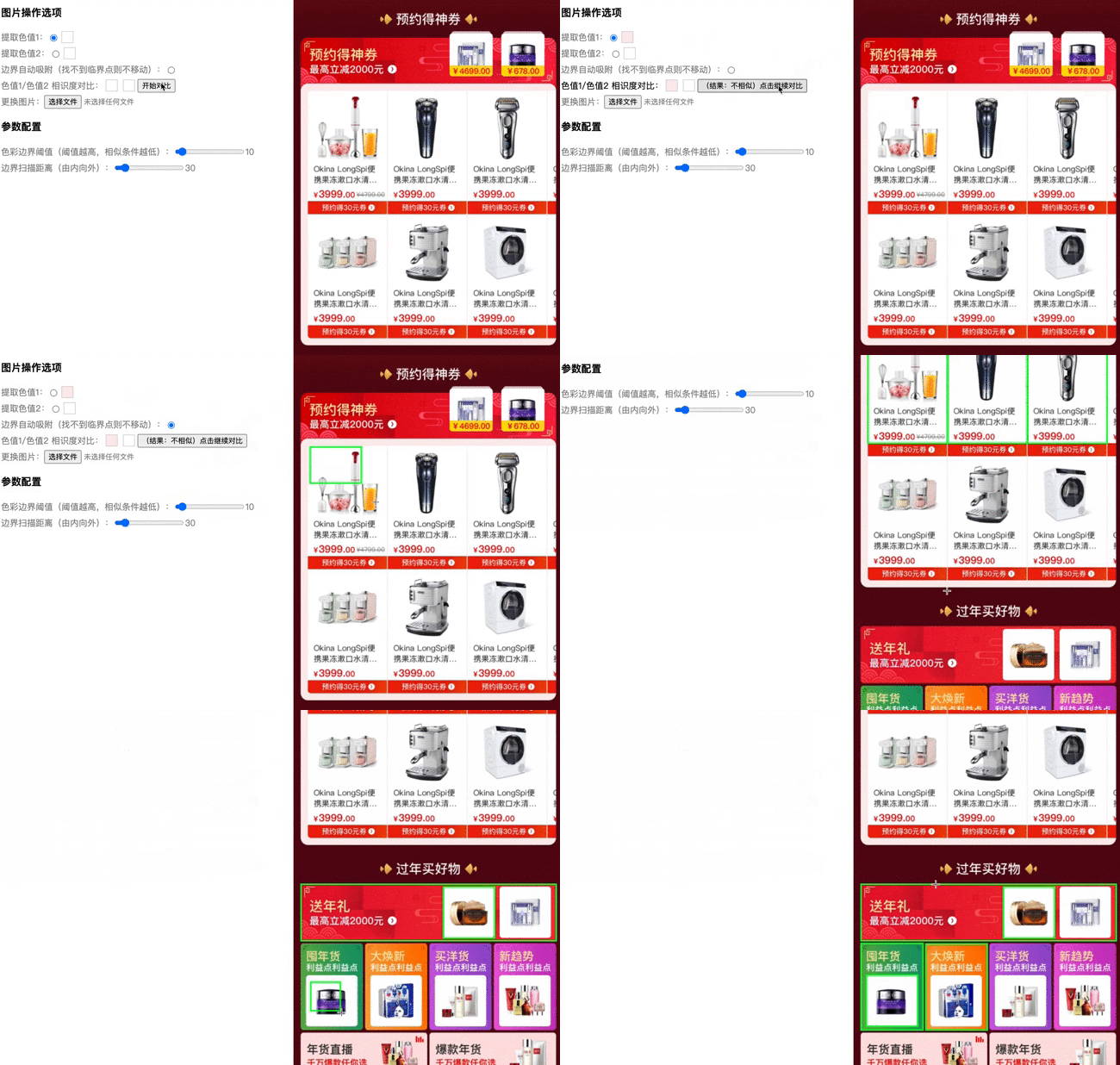
npm install image-color-utils --save
import { ImageColorUtils } from 'image-color-utils'const { ImageColorUtils } = require('image-color-utils')import { ImageColorUtils } from 'image-color-utils'
const params = {
origin: img,
width: canvas.width,
height: canvas.height,
boundaryValue,
mockMovePx,
onload,
}
const imageColorUtils = new ImageColorUtils(params)| Name | Desc | Type | Default | required |
|---|---|---|---|---|
| origin | 数据源(可以是 http链接 / ImageBitmap / HTMLImageElement ) | string / HTMLImageElement / ImageBitmap / | - | true |
| width | 画板宽度 | number | - | false (不传参将根据图片宽高自适应,origin 为 ImageBitmap / HTMLImageElemen,必填) |
| height | 画板高度 | number | - | false (不传参将根据图片宽高自适应,origin 为 ImageBitmap / HTMLImageElemen,必填) |
| mockMovePx | 边界扫描距离(最大边界扫描距离, 扫描方向由内向外) | number | 30 | false |
| boundaryValue | 色彩边界阈值(作用于色值相似度对比, 阈值越高,相似条件越高) | number | 10 | false |
| onload | 加载完成 | ()=>void | - | false |
| Desc | Type |
|---|---|
| ImageColorUtils实例 | Object |
import { ImageColorUtils } from 'image-color-utils'


const imageColorUtils = new ImageColorUtils({
  origin: img,
  width: canvas.width,
  height: canvas.height
})
const res = imageColorUtils.pickColor(x, y)| Name | Desc | Type | Default | required |
|---|---|---|---|---|
| x | 目标点距离画布左上角x坐标 | number | - | true |
| y | 目标点距离画布左上角y坐标 | number | - | true |
| Desc | Type |
|---|---|
| 目标点 rgb 色值 | number[] |
import { ImageColorUtils } from 'image-color-utils'


const imageColorUtils = new ImageColorUtils({
  origin: img,
  width: canvas.width,
  height: canvas.height
})
const res = imageColorUtils.pickColors()| Desc | Type |
|---|---|
| 图片色值 | {rgb: string[], hex: string[] } |
import { ImageColorUtils } from 'image-color-utils'

const imageColorUtils = new ImageColorUtils({
  origin: img,
  width: canvas.width,
  height: canvas.height,
  boundaryValue,
  mockMovePx
})
imageColorUtils.adjust(leftTopPosition, rightBottomPosition)| Name | Desc | Type | Default | required |
|---|---|---|---|---|
| leftTopPosition | 图片所选区域初始左上角坐标 | number[] | [] | false |
| rightBottomPosition | 图片所选区域初始右下角坐标 | number[] | [] | false |
| Desc | Type |
|---|---|
| 边界计算后左上角坐标(x,y)及区域宽高(width,height) | Object:{x: number, y: number, width: number, height: number} |
import { ImageColorUtils } from 'image-color-utils'

const res = ImageColorUtils.compare(color1, color2, boundaryValue, type)| Name | Desc | Type | Default | required |
|---|---|---|---|---|
| color1 | rgb 色值1 | number[] | - | true |
| color2 | rgb 色值2 | number[] | - | true |
| boundaryValue | 色彩边界阈值(作用于色值相似度对比, 阈值越高,相似条件越高) | number | 10 | false |
| type | 颜色模型 | 'rgb' or 'lab' | 'rgb' | true |
| Desc | Type |
|---|---|
| 是否相似 | boolean |
import { hex2rgb } from 'image-color-utils'

const rgb = hex2rgb(hex)| Name | Desc | Type | Default | required |
|---|---|---|---|---|
| hex | HEX色值 | String | - | true |
| Desc | Type |
|---|---|
| RGB色值 | number[] |
import { rgb2hex } from 'image-color-utils'

const hex = rgb2hex(rgb)| Name | Desc | Type | Default | required |
|---|---|---|---|---|
| rgb | RGB色值 | number[] | - | true |
| Desc | Type |
|---|---|
| HEX色值 | string |
import { isDeepColorByHsl } from 'image-color-utils'

const isDeep = isDeepColorByHsl(hsl)| Name | Desc | Type | Default | required |
|---|---|---|---|---|
| hsl | HSL色值 | number[] | - | true |
| Desc | Type |
|---|---|
| isDeep | boolean |
import { isDeepColorByHsv } from 'image-color-utils'

const isDeep = isDeepColorByHsv(hsv)| Name | Desc | Type | Default | required |
|---|---|---|---|---|
| hsv | HSV色值 | number[] | - | true |
| Desc | Type |
|---|---|
| isDeep | boolean |
import { ImageColorUtils } from 'image-color-utils'

const imageColorUtils = new ImageColorUtils({
  origin: img,
  width: canvas.width,
  height: canvas.height,
  boundaryValue,
  mockMovePx
})

console.log(imageColorUtils.canvas)
console.log(imageColorUtils.ctx)
console.log(imageColorUtils.imageData)| Name | Type |
|---|---|
| canvas | OffscreenCanvas |
| ctx | OffscreenCanvasRenderingContext2D |
| imageData | ImageData |