An event display calendar for the Quasar framework.
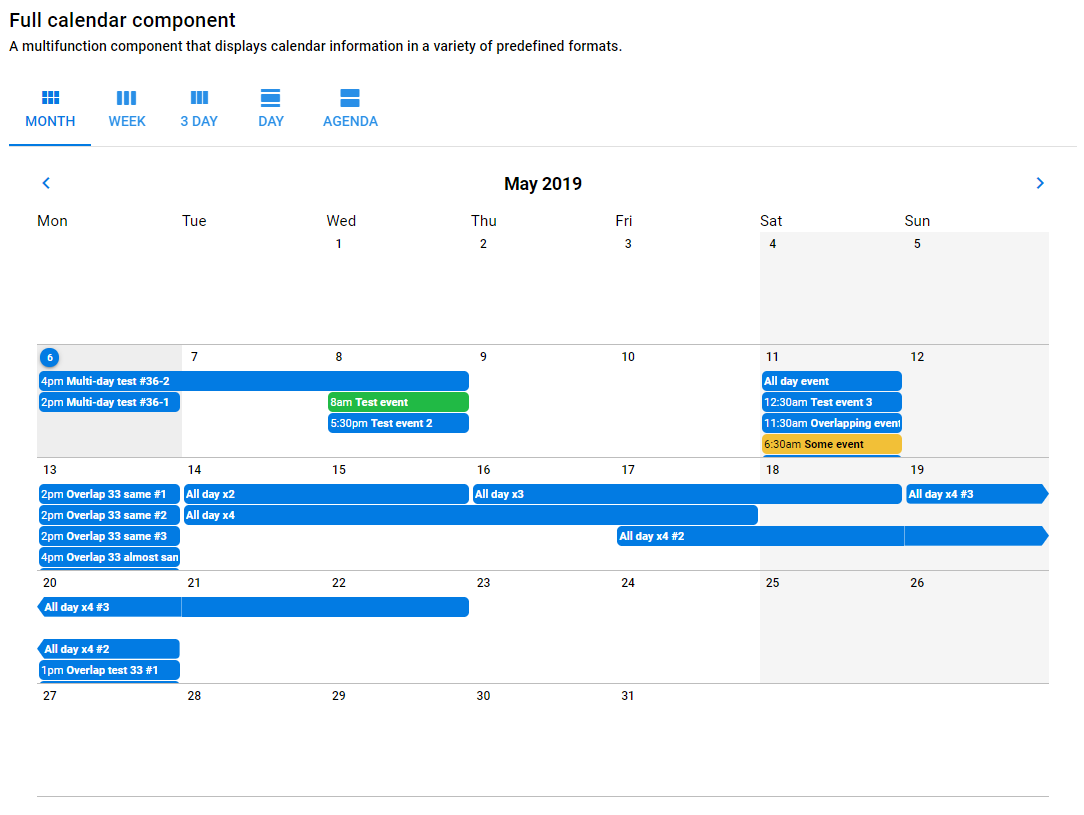
Formerly known as Quasar Calendar, Daykeep Calendar for Quasar is a Quasar-flavored Vue.js calendar component.
- Node.js Node >=10 or <=14
- NPM >=5
Do not use uneven versions of Node i.e. 13, 15, etc. These versions are not tested with Quasar.
If you use NVM, the /.nvmrc file will set your Node version with nvm use.
There is a Dockerfile that can be used to simulate a production-like environment. A helper script is provided to make the process more stream-lined.
./docker.sh build # builds the docker image
./docker.sh start # creates a docker container to run in background
npm run build
The Docker image merely houses the serving of built files, but does not automatically build the application. If you want the Docker environment to build the app as well:
./docker.sh enter
> npm run build
# or
> npm start
You can run ./docker.sh help to see more options.
The debug utility allows you to debug output for different parts of the app.
When running the app through Node.js set the DEBUG enviromental variable in your .env.dev file to include "calendar:*" to enable debug messages.
When running the app in a browser set localStorage.debug to include "calendar:*" to enable debug messages.
Version 1.0.x of Daykeep Calendar is intended to be used with Quasar Framework v1. For legacy versions of Quasar, you should use v0.3.x of Quasar Calendar.
yarn add @daykeep/calendar-quasarAdd Daykeep Calendar to your .vue page similar to a Quasar component
import { DaykeepCalendar } from '@daykeep/calendar-quasar'or import individual components
import {
  DaykeepCalendarMonth,
  DaykeepCalendarAgenda,
  DaykeepCalendarMultiDay
} from '@daykeep/calendar-quasar'
In your template, you can just put in a calendar viewer using the current date as the start date
<daykeep-calendar />Or you can pass in parameters to customize
<daykeep-calendar-month
  :start-date="Date('2019-01-01')"
  :event-array="someEventObject"
  :sunday-first-day-of-week="true"
  calendar-locale="fr"
  calendar-timezone="Europe/Paris"
  :allow-editing="false"
  :render-html="true"
/>The event data format is meant to be a subset of the Google Calendar v3 API (this is still a work in progress). Events should be passed in as an array of objects. Each object can have elements like in this example:
[
  {
    id: 1,
    summary: 'Test event',
    description: 'Some extra info goes here',
    location: 'Office of the Divine Randomness, 1232 Main St., Denver, CO',
    start: {
      dateTime: '2018-02-16T14:00:00', // ISO 8601 formatted
      timeZone: 'America/New_York' // Timezone listed as a separate IANA code
    },
    end: {
      dateTime: '2018-02-16T16:30:00',
      timeZone: 'American/New_York'
    },
    color: 'positive',
    attendees: [
      {
        id: 5,
        email: 'somebody@somewhere.com',
        displayName: 'John Q. Public',
        organizer: false,
        self: false,
        resource: false
      }
    ]
  },
  {
    id: 2,
    summary: 'Test all-day event',
    description: 'Some extra info goes here',
    start: {
      date: '2018-02-16' // A date variable indicates an all-day event
    },
    end: {
      date: '2018-02-19'
    }
  },
    {
      id: 3,
      summary: 'Some other test event',
      description: 'Some extra info goes here',
      start: {
        dateTime: '2018-02-17T10:00:00+0500', // timezone embedded in dateTime
      },
      end: {
        dateTime: '2018-02-17T12:30:00+0500',
      },
    },
]
Each object needs to have a unique ID. The date time should be in ISO 8601 format. A value in the optional timeZone field will override the timezone.
Each calendar is given a random reference string so that we can distinguish between multiple calendars on a page. You can override this and pass in a string so that you can listen for events from that calendar. In this case, if we pass in the string MYCALENDAR, the Vue.js event click-event-MYCALENDAR would fire on the global event bus when a calendar event is clicked on.
By default we use our own event detail popup when an event is clicked. You can override this and use your own by doing a few things:
- Pass in an event reference string
- Prevent the default event detail from showing up
- Listen for a click event to trigger your own detail content
So to implement, be sure to have prevent-event-detail and event-ref set when you embed a calendar component:
<daykeep-calendar
  event-ref="MYCALENDAR"
  :prevent-event-detail="true"
  :event-array="someEventObject"
/>
And then somewhere be sure to be listening for a click event on that calendar:
this.$root.$on(
  'click-event-MYCALENDAR',
  function (eventDetailObject) {
    // do something here
  }
)Starting with v0.3 we are setting up the framework to allow for editing individual events. By default this functionality is turned off, but you can pass a value of true into the allow-editing parameter on one of the main calendar components. The functionality if very limited to start but we expect to be adding more features in the near future.
When an event is edited, a global event bus message in the format of update-event-MYCALENDAR is sent with the updated event information as the payload. You can listen for this to trigger a call to whatever API you are using for calendar communication. Right now when an update is detected the passed in eventArray array is updated and the array is parsed again.
Only a subset of fields are currently editable:
- Start / end time and date
- Is an all-day event
- Summary / title
- Description
The DaykeepCalendarMonth component triggers a "click-day-{eventRef}" event when a calendar cell is clicked. The event data is an object describing the day, with a day, month, and year property each set to the appropriate value for the selected day.
So for a <daykeep-calendar-month> component with a "MYCALENDAR" event-ref:
this.$root.$on(
  'click-day-MYCALENDAR',
  function (day) {
    // do something here
  }
)The usable components of DaykeepCalendar, DaykeepCalendarMonth, DaykeepCalendarMultiDay and DaykeepCalendarAgenda share the following properties:
| Vue Property | Type | Description |
|---|---|---|
start-date |
JavaScript Date or Luxon DateTime | A JavaScript Date or Luxon DateTime object that passes in a starting display date for the calendar to display. |
sunday-first-day-of-week |
Boolean | If true this will force month and week calendars to start on a Sunday instead of the standard Monday. |
calendar-locale |
String | A string setting the locale. We use the Luxon package for this and they describe how to set this here. This will default to the user's system setting. |
calendar-timezone |
String | Manually set the timezone for the calendar. Many strings can be passed in including UTC or any valid IANA zone. This is better explained here. |
event-ref |
String | Give the calendar component a custom name so that events triggered on the global event bus can be watched. |
prevent-event-detail |
Boolean | Prevent the default event detail popup from appearing when an event is clicked in a calendar. |
allow-editing |
Boolean | Allows for individual events to be edited. See the editing section. |
render-html |
Boolean | Event descriptions render HTML tags and provide a WYSIWYG editor when editing. No HTML validation is performed so be sure to pass the data passed in does not present a security threat. |
day-display-start-hour |
Number | Will scroll to a defined start hour when a day / multi-day component is rendered. Pass in the hour of the day from 0-23, the default being 7. Current has no effect on the CalendarAgenda component. |
In addition, each individual components have the following properties:
| Vue Property | Type | Description |
|---|---|---|
tab-labels |
Object | Passing in an object with strings that will override the labels for the different calendar components. Set variables for month, week, threeDay, day and agenda. Eventually we will replace this with language files and will use the calendar-locale setting. |
| Vue Property | Type | Description |
|---|---|---|
num-days |
Number | The number of days the multi-day calendar. A value of 1 will change the header to be more appropriate for a single day. |
nav-days |
Number | This is how many days the previous / next navigation buttons will jump. |
force-start-of-week |
Boolean | Default is false. This is appropriate if you have a week display (7 days) that you want to always start on the first day of the week. |
day-cell-height |
Number | Default is 5. How high in units (units defined below) an hour should be. |
day-cell-height-unit |
String | Default is rem. When combined with the day-cell-height above, this will determine the CSS-based height of an hour in a day. |
show-half-hours |
Boolean | Default is false. Show ticks and labels for half hour segments. |
| Vue Property | Type | Description |
|---|---|---|
num-days |
Number | The number of days to initially display and also the number of additional days to load up when the user scrolls to the bottom of the agenda. |
scroll-height |
String | Defaults to 200px, this is meant to define the size of the "block" style. |
This is the structure of a Quasar project with all modes installed.
.
├── public/                  # pure static assets (directly copied)
├── boot/                    # boot files (app initialization code)
├── component/              # .vue components used in pages & layouts
├── src/
│   ├── assets/              # dynamic assets (processed by webpack)
│   ├── css/                 # CSS/Stylus/Sass/... files for your app
|   |   ├── app.styl
|   │   └── quasar.variables.styl # Quasar Stylus variables for you to tweak
│   ├── layouts/             # layout .vue files
│   ├── pages/               # page .vue files
│   ├── router/              # Vue Router
|   |   ├── index.js         # Vue Router definition
|   │   └── routes.js        # App Routes definitions
│   ├── store/               # Vuex Store
|   |   ├── index.js         # Vuex Store definition
|   │   ├── <folder>         # Vuex Store Module...
|   │   └── <folder>         # Vuex Store Module...
│   ├── App.vue              # root Vue component of your App
│   └── index.template.html  # Template for index.html
├── src-ssr/                 # SSR specific code (like production Node webserver)
├── src-pwa/                 # PWA specific code (like Service Worker)
├── src-cordova/             # Cordova generated folder used to create Mobile Apps
├── src-electron/            # Electron specific code (like "main" thread)
├── src-bex/                 # BEX (browser extension) specific code (like "main" thread)
├── dist/                    # where production builds go
│   ├── spa/                 # example when building SPA
│   ├── ssr/                 # example when building SSR
│   ├── electron/            # example when building Electron
│   └── ....
├── quasar.conf.js           # Quasar App Config file
├── babel.config.js          # Babeljs config
├── .editorconfig            # editor config
├── .eslintignore            # ESlint ignore paths
├── .eslintrc.js             # ESlint config
├── .postcssrc.js            # PostCSS config
├── .stylintrc               # Stylus lint config
├── .gitignore               # GIT ignore paths
├── package.json             # npm scripts and dependencies
└── README.md # readme for your website/AppThe Github action ci.yml deploys the app on merges. It requires there to be the appropriate target IP addresses in the Settings -> Secrets and Variables -> Actions -> HOSTS as a space separated list.
