This is a script with a GUI built with flet which is a python library based on Flutter.
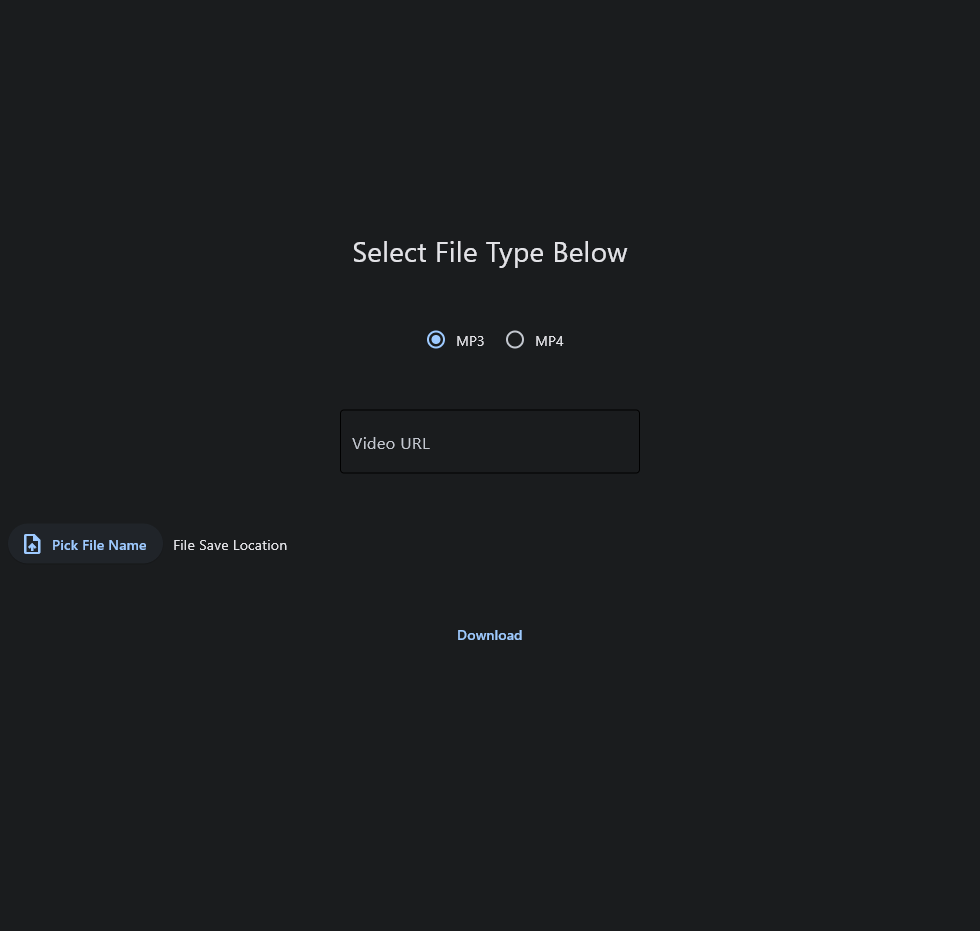
This is a YouTube video downloader script that allows you to download videos in MP3 or MP4 format. The script provides a graphical user interface (GUI) for easy use and shows the progress of the download. The script is divided into three separate files: backend.py, gui.py, and main.py.
This is a great way to download videos off of youtube, it gives you options on what the file type will be when you go to download, select the location by opening the file directory via windows OS and MacOS, and shows you progress on your download.
Requirements:
The script requires the following Python libraries: pytube flet
Also make sure you have Python 3.6 or newer installed
Usage:
Install the required Python libraries: pip install pytube flet Run the main.py script:
python main.py
backend.py:
This file contains the backend logic for downloading videos from YouTube. It has two functions: get_video(): This function takes a YouTube URL, save location, in_progress, on_complete, and handle_error callbacks as input and downloads the video as an MP4 file. get_audio(): This function takes a YouTube URL, save location, in_progress, on_complete, and handle_error callbacks as input and downloads the video as an MP3 file.
gui.py:
This file contains the frontend GUI for the script. It uses the flet library to create the user interface. The main components of the interface include:
Video URL input field File type selection (MP3 or MP4) File save location picker Download button Download progress indicator The GUI also provides error handling and updates the interface with download progress.
main.py:
This file is the main entry point for the application. It imports the backend.py and gui.py files and connects the backend functions with the GUI. Running this file launches the GUI for the user.
To download a YouTube video as an MP4 file:
- Run the main.py script.
- Select "MP4" as the file type in the GUI.
- Enter the YouTube video URL in the URL input field.
- Click "Pick File Name" and choose the save location and file name for the downloaded video.
- Click "Download" to start the download process.
To download a YouTube video as an MP3 file:
- Run the main.py script.
- Select "MP3" as the file type in the GUI.
- Enter the YouTube video URL in the URL input field.
- Click "Pick File Name" and choose the save location and file name for the downloaded audio.
- Click "Download" to start the download process.