
The objective is to cultivate a community-driven, standards-based ecosystem for next-generation architectures built on Composable Hardware in Disaggregated Infrastructure (CoHDI, pronounced "Cody"). While Composable Disaggregated Infrastructure enables data center operators to unlock significant cost efficiency, high availability, and sustainability, a critical gap remains between Kubernetes and disaggregated hardware. This gap hinders the realization of truly dynamic composability within cloud-native environments. The CoHDI software suite—consisting of the Composable-DRA-Driver, Dynamic-Device-Scaler, and Composable Resource Operator—is designed to bridge this divide by integrating directly with Kubernetes' Dynamic Resource Allocation (DRA) and collaborating with the sig-node, sig-autoscaling, and sig-scheduling.
The CoHDI system consists of a hardware-disaggregated resource pool and the Composable Manager (CoHDI Manager) software. Within the resource pool, all components are interconnected via PCIe or CXL switches. The CoHDI Manager orchestrates these switches to dynamically compose bare-metal hardware servers through software-defined configurations. It provides a Composable Resource API, which can be accessed by either the Composable Resource Operator or Kubernetes API.


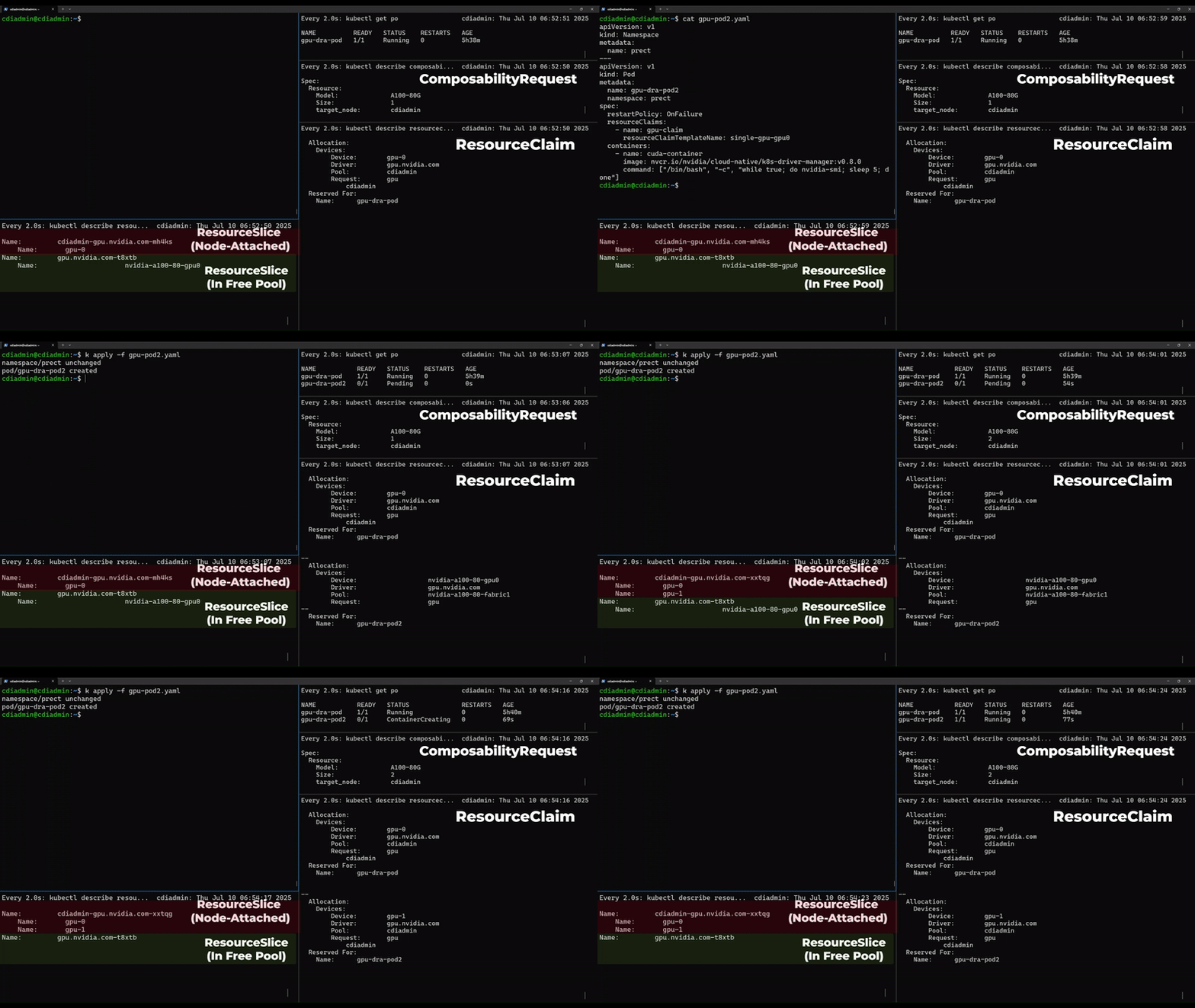
- When we use current DRA, it checks and lists all attached devices in worker nodes to Resource slice. (1)
- We introduce new kind of resource slice for free devices (e.g. GPU) in resource pool. Composable-dra-driver checks the free devices in resource pool and lists them in the resource slice. (1)
- Now we assume user creates a new Pod requesting a non-existing GPU in worker nodes. (2)
- When scheduler tries to schedule the Pod and finds the GPU in Resource Slice for resource pool is available, scheduler waits to schedule the Pod. (3-1, 3-2, 4)
- After that , when Dynamic-device-scaler detects this situation, it requests to attach GPU through composabile-resource- operator custom resource. (5-1, 5-2)
- Composable-resource-operator requests attachment of GPU to rest API of CDI system. (6-1)
- Then Composable Hardware Dissagregated Infrastructure Manager controls PCI switch and attach a GPU to a worker node. (6-2)
- Once GPU is attached, vendor DRA plugin adds the GPU to Resource slice. (1)
- Finally the Pod is scheduled using attached GPU.
For more detailed information on each component, please refer to its respective repository in the CoHDI project.
See also KEP-5007.

GPU Hot-Add Demonstration: A pod request triggers an increase in the number of GPUs attached to a node, from 1 to 2:
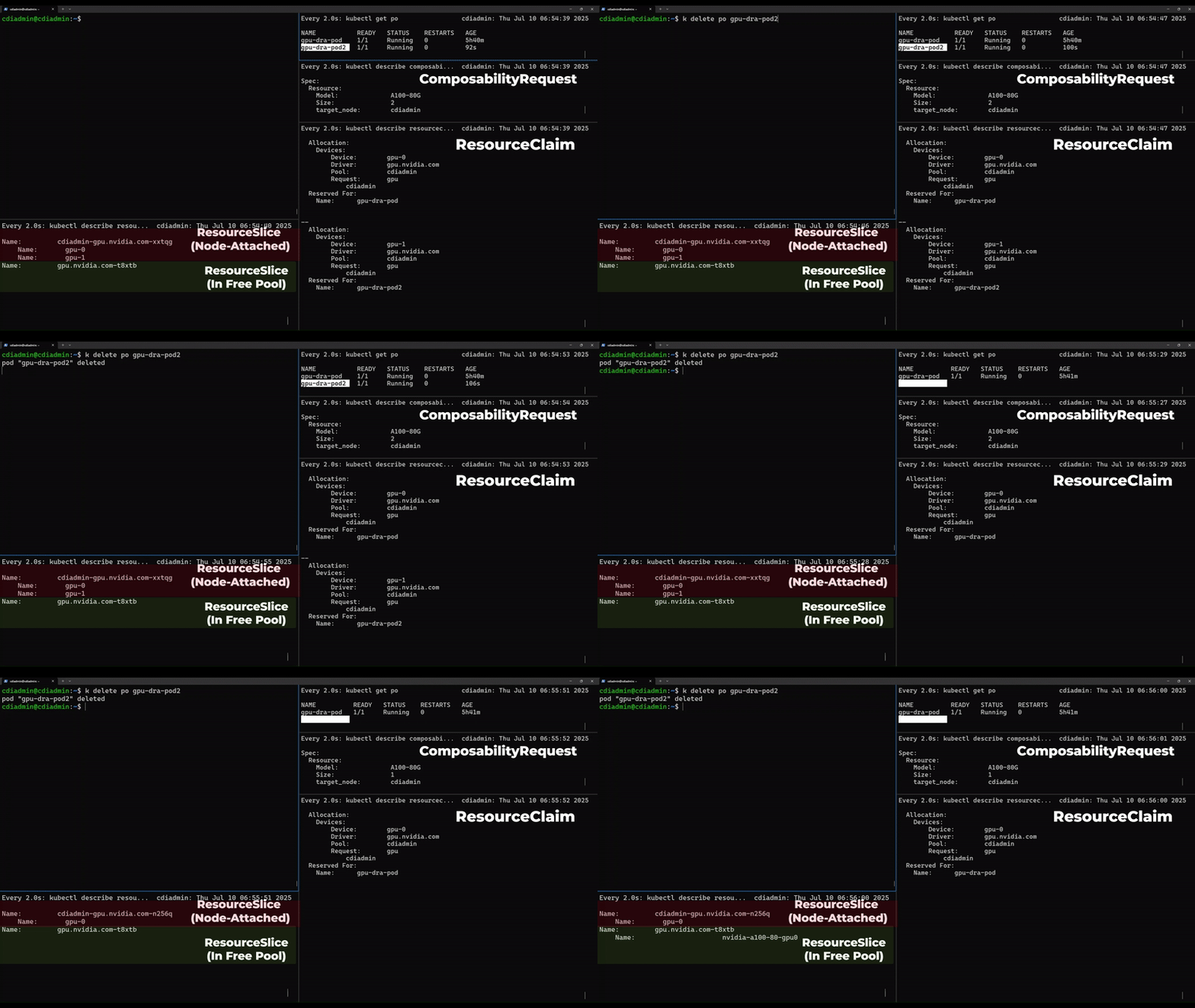
GPU Hot-Remove Demonstration: Pod deletion triggers a decrease in the number of GPUs attached to a node, from 2 to 1:
These are enhancement description for K8s scheduler.
For alpha release: KEP-5007
For beta release: KEP-5007
Please see the "Meeting details" on the CoHDI Slack Channel