NSInstaller will check for the latest Hekate, Atmosphere, and Signature Patch releases and will automatically extract it for you in just one click! DO note that you still have to manually back up and create an emuMMC via hekate, this app only helps if you are in a hurry for installing or updating Hekate or Atmosphere. I would still recommend installing these stuff manually but if its too complicated for you, you can use this tool to help you. You can install other Bootloaders, Custom Firmwares, and Signature Patches in-one-click by modifying releases.txt (Usage is shown below). Do note that this is a pre release, expect some bugs, errors, and crashes. If any of the mentioned problems shows up, don't hesitate to dm me on discord or submit an issue. If you dont mind reading guides check out Switchway they also have a pack where you can extract it yourself.
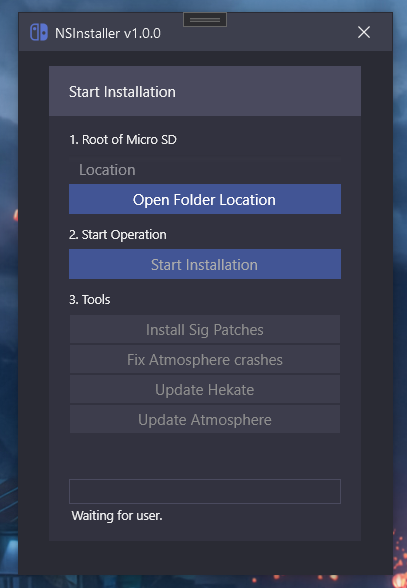
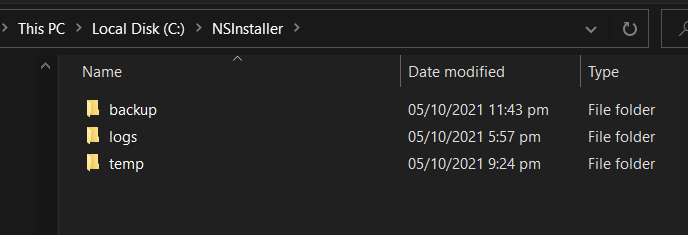
NSInstaller's Folder can be found at C:/NSInstaller/ It is where backups/temporary files are stored. (Logs not yet implemented.)

releases.txt file contains repositories that are needed for switch, you can add another one by adding the link below the line and also adding api before Github.com and adding repos after.
For Example: https://github.com/CTCaer/hekate/releases -> https://api.github.com/repos/CTCaer/hekate/releases
IMPORTANT Links must be in order so that it will download the bootloader first, atmosphere, and then the signature patches.
When you Start Installation It will also download the files and extract it to your Micro SD.
- First of, plug your micro sd into your computer.
- Format the micro sd and make sure its Fat32. (Skip this part if its already formatted and its Fat32, ExFat32 is also acceptable but to avoid data corruption we will go for Fat32.)
- Open NSInstaller and click Open File Location.
- Locate the path of your Micro SD Folder and click Select Folder.
- Click on Start Installation and you can relax and sit back and wait for it to finish.
- Once done you can now Eject it and use TegraRCMGui to boot Hekate/Fuuse.
- Do note that sig patches are already installed into your atmosphere, you don't need to use the Tools since it does it for you already.
IMPORTANT
- For a video explaining how to jailbreak switch using NSInstaller you can check this video out https://www.youtube.com/watch?v=_hRNVX3reME
- Also don't forget to backup your Nand! You can follow this guide right here
- Install Sig Patches - If you have Atmosphere already, you can install Sigpatches if games/homebrew applications keeps crashing.
- Fix Atmosphere Crashes - Will install the latest Sig Patches and deletes the
\atmosphere\contents\01000000001000 - Update Hekate - Updates Hekate to its latest version.
- Update Atmosphere - Backups folders and extracts the latest version of Atmosphere including Sig Patches.
Any errors that isn't in the Common Errors list, please file an issue with the picture provided, or join the support discord.
The File C:/NSInstaller/backup/...- Back up folder still exist, delete everything inside it. If you deleted the backup folder, restart NSInstaller.Needs Internet Connection even though I have Internet.Firewall is probably blocking NSInstaller, try allowing NSInstaller in Firewall. (Fix for this in the next major update.)
- benruehl for the best looking themes Adonis UI WPF
- Ookii for the amazing folder dialogs! Ookii Dialogs WPF
- Anonymous for the amazing XCI-Explorer!
- CTCaer for the amazing bootloader! Hekate
- SciresM for the amazing custom firmware! Atmosphere
- ITotalJustice for the amazing sig patches! Patches
- Switchway one of the best switch jailbreak community if it wasn't for their switch modding guides, I wouldn't be where I'm today!
- Better Gaming (Yu) and Better Gaming Community for making the best videos and having one of the best community out there!
- JustNightBGツャ For making a website about NSInstaller!
NSInstaller & the Author is not responsible for any damages that may/may not happen in your Nintendo Switch. NSInstaller simply provides installation files from Github and extracts those files into your Micro SD (Check Credits for the links). I will not take any responsibility for any damages that happens to your device.
BTC: 1GkLMJR6Xf2ovBpeB3fy72AFSQBMJgwr7r