This repo houses all the code the car needs to run, separated into steering wheel, telemetry, and CAN bus files.
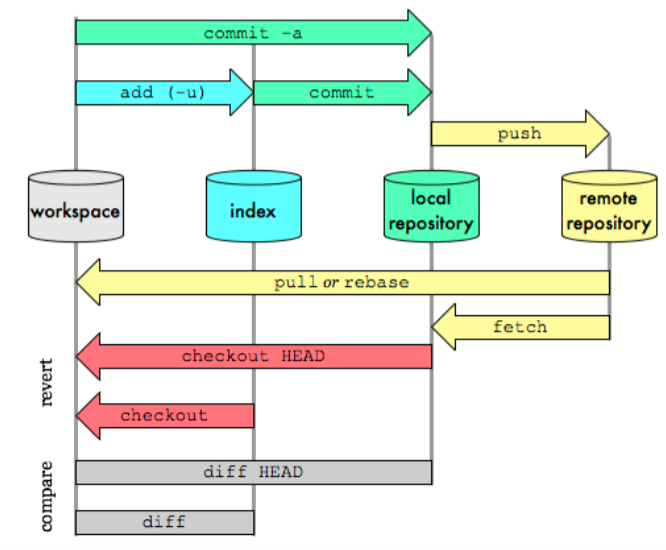
Git can be separated into remote and local repository (repo), how it works is that you can clone a repo to your local machine, add files you would like git to track, commit your changes to your local branch, pull changes by others from the remote repo, and push your own local changes. Locally git can be separated into three areas:
Untracked files -> tracked files -> staging area
Untracked files are usually not part of the project and will not be added to the
repo. Tracked files are project files, and files in here will have status shown
(i.e. new file/changed/renamed...). The staging area is files that are ready to
be committed, and tracked files needs to be added by git add.
These are the only commands I would recommend using on the command line/IDE, for more complex commands (such as creating pull requests for merging branches) use the web interface.
No direct pushing/committing on the master branch
- Use branches
Each of the following tasks are on a separate branch, please work on the branch relevant to your task. If multiple people are on the same branch please make sub-branches from the main task branch
e.g.
steering-wheel -> steering-wheel-warninglights
               -> steering-wheel-RPM-lights
We will merge them into the main steering-wheel branch when you make a merge request to the task branch.
- Micro-commit
Commit every time you've implemented a feature - it allows easy rollback to previous version without too much code loss if things go wrong (and they WILL go wrong).
- Handy commands
git config --global user.name <display name> - sets your name on your commits to the repo
git clone <path/to/directory> - clones a local copy of the repo to your
machine so you can make changes.
git pull origin <name of branch> - pulls any changes others have
published on the remote branch of the said name since your last update/ initial
clone
git add <file to be added> - adds file to the staging area to be included
in the next commit.
git commit -m "Commit message here" - commits file to the local branch
with the commit message - please make the commit message meaningful so it is
easier to backtrack (Not Add new file)
git push origin <name of branch> - push your local commits to the remote
repo on the named branch. Note that on the first push git may require you to
set the upstream branch with git branch --set-upstream-to <name of head branch>
git remote update origin --prune - updates branches and removes merged branches
on your local machine.
Each function to be made are described in respective folders' README,
please edit the README with your name if you are currently working on the
task, and remove it if not. If someone is already working on one and you want
to join, contact them and see if you can help before writing your own code.
Otherwise just write your name down and contact me (Will) for any
questions/purchasing.