Youtube Video at this link
Send data from matlab to arduino:
Get data from arduino using matlab:
IMPORTANT!!!
Before using the matlab code you have always to upload the code in arduino first, and then run the matlab code.
Send Data:
In this case connect 6 leds on the arduino ports number 2,3,4,5,6,7. You can find an example of a simple circuit here
https://www.maxphi.com/wp-content/uploads/2017/08/led-interfacing-arduino-wiring-1024x503.png
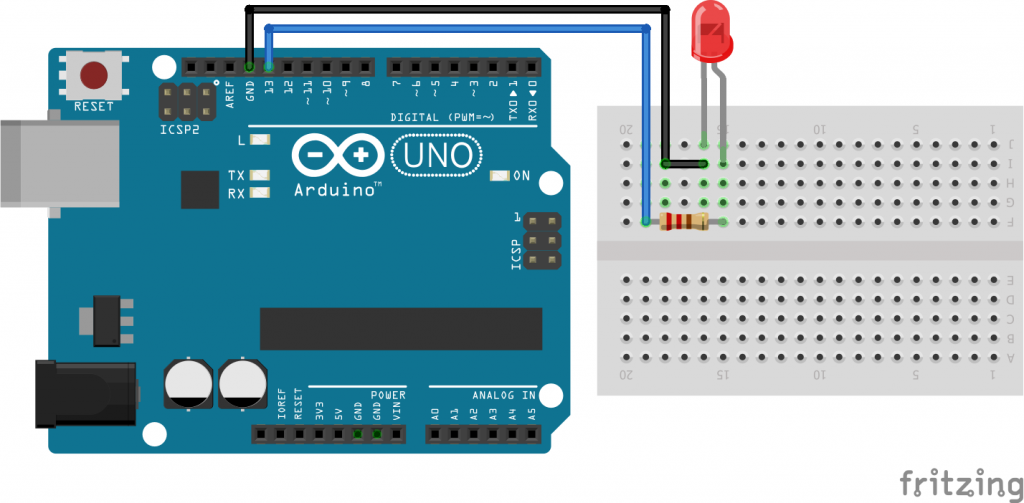
Use one port between the port number 2 and 7 instead of port 13 (as in the image example).
Get Data:
Just connect your sensor to the arduino port A1 ( in the case you want to use only 1 port) or A1 and A2 (if you need two inputs). Run the arduino code and then the matlab code. In the file "Get_data_1_channel.m" and "Get_data_2_channel.m" at line 10 you can find the sampling time. You can adjust it according to the total time of your trial or experiment. I set it at 10 seconds, but you can increase or decrease it as you prefer.