A GUI-based tool for automatically generating ROS2 launch files by monitoring running ROS2 commands.
- Real-time Monitoring: Continuously monitors all running and new terminals for
ros2 runandros2 launchcommands - Command Extraction: Automatically extracts PID, command type, package, executable, node name, arguments, and parameters
- Interactive GUI: Organized display of detected commands with selection capabilities
- Live Updates: Commands are constantly refreshed and updated, removing entries for processes that no longer exist
- Launch File Generation: Generate proper ROS2 launch files from selected commands
- Preview and Save: Preview generated launch files before saving to disk
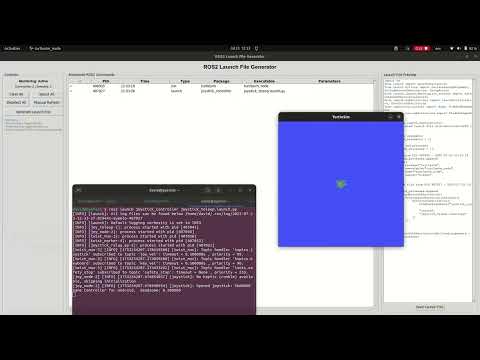
See the tool in action! This video demonstrates:
- Real-time monitoring of ROS2 commands
- Interactive GUI for selecting commands
- Launch file generation with proper ROS2 syntax
- Complete workflow from monitoring to launch file creation
- Ensure you have Python 3.6+ installed
- Install required dependencies:
pip install -r requirements.txt
- For optimal code formatting (recommended):
pip install black ruff
- For development with automated code quality checks:
pip install pre-commit
pre-commit install
- If you encounter tkinter issues on Linux:
sudo apt-get install python3-tk
python3 ros2_launch_generator_gui.pyTo test the command monitoring functionality. This should output ROS2 commands which you executed on a seperate terminal:
python3 test/command_monitor.pyThis will launch the GUI with sample commands to test the selection interface.
To test the launch file generation with proper ROS2 syntax:
python3 test/test_launch_generation.pyThis will generate a sample launch file demonstrating the correct syntax for both Node and IncludeLaunchDescription actions.
To test the code formatting capabilities with both Black and Ruff:
python3 test/test_black_and_ruff.pyThis demonstrates the complete formatting pipeline and shows quality metrics.
- Start Monitoring: The tool automatically starts monitoring ROS2 commands when launched
- Run ROS2 Commands: Execute your ROS2 commands in any terminal:
ros2 run turtlesim turtlesim_node
ros2 run turtlesim turtle_teleop_key
ros2 launch nav2_bringup tb3_simulation.launch.py
- View Detected Commands: Commands appear automatically in the GUI table
- Select/Deselect Commands:
- Double-click any row to toggle selection
- Click a row and press Enter or Space to toggle
- Use Select All or Deselect All buttons
- Selected commands show ✓, unselected show ○
- Generate Launch File: Click "Generate Launch File" to create a launch file from selected commands
- Preview and Save: Review the generated launch file in the preview pane and save to disk
- Clear All: Remove all monitored commands
- Select All: Select all commands for launch file generation
- Deselect All: Deselect all commands
- Manual Refresh: Manually refresh the command list (auto-refreshes every 2 seconds)
- Generate Launch File: Create launch file from selected commands
- Save Launch File: Save the previewed launch file to disk
- Double-click: Double-click any row in the table to toggle its selection
- Keyboard: Click a row to select it, then press Enter or Space to toggle selection
- Batch operations: Use Select All/Deselect All buttons for bulk operations
- Visual feedback: Selected commands show ✓, unselected show ○ in the first column
- Status display: Bottom of control panel shows total and selected command counts
- PID: Process ID of the ROS2 command
- Time: When the command was detected
- Type: Command type (
runorlaunch) - Package: ROS2 package name
- Executable: Executable or launch file name
- Parameters: Arguments and parameters passed to the command
The tool generates standard ROS2 launch files with proper syntax:
- Node declarations with proper package, executable, and name
- Parameter dictionaries with correct data types (bool, int, string)
- Remappings extracted from command line arguments
- Arguments passed to the executable
- Output redirection to screen
- IncludeLaunchDescription actions (not ExecuteProcess)
- PythonLaunchDescriptionSource for .py launch files
- PathJoinSubstitution with FindPackageShare for proper path resolution
- launch_arguments dictionary for passing parameters
- Standard ROS2 launch composition following best practices
- ✅ Proper ROS2 syntax - Uses IncludeLaunchDescription instead of ExecuteProcess
- ✅ Parameter type detection - Automatically detects bool, int, and string types
- ✅ Remapping support - Extracts and applies topic/service remappings
- ✅ Package path resolution - Uses FindPackageShare for robust package finding
- ✅ Launch arguments - Properly passes parameters to included launch files
- ✅ Comments with metadata - Includes source PID and timestamp for traceability
- ✅ Professional code formatting - Automatically formats generated code using Black/Ruff standards
- ✅ Clean, readable output - Generated files are ready for professional robotics codebases
import os
from launch import LaunchDescription
from launch.actions import DeclareLaunchArgument, IncludeLaunchDescription, GroupAction
from launch.launch_description_sources import PythonLaunchDescriptionSource
from launch.substitutions import LaunchConfiguration, PathJoinSubstitution
from launch_ros.actions import Node, PushRosNamespace
from launch_ros.substitutions import FindPackageShare

def generate_launch_description():
    """Generated launch file from monitored ROS2 commands"""

    # Launch arguments
    declared_arguments = []

    # Nodes and processes
    nodes_and_processes = []

    # Node from PID 12345 - 2025-07-23 14:30:15
    nodes_and_processes.append(
        Node(
            package="turtlesim",
            executable="turtlesim_node",
            name="turtlesim_node",
            parameters=[{
                "use_sim_time": true,
                "background_r": 255
            }],
            output="screen"
        )
    )

    # Launch file from PID 12347 - 2025-07-23 14:30:25
    nodes_and_processes.append(
        IncludeLaunchDescription(
            PythonLaunchDescriptionSource([
                PathJoinSubstitution([
                    FindPackageShare("nav2_bringup"),
                    "launch",
                    "tb3_simulation.launch.py"
                ])
            ]),
            launch_arguments={
                "world": "turtlebot3_world",
                "x_pose": "0.0",
                "y_pose": "0.0"
            },
        )
    )

return LaunchDescription(declared_arguments + nodes_and_processes)The tool uses psutil to monitor system processes and detects ROS2 commands by:
- Scanning process command lines for
ros2executable - Identifying
runorlaunchsubcommands - Parsing package names, executables, and arguments
Supports various ROS2 parameter formats:
-p parameter_name:=value--param parameter_name:=valueparameter_name:=value-r old_name:=new_name(remappings)--remap old_name:=new_name
- Continuously monitors for new processes
- Automatically removes entries for terminated processes
- Maintains process state across GUI updates
The tool automatically formats generated launch files to professional standards:
- Black + Ruff formatting - Uses both Black and Ruff when available for comprehensive code quality
- Black formatting - Primary code formatter for PEP 8 compliance and consistent style
- Ruff linting - Additional linting and formatting fixes for code quality
- Consistent indentation - 4-space indentation throughout
- Line length management - Attempts to respect 88-character line length
- Clean parameter formatting - Properly formatted parameter dictionaries
- Import organization - Organized and consistent imports with unused import removal
- Trailing commas - Proper trailing comma usage for better diffs
- Fallback formatting - Enhanced basic formatting applied when tools aren't installed
Generated files are ready for professional robotics codebases and will pass most linting checks.
ros2_launch_file_generator/
├── ros2_launch_generator_gui.py    # Main GUI application
├── launch_gui.sh                   # Launcher script with dependency checks
├── requirements.txt                # Python dependencies
├── README.md                      # This documentation file
├── LICENSE                        # License file
├── .pre-commit-config.yaml        # Automated code quality checks configuration
├── PRE_COMMIT_GUIDE.md            # Guide for using pre-commit hooks
├── test/                          # Test files and utilities
│   ├── command_monitor.py         # Original command monitoring script
│   ├── test_monitor.py            # Test monitoring functionality
│   ├── test_selection.py          # Test GUI selection with mock data
│   ├── test_launch_generation.py  # Test launch file generation
│   ├── test_formatting.py         # Test basic code formatting
│   ├── test_black_and_ruff.py     # Test comprehensive Black + Ruff formatting
│   ├── demo.py                    # Demo and setup verification script
│   └── test_generated_launch.py   # Example generated launch file
- tkinter not found: Install with
sudo apt-get install python3-tk - Permission errors: Ensure the user has permission to read process information
- No commands detected: Verify ROS2 commands are running and contain the expected format
You can monitor the console output for debugging information when commands are detected or removed.
- Node name detection improvement - Better extraction of custom node names from command line arguments
- XML launch file support - Add support for detecting and including .xml launch files
- Launch argument validation - Validate that detected parameters match the target launch file's declared arguments
- Namespace detection - Better handling of ROS2 namespaces in monitored commands
- Conditional launch logic - Generate launch files with conditional node starting
- Parameter file generation - Generate separate YAML parameter files
- Launch file validation - Validate generated launch files against ROS2 launch syntax
- Real-time parameter editing - Allow editing parameters before generating launch files
Feel free to submit issues, feature requests, or pull requests to improve the tool.
This project is open source. Please check the license file for details.