An interactive 2D virtual clothing try-on application using MediaPipe pose detection and OpenCV. Control clothing selection with hand gestures in real-time!
This project demonstrates a computer vision-based virtual try-on system that allows users to virtually "wear" different clothing items using their webcam. The application uses MediaPipe's pose detection to track body landmarks and overlays 2D clothing images onto the user in real-time.
Key features include:
- Hand Gesture Control: Navigate and select clothing items by hovering your index finger over virtual buttons
- Real-time Pose Tracking: Accurately maps clothing to body position and size using MediaPipe Holistic
- Multiple Clothing Options: Browse through various designer clothing items with brand names and prices
- Responsive Overlay: Clothing automatically adjusts to your body size and movements
- Visual Feedback: Interactive UI with hover effects and a visual indicator on your fingertip
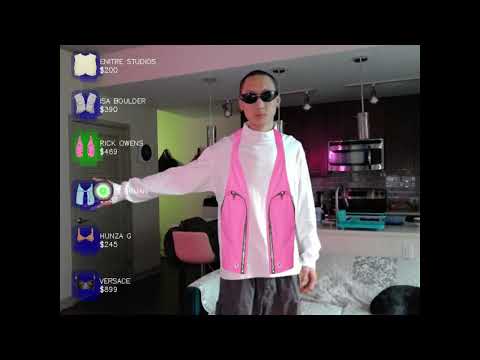
Watch the full demo on YouTube
- Real-time pose detection using MediaPipe
- Virtual clothing overlay on detected body
- Hand gesture-based UI control
- Multiple clothing options with hover selection
- Smooth and responsive interaction
- Python 3.7 or higher
- Webcam connected to your computer
- Windows/Mac/Linux operating system
- Clone this repository:
git clone https://github.com/PINKDIAMONDVVS/2d-virtual-try-on.git
cd 2d-virtual-try-on- Create a virtual environment (recommended):
python -m venv venv

# On Windows
venv\Scripts\activate

# On Mac/Linux
source venv/bin/activate- Install required dependencies:
pip install -r requirements.txt2d-virtual-try-on/
│
├── main.py # Main application script
├── requirements.txt # Python dependencies
├── README.md # This file
├── .gitignore # Git ignore file
├── CLOTHING_PREPARATION.md # Guide for preparing custom clothing images
│
└── assets/ # Clothing images folder (included)
├── vest1.png # ENITRE STUDIOS vest
├── vest2.png # ISA BOULDER vest
├── vest3.png # RICK OWENS vest
├── vest4.png # BORIS BIDJAN vest
├── bra1.png # HUNZA G bra
└── bra2.png # VERSACE bra
# Clone the repository
git clone https://github.com/PINKDIAMONDVVS/2d-virtual-try-on.git
cd 2d-virtual-try-on

# Install dependencies
pip install -r requirements.txt

# Run the application
python main.py- Hover: Move your right index finger over the buttons
- Select: Keep your finger on a button for 1 second
- Quit: Press 'q' key
- Add your clothing image (PNG with transparency) to the
assets/folder - In
main.py, load your image:
new_img = cv2.imread('assets/your_clothing.png', cv2.IMREAD_UNCHANGED)- Create an icon version and add a new button in the appropriate section
If the default camera doesn't work, change the camera index in line:
cap = cv2.VideoCapture(0) # Try 0, 1, 2, etc.- Try changing the camera index (0, 1, 2, etc.)
- Ensure camera permissions are granted
- Check if another application is using the camera
- Ensure proper lighting
- Stand at appropriate distance from camera
- Keep your body facing forward
- Close other applications
- Ensure your system meets the minimum requirements
- Try reducing the video resolution
- OpenCV (cv2)
- MediaPipe
- NumPy
Feel free to fork this project and submit pull requests for any improvements.
This project is licensed under the MIT License - see the LICENSE file for details.
- MediaPipe by Google for pose detection
- OpenCV community for computer vision tools
Your Name - PINKDIAMONDVVS
- Add more clothing categories
- Implement size adjustment controls
- Add clothing color variations
- Support for full-body clothing
- Save/export try-on images
- Multiple clothing layers support