A library of shell functions designed to ease the development of shell scripts written for both bash and zsh.
- Core functions
len- Check the length of passed arguments, e.g.len 'hello'would output5has_command- Returns 0 (true) if a requested command exists (function/alias/binary)has_binary- Returns 0 (true) if a command exists as a binary (not an alias/function)ident_shell- Identify the current shell (either bash, zsh or unknown)sudo- Wrapper function designed to prevent issues on systems which don't havesudoinstalled
- GnuSafe (
lib/000_gnusafe.sh) - A function to ensure calls tosed,awkandgrepare always the GNU versions, rather than BSD - preventing strange issues on non-Linux systems. It detects whether or not the running system is Linux or a BSD, if the system is a BSD, it will attempt to aliassed/awkandgrepto gsed/gawk/ggrep. If the GNU versions are missing, it will display a warning letting the user know they need to install certain GNU utils. - Error handling helpers
base/trap.bashis a painless plug-n-play error handler specifically for Bash scripts, which offers pretty printed tracebacks, stderr tracking, and attempts to identify the line of code causing the issue in a readable way to assist with fixing bugs.lib/000_trap_helper.shis a set of functions designed to make handling shell script errors easier, some of which work on both bash and zsh.get_trap_cmd- shows the code currently tied to a given signal (e.g.INTUSR1orEXIT)trap_add- appends to / creates a trap signal, allowing you to easily add multiple functions to bash/zsh traps, instead of just overwriting the trap.add_on_exit- appends shellscript code to be ran when the script terminates. if the script is running on Bash, then it will append to theEXITtrap. if the script is running on ZSH, then it will append to thezshexitfunction (or create it if it doesn't exist).
- Coloured / Timestamped messages
- Inside of
base/colors.shis a set of bash+zsh compatible formatted message functions msgallows you to easily output both plain and coloured messages, e.g.msg bold red hello worldmsgerrworks the same asmsgbut outputs your message to stderr instead of stdoutmsgts(ormsg ts/msgerr ts) adds a timestamp to the start of your message e.g.msgts hello worldwould print[2019-11-25 22:47:38 GMT] hello world
- Inside of
- General helper functions (
lib/010_helpers.sh)-
containsElement- returns 0 (true) if$1exists in the array$2e.g.
x=(hello world); if containsElement "hello" "${x[@]}"; then echo 'hello is in x'; fiwould printhello is in x -
yesno- (bash only) yes/no prompts made as simple as anifstatement (or||/&&).yesno "Are you sure? (y/n) > " && echo "You said yes" || echo "You said no" -
pkg_not_found- Check if the command$1is available. If not, install$2via apt (can override package install command via PKG_MGR_INSTALL)Example - If
lz4doesn't exist, install packageliblz4-tool:pkg_not_found lz4 liblz4-tool -
split_by- Split a string$1into an array by the character$2x=($(split_by "hello-world-abc" "-")); echo "${x[0]}";would printhello -
split_assoc- Split a string into an associative array (key value pairs). Due to limitations with exporting associative arrays in both zsh/bash, you must source the temporary file which the function prints to load the array.source $(split_assoc "hello:world,lorem:ipsum" "," ":"); echo "${assoc_result[hello]}"would printworld.
-
Automatically install ShellCore if it's missing on the first run
This is the recommended method, as it means you don't have to bundle ShellCore with small scripts.
Below is a short snippet that you can place at the start of your script or main shell file, which will:
- Check if ShellCore is installed at all - locally or globally
- If not, attempt to automatically install ShellCore if we failed to find an installation. The installation script is fully unattended - errors are sent to stderr.
- If the installation fails, then output an error message to stderr and exit the script with a non-zero return code.
- Attempt to load ShellCore from
~/.pv-shcore(local) first, then fallback to/usr/local/share/pv-shcore(global)
# Error handling function for ShellCore
_sc_fail() { >&2 echo "Failed to load or install Privex ShellCore..." && exit 1; }
# If `load.sh` isn't found in the user install / global install, then download and run the auto-installer
# from Privex's CDN.
[[ -f "${HOME}/.pv-shcore/load.sh" ]] || [[ -f "/usr/local/share/pv-shcore/load.sh" ]] || \
    { curl -fsS https://cdn.privex.io/github/shell-core/install.sh | bash >/dev/null; } || _sc_fail

# Attempt to load the local install of ShellCore first, then fallback to global install if it's not found.
[[ -d "${HOME}/.pv-shcore" ]] && source "${HOME}/.pv-shcore/load.sh" || \
    source "/usr/local/share/pv-shcore/load.sh" || _sc_fail

# Optionally, you may wish to run `autoupdate_shellcore` after loading it. This will quietly update ShellCore to
# the latest version.
# To avoid auto-updates causing slow load times, by default they'll only be triggered at most once per week.
# You can also use `update_shellcore` from within your script to force a ShellCore update.
autoupdate_shellcore
Bundling with your application
You can also simply git clone https://github.com/Privex/shell-core.git and place it within your project, or use a Git Submodule.
If you're concerned about ShellCore updates potentially breaking your script, then this may be the preferred option - as any other shellscript project (or a user) on the system could trigger updates to the local/global ShellCore installation.
Bash Error Handler
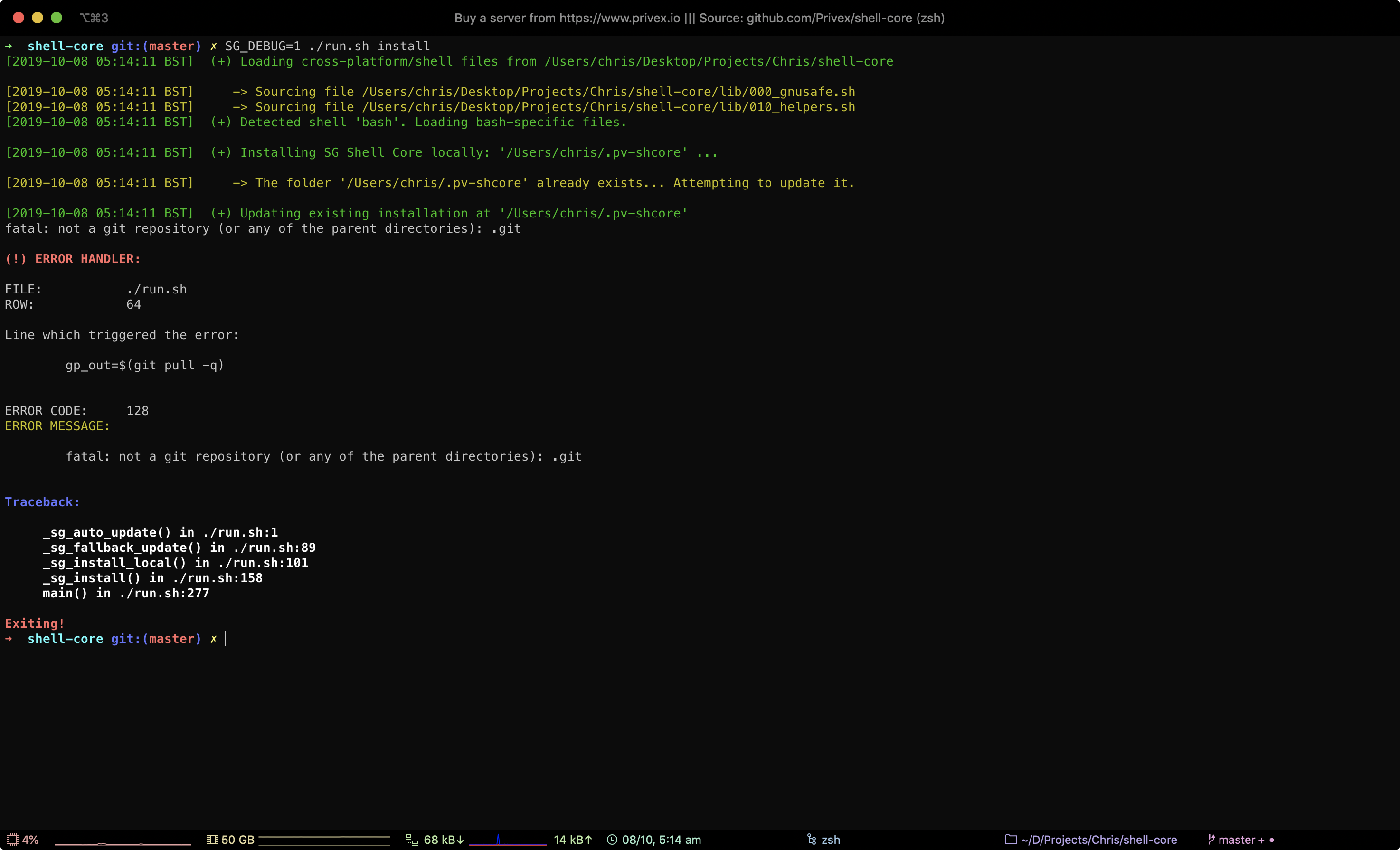
Included with ShellCore's various helpers, is a bash module in base/trap.bash - which adds python-like error handling
to any bash script, with tracebacks, the file and line number of the problematic code, etc.
It's known to work on both Mac OSX as well as Ubuntu Linux Server, and may work on other OS's too.
The error handling module is based on a snippet posted to Stack Overflow by Luca Borrione - Source: https://stackoverflow.com/a/13099228
To help with detection of accidental breakage and bugs, we try to add unit tests where possible for ShellCore.
We use BATS for unit testing, which is a unit testing system for Bash.
To run the tests, you first need to install BATS. If you're on OSX, just run brew install bats-core
Running tests.bats directly
The simplest way to run the tests is to just execute tests.bats - as it has the appropriate shebang and should be executable.
$ ./tests.bats
 ✓ test has_binary returns zero with existant binary (ls)
 ✓ test has_binary returns non-zero with non-existant binary (thisbinaryshouldnotexit)
 ✓ test has_binary returns non-zero for existing function but non-existant binary (example_test_func)
 ✓ test has_command returns zero for existing function but non-existant binary (example_test_func)
 ✓ test has_command returns zero for non-existing function but existant binary (ls)
 ...
 19 tests, 0 failures
Running tests.bats via the bats program
You can also run the tests via the bats program itself. This gives you more customization, e.g. you can run it in TAPS mode
with the -t flag (often required for compatibility with automated testing systems like Travis).
$ bats -t tests.bats
  1..19
  ok 1 test has_binary returns zero with existant binary (ls)
  ok 2 test has_binary returns non-zero with non-existant binary (thisbinaryshouldnotexit)
  ok 3 test has_binary returns non-zero for existing function but non-existant binary (example_test_func)
  ok 4 test has_command returns zero for existing function but non-existant binary (example_test_func)
ok 5 test has_command returns zero for non-existing function but existant binary (ls)+===================================================+
| © 2019 Privex Inc. |
| https://www.privex.io |
+===================================================+
| |
| Privex ShellCore |
| |
| Core Developer(s): |
| |
| (+) Chris (@someguy123) [Privex] |
| |
+===================================================+
Copyright (C) 2019 Privex Inc. (https://www.privex.io)
This program is free software: you can redistribute it and/or modify
it under the terms of the GNU General Public License as published by
the Free Software Foundation, either version 3 of the License, or
(at your option) any later version.
This program is distributed in the hope that it will be useful,
but WITHOUT ANY WARRANTY; without even the implied warranty of
MERCHANTABILITY or FITNESS FOR A PARTICULAR PURPOSE. See the
GNU General Public License for more details.
You should have received a copy of the GNU General Public License
along with this program. If not, see <https://www.gnu.org/licenses/>.