This repository, mamcti, contains the codes needed to automate the movement of the microscope stage with respect to a matrix of the chamber positions in a microfluidic chip. It is automated to capture a multi-channel time-lapse experiment. It corrects the errors in alignment using a chamber detection algorithm real-time. It also interfaces with MLIDA to conduct on the flu image analysis.
- Create a new conda environment using
conda create --name <NAME>
-
Install the following packages using anaconda:
- Python
- Spyder
- pycromanager
- matplotlib
- scikit-learn
- opencv
- pandas
- numpy
- skimage
via:
conda install <PACKAGE>
-
Install Micromanager 2.0 using instructions on the website into the computer that is connected to the microscope.
-
There is a need to do a hardware configuration to connect the microscope to the program. Check out the Micromanager page to walk you through it.
a. We add
Ti2_Mic_Driver.dllfile into the Micro-Manager program file in the computer because we use a Nikon Ti2 microscope
b. We also use a PCO camera, so we addedPCO_CDlg.dll,PCO_Conv.dll, andPCO_Kamlib64.dllfiles into the same program file.
-
edge_detection_chambers.pyis a function code that helps detect the edges of the chamber present in the images captured under a normal PHC light. The code detects the images captured and outputs the edges in terms of pixel coordinates. The pixels of the images taken are 2048 by 2048. For example, this image below has edges located in[(289, 330), (289, 1874), (1888, 330), (1888, 1874)](top_left, bottom_left, top_right, bottom_right):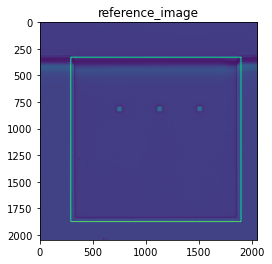
Furthermore, the class
ref_chamberin the code enables the first image taken, that is manually positioned, to be used as a reference for the position and orientation of subsequent chambers. The other functions in this library includes drawing the edges, detecting the chamber size and fixing the errors in terms of both edge recognition and the stage position to capture the chamber in the same position and orientation as the reference.However, there is a need to improve the error recognition and adjustment as the algorithm can take the wrong set of edges as shown below:
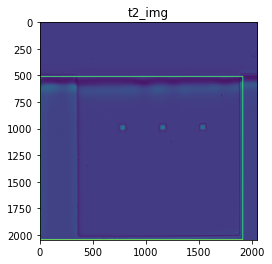
-
In the experiments folder, the codes updated there can be used for different types of experiments according to the design of the microfluidic chamber. For now, it can only take 1 run through of the experiment. It still needs to be changed to fit the current
edge_detection_chambers.pylibrary.