
- About
- Development Team
- Key Features
- Technology Stack
- System Requirements
- Installation Guide
- Database Configuration
- Application Deployment
- Project Architecture
- App Navigation Guide
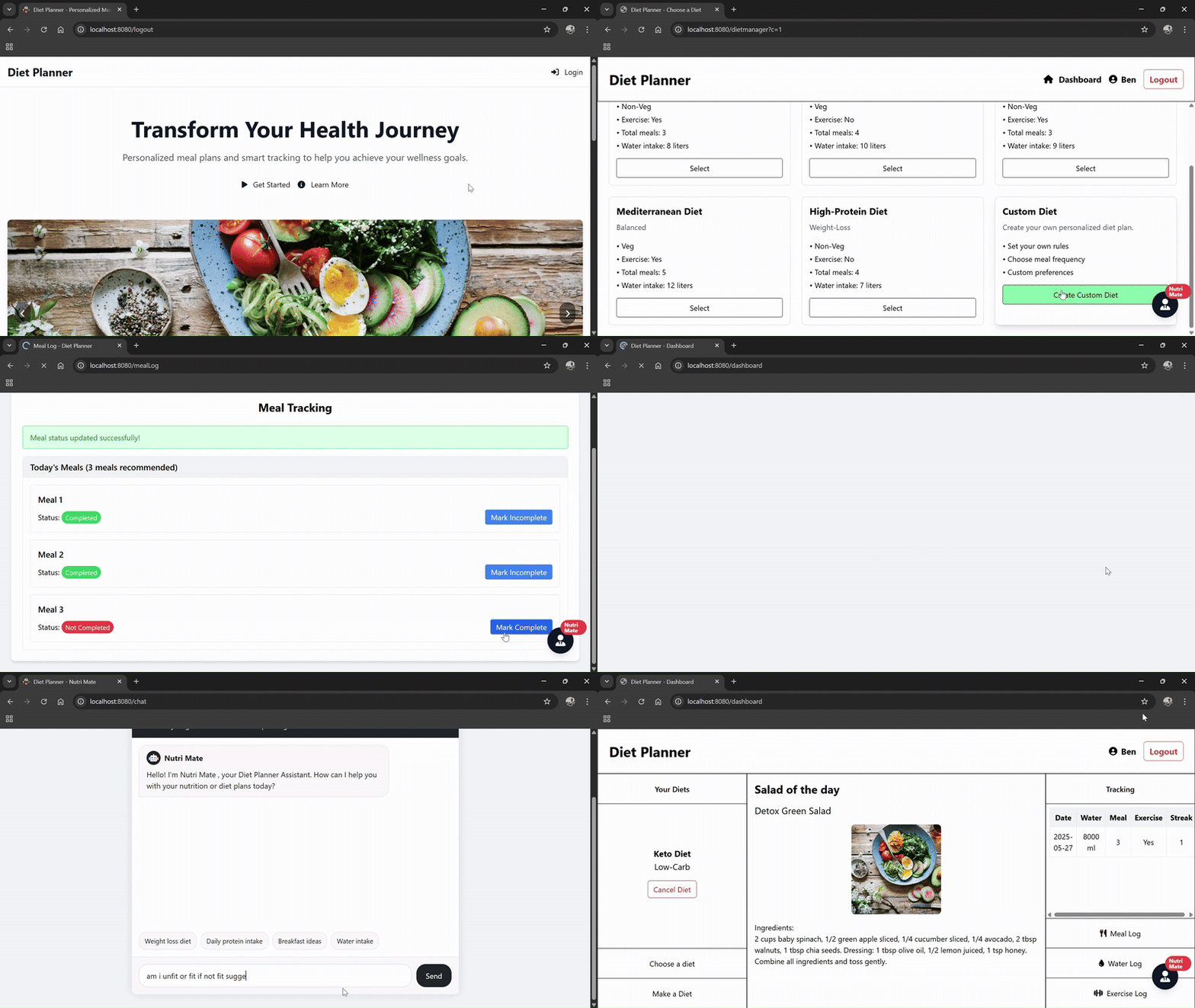
Diet Planner is a Spring-Hibernate based web application that revolutionizes personal nutrition management. This comprehensive solution combines intelligent diet planning with habit tracking and AI-powered guidance to help users achieve their health goals.
Core Value Proposition:
- 🎯 Personalized nutrition planning tailored to individual needs
- 📈 Comprehensive progress tracking with actionable insights
- 🤖 Intelligent AI assistant for real-time nutrition guidance
- 📱 Responsive design for seamless cross-device experience
| Name | GitHub | Contributions |
|---|---|---|
| Akshay Venugopalan | @akshayvenu | Logging systems, AI chatbot integration |
| Benjamin Sebastian | @SebastianBenjamin | Dashboard UI, diet management, streak logic |
| Shravya Salian | @salianShravya | Authentication system, UI components |
| Feature | Description |
|---|---|
| Custom Diet Creation | Build personalized plans with custom meal frequencies and preferences |
| Predefined Templates | Choose from professionally designed diet templates |
| Nutritional Targets | Set daily calorie, protein, and water intake goals |
| Component | Capabilities |
|---|---|
| Meal Logger | Track meal completion status with visual indicators |
| Water Tracker | Monitor daily hydration with goal progress |
| Exercise Log | Record workout sessions and intensity levels |
| Streak System | Motivation through achievement streaks and milestones |
- Natural language processing for nutrition queries
- Context-aware recommendations
- Quick-access templates for common questions
- Personalized feedback based on user data
- Modern dashboard with at-a-glance metrics
- Intuitive navigation and workflow
- Responsive design optimized for all devices
- Visual data representations for easy interpretation





Minimum Specifications:
- Java Development Kit 17+
- Apache Tomcat 10.x
- MySQL Server 8.0+ or XAMPP
- Maven 3.8+
- Modern web browser (Chrome, Firefox, Edge)
- Clone the Repository
bash git clone https://github.com/SebastianBenjamin/DietPlanner.git cd DietPlanner
- Configure Application Properties - Update database connection parameters in:
src/main/resources/hibernate.cfg.xml
- Build Dependencies
bash mvn clean install
- Initialize MySQL Database
sql CREATE DATABASE dietplanner ;
- Import Schema
bash mysql -u [username] -p dietplanner < dietplanner.sql
Tomcat Deployment Steps:
- Build the WAR package:
bash mvn clean package
2. Deploy to Tomcat:
- Copy target/DietPlanner.war to [TOMCAT_HOME]/webapps/
- Start Tomcat server
3. Access application:
http://localhost:8080/DietPlanner/
DietPlanner/
├── src/
│   ├── main/
│   │   ├── java/org/
│   │   │   ├── classFiles/             # Domain models and business logic
│   │   │   │   ├── User.java          # User entity
│   │   │   │   ├── Diet.java          # Diet plan entity
│   │   │   │   ├── LogData.java       # Log data Entity
│   │   │   │   └── Services.java      # Core business services
│   │   │   └── Controllers/           # MVC controllers
│   │   │       └── Controller.java    # Main application controller
│   │   ├── resources/
│   │   │   └── hibernate.cfg.xml      # ORM configuration
│   │   └── webapp/
│   │       ├── WEB-INF/views/         # View templates (JSP)
│   │       └── static/                # Static assets (CSS/JS/images)
├── pom.xml                            # Build configuration
└── dietplanner.sql                    # Database schema
The Diet Planner application includes several key pages with interactive UI elements that trigger specific endpoints. Below is a comprehensive navigation map showing both pages and their associated actions:
| Page | UI Element/Action | Triggered Endpoint | Description |
|---|---|---|---|
| Dashboard | Page Load | /dashboard |
Main page showing current diet plan, daily salad recommendation, and tracking summary |
| "Choose a diet" link | /dietmanager?c=1 |
Navigate to diet selection page | |
| "Make a Diet" link | /dietmanager?c=0 |
Navigate to custom diet creation page | |
| "Cancel Diet" button | /cancelDiet (POST) |
Remove current diet plan | |
| "Meal Log" link | /mealLog |
Navigate to meal tracking page | |
| "Water Log" link | /waterLog |
Navigate to water intake tracking page | |
| "Exercise Log" link | /exerciseLog |
Navigate to exercise tracking page | |
| "Nutri Mate" button | /chat |
Open nutrition assistant chatbot | |
| Diet Chooser | Page Load | /dietmanager?c=1 |
Display available diet plans |
| "Select" button | /selectDiet (POST) |
Choose specific diet plan | |
| "Create Custom Diet" link | /dietmanager?c=0 |
Navigate to diet creation page | |
| Diet Maker | Page Load | /dietmanager?c=0 |
Show diet creation form |
| "Create Diet Plan" button | /makeDiet (POST) |
Submit custom diet information | |
| Meal Log | Page Load | /mealLog |
Show meal tracking interface |
| "Mark Complete/Incomplete" button | /updateMeal (POST) |
Update meal status | |
| Water Log | Page Load | /waterLog |
Show water tracking interface |
| Water amount buttons | /addWaterLog (POST) |
Add specific water amount | |
| "Reset Today's Water Log" button | /resetWaterLog (POST) |
Clear today's water intake data | |
| Exercise Log | Page Load | /exerciseLog |
Show exercise tracking interface |
| "Update Status" button | /updateExercise (POST) |
Update exercise completion status | |
| User Management | "Profile" icon | /profile |
View user profile information |
| "Logout" button | /logout |
End user session |

💡 Pro Tip: For optimal results, use the application consistently to benefit from the streak system and receive increasingly personalized recommendations from our AI nutrition assistant, Nutri Mate!


