Releases: Silverfeelin/Starbound-WEdit
WEdit v1.4.4.8

- Rotate tool, which allows you to rotate your copied selection 90 degrees (suggested by Vokun).
- (Currently) does not support objects; these will not be pasted while the copy is rotated.
- Holding shift with pencil will now erase, rather than requiring you to change blocks.
WEdit v1.4.4.7
- Workaround for compatibility issues with Stardust Core.
- Hopefully the tech works properly now (specifically noclip).
Keep in mind WEdit is still compatible with Quickbar Mini. The zip version attached below still comes with Quickbar Mini.
If you are using Stardust Core or Stardust Core Lite, you should not use the Quickbar Mini and can simply remove that file.
WEdit v1.4.4.6
- Modifier and MatMod Remover now use the MatMod size from the settings (previously only MatMods from the MatMod Pinner used this setting). Thanks to SapphireCoyote for the suggestion.
WEdit v1.4.4.5
- New Hue tool, allowing you to select a hue and recolor tiles (#34).
- New Random Pencil and Random Fill tools, allowing you to randomly draw or fill an area based on a chosen percentage (thanks to SapphireCoyote for the suggestion).
These tools have been added to the Features page with more information.
WEdit v1.4.4
Changelog
1.4.4.3 1.4.4.2
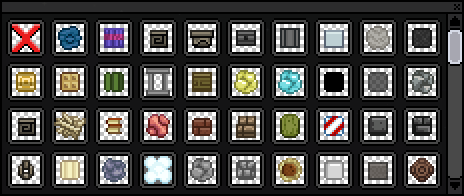
- Updated material picker list by HΛDES.
1.4.4.1
- Adjusted tech patch to reduce the chance of it failing.
1.4.4
- Ability to remove your copy to get rid of the paste outline.
- Calibrate tool to set the iteration delay automatically.
- Disable noclip functionality if the keybind is empty.
WEdit v1.3.3
Built for Starbound 1.3.3.
Changelog
- Changed dependency for interfaces from ItemInterfaces to RemoteInterfaces.
- Bunch of improvements to the Compact Interface; it is now the easiest way to use WEdit.
- The interface can now be opened by using the
WE_AllInOnetool;WE_CompactInterfaceremoved. WE_AllInOnecan be crafted directly from your crafting menu.- Debug information can be toggled on/off.
- The interface can now be opened by using the
- Interfaces added for picking materials, material mods, dyes, liquids.
- See the updated usage on the feature page.
- Added indicators when selecting a block (i.e. when using the color picker).
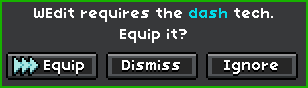
- WEdit will notify you that you don't have the dash tech equipped.
- The dash script is no longer overwritten. The mod won't conflict with other dash tech mods (although if the other mods react to the G key, it will activate both).
Installation & Usage
WEdit.v1.3.3.zip also contains Remote Interfaces v1.0.0 and Quickbar Mini Alpha v0.20.
https://github.com/Silverfeelin/Starbound-WEdit#installation
- Download
WEdit.pak, not the source code. - Follow the Installation steps from the readme.
Features
https://github.com/Silverfeelin/Starbound-WEdit/wiki/Features
Issues
You can report any issues on the Issues page.
Steam Workshop
http://steamcommunity.com/sharedfiles/filedetails/?id=734859295
WEdit v1.3.2
Built for Starbound 1.3.2.
Changelog
- Dye Tool.
- Copy and pasting also works for dyed tiles.
- WEdit now uses the Quickbar for settings.
Installation & Usage
WEdit.v1.3.2.zip also contains Item Interfaces v1.3.2 and Quickbar Mini Alpha v0.20.
https://github.com/Silverfeelin/Starbound-WEdit#installation
- Download
WEdit.pak, not the source code. - Follow the Installation steps from the readme.
Features
https://github.com/Silverfeelin/Starbound-WEdit/wiki/Features
Issues
You can report any issues on the Issues page.
Steam Workshop
http://steamcommunity.com/sharedfiles/filedetails/?id=734859295
WEdit v1.3.1
Built for Starbound 1.3.1, though the mod could work fine in future updates to the game.
Changelog
Changes for v1.3.0
- Fixes for Starbound 1.3.
- Configuration changes are now instant, but are serialized per character rather than globally.
- Descriptions added for the compact interface and all in one tool, in debug mode.
Changes for v1.3.1
- Fixed noclip drifting (#20).
Installation & Usage
https://github.com/Silverfeelin/Starbound-WEdit#installation
- Download
WEdit.pak, not the source code. - Follow the Installation steps from the readme.
Features
https://github.com/Silverfeelin/Starbound-WEdit/wiki/Features
Issues
You can report any issues on the Issues page. Please do not report issues through negative reviews on PlayStarbound.
Steam Workshop
http://steamcommunity.com/sharedfiles/filedetails/?id=734859295
WEdit v1.2.2.3
Built for Starbound 1.2.2, though the mod could work fine in future updates to the game.
Changelog
- Ruler now shows the total length in blocks, as well as the width and height the line covers.
v1.2.2.3 fix
- Fixed an error caused by the
WEditkey not being set properly in thestarbound.configfile.- Reported by Geotec and another person (sorry I don't remember who it was!).
Installation & Usage
https://github.com/Silverfeelin/Starbound-WEdit#installation
- Download
WEdit.pak, not the source code. - Follow the Installation steps from the readme.
Features
https://github.com/Silverfeelin/Starbound-WEdit/wiki/Features
Issues
You can report any issues on the Issues page. Please do not report issues through negative reviews on PlayStarbound.
Steam Workshop
http://steamcommunity.com/sharedfiles/filedetails/?id=734859295
WEdit v1.2.2.1
Built for Starbound 1.2.2, though the mod could work fine in future updates to the game.
Changelog
- Compact Interface added.
- Some small code improvements and bugfixes.
1.2.2.1 fixes
- Selection now remains visible when changing active tools within the Compact Interface.
- Recalculating iterations (hopefully) fixed, which addresses most issues where pasting would end before the process finishes placing blocks.
Installation & Usage
https://github.com/Silverfeelin/Starbound-WEdit#installation
- Download
WEdit.pak, not the source code. - Follow the Installation steps from the readme.
Features
https://github.com/Silverfeelin/Starbound-WEdit/wiki/Features
Issues
You can report any issues on the Issues page. Please do not report issues through negative reviews on PlayStarbound.
Steam Workshop
http://steamcommunity.com/sharedfiles/filedetails/?id=734859295