HootSight is actively developed and maintained by me, Tanathy, together with Roxxy, my in-house development automation assistant.
The project began as a personal rebellion against subscription-based AI services that demand exorbitant fees for tasks you can absolutely perform yourself with the right tools. I built HootSight to be the toolkit I wish I had when I started: approachable enough for solo developers, powerful enough for real work, and honest about its capabilities and limitations.
Most cloud marketplaces, hosted APIs, "AI platforms" happily charge per month for fundamental operations like image classification, similarity search, or internal research tooling. But you don’t need to rent those features if you can build them yourself. You can train serious and personalized models at home, keep full control of your data, and spend your money on hardware, on your projects and improve rather than endless subscriptions.
It’s free to use, support-funded, and designed to be approachable without being watered down.
At its core, HootSight is an offline-first computer vision training stack—built for developers who would rather own their models outright than rely on rented solutions tied to big-company ecosystems.
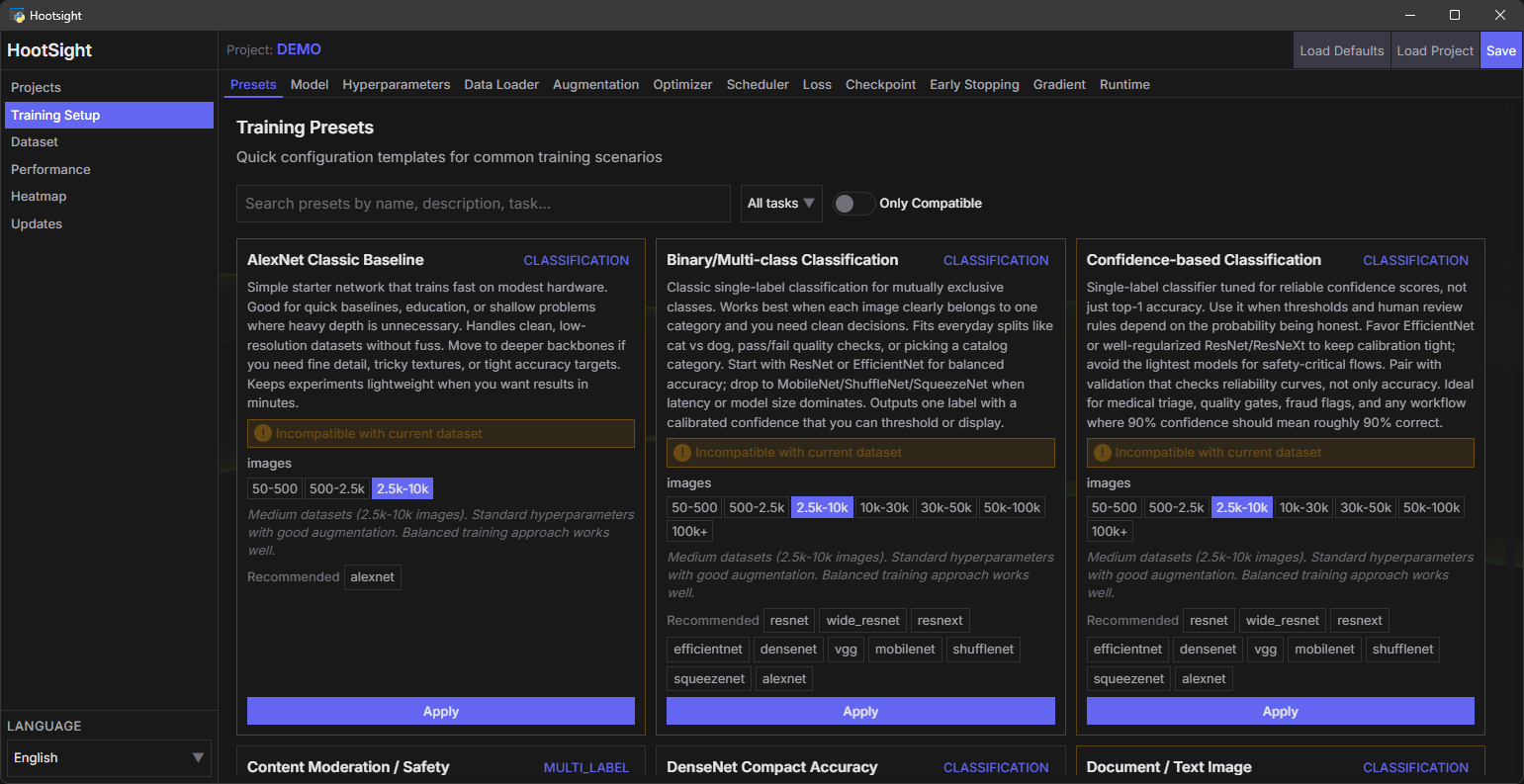
- Config-driven workflow – Every switch lives in JSON and is editable through the UI. Automate it, version it, or ship it headless.
- Project auto-discovery – Drop a folder under
projects/and it shows up ready to train, complete with dataset analysis and Grad-CAM tooling. - Multi-label aware from the ground up –
.txtsidecar tags switch the entire pipeline into multi-label mode automatically. - Memory protection – Batch sizes are tuned on the fly so you stop burning time on CUDA OOM crashes. Literally you can game next to training.
- Rich augmentation & monitoring – Toggle augmentations visually, preview outputs, watch training progress batch by batch.
- Offline-first FastAPI + PyTorch stack – No telemetry, no surprise network calls; the optional update check runs only when you trigger it and is scoped to this repository.
- Mode-aware training – New / Resume / Fine-tune flows per project. Resume restores optimizer/scheduler state and continues epochs; Fine-tune reloads weights but resets optimizer/scheduler and restarts epochs.
- Curated presets – One-click task templates under
config/presets/for classification, multilabel, embeddings/retrieval, detection, mobile, medical, aesthetics, and small-data flows. - Manual updater – User-triggered, repo-scoped update checker; stays offline unless you ask, and only fetches this repo’s manifests.
- Mode-aware training controls – Start runs as New, Resume, or Fine-tune per project. Resume restores optimizer/scheduler state and continues epochs; Fine-tune reuses weights but resets optimizer/scheduler and restarts epochs.
- Curated presets – One-click task templates (classification, multilabel, embeddings, detection, mobile, medical, aesthetics, etc.) shipped under
config/presets/to get sane configs fast. - Manual updater – A user-triggered update checker that stays offline unless you explicitly request it; checks only this repo’s release info.
- Windows 10 or 11 (64-bit)
- Python 3.12 (3.10–3.12 tested; 3.12 recommended)
- NVIDIA GPU strongly recommended for speed; CPU-only works but will be slower
- Internet access on the first run to pull dependencies
- Matching NVIDIA CUDA Toolkit if you expect GPU acceleration: https://developer.nvidia.com/cuda-downloads
Notes:
- The installer never touches your global Python. A local virtual environment is created on first run and reused afterward.
- PyTorch and xFormers CUDA wheels are auto-selected via hardware detection or the
config/packages.jsonc → pytorch_cuda_versionsetting (defaultcu129). Remove that key or leave it empty for CPU-only installs. - If your machine uses a different CUDA runtime than the configured wheel, update
pytorch_cuda_versionto match or xFormers will fail. - Linux and AMD GPU support are on the roadmap but not certified yet. Expect rough edges outside Windows + NVIDIA.
- Clone or download the repository.
- From the repo root, run:
py -3.12 run.pyWhat you get on first launch:
\.venvis created, pip is upgraded, and packages fromconfig/packages.jsoncare installed.- PyTorch (CUDA build when available) and the FastAPI backend spin up.
- The PyWebView desktop shell opens; if it doesn’t, browse to http://127.0.0.1:8000.
Subsequent launches reuse the same environment and skip heavy installs.
- How to start: Right-click a project card in the UI to open the context menu. Choose New Training, Resume Training (requires checkpoint), or Fine-tune (requires checkpoint). The header progress pill shows the active mode.
- New: Fresh model init; optimizer and scheduler start clean; epochs follow your config.
- Resume: Full state restore (model + optimizer + scheduler + metrics) from the latest checkpoint; training continues from the saved epoch.
- Fine-tune: Loads model weights from the latest checkpoint, but resets optimizer/scheduler and restarts at epoch 1. Use this to adapt an existing model without carrying over its optimizer state.
- API:
POST /training/startacceptsmode=new|resume|finetune(legacyresumeflag still accepted). Behavior matches the UI modes.
Presets live in config/presets/ and can be applied from the UI to bootstrap sensible configs:
| Preset | Purpose |
|---|---|
alexnet_classic_baseline.json |
Simple baseline classification for quick smoke tests. |
binary_multiclass_classification.json |
Standard single-label classification. |
confidence_based_classification.json |
Classification with confidence-oriented tuning. |
content_moderation_safety.json |
Safety/content filtering setups. |
densenet_compact_accuracy.json |
DenseNet-focused compact accuracy runs. |
document_classification.json |
Document/image classification defaults. |
efficientnet_balanced_scaling.json |
Balanced EfficientNet scaling settings. |
embedding_retrieval_balanced.json |
Embedding/retrieval with balanced trade-offs. |
embedding_retrieval_high_fidelity.json |
Higher-fidelity embedding/retrieval configs. |
fast_mobile_inference.json |
Mobile/edge-friendly fast inference. |
feature_extraction_embedding.json |
Feature extraction / embedding generation. |
finegrained_recognition.json |
Fine-grained class separation. |
highres_detail_preservation.json |
High-resolution detail preservation. |
image_quality_assessment.json |
Image quality assessment tasks. |
medical_scientific_analysis.json |
Medical/scientific imaging defaults. |
mobilenet_edge_deployment.json |
MobileNet configs for edge deployment. |
multi_object_detection.json |
Multi-object detection tasks. |
multi_object_multi_attribute.json |
Multi-object, multi-attribute detection. |
multilabel_boolean.json |
Multi-label with boolean targets. |
multilabel_probability.json |
Multi-label with probabilistic targets. |
resnet_deep_learning.json |
ResNet-focused deeper runs. |
resnext_aggregated_networks.json |
ResNeXt aggregated blocks defaults. |
shufflenet_lightweight_speed.json |
ShuffleNet for speed/latency. |
small_dataset_fewshot.json |
Small-data / few-shot friendly settings. |
squeezenet_ultra_compact.json |
Ultra-compact SqueezeNet setups. |
style_aesthetic_classification.json |
Style/aesthetics classification. |
vgg_feature_rich.json |
VGG-style feature-rich baselines. |
wide_resnet_balanced_depth.json |
Wide ResNet depth/width balance. |
Each preset is editable post-apply; they’re starting points, not locks.
HootSight ships with curated backbones tuned for practical work. Choose them in the UI or via config/config.json → models.
| Family | Variants | When to pick it |
|---|---|---|
| ResNet | resnet18, resnet34, resnet50, resnet101, resnet152, wide_resnet50_2, wide_resnet101_2 |
Battle-tested generalists. Start with resnet50; go wide (wide_resnet*) when you want richer features and have VRAM. |
| ResNeXt | resnext50_32x4d, resnext101_32x8d, resnext101_64x4d |
Wider residual blocks for richer representations. Great when you have heavy class overlap or need better recall, but expect higher VRAM appetite. |
| MobileNet | mobilenet_v2, mobilenet_v3_small, mobilenet_v3_large |
Mobile and edge scenarios. Excellent when you want quick inference, embedded deployment, or CPU-bound projects. |
| ShuffleNet | shufflenet_v2_x0_5, x1_0, x1_5, x2_0 |
Ultra-lightweight experimentation and real-time feeds on modest GPUs. Pairs nicely with aggressive augmentation. |
| SqueezeNet | squeezenet1_0, squeezenet1_1 |
Minimal footprint for proof-of-concept or legacy hardware. Expect lower accuracy ceiling but near-instant training cycles. |
| EfficientNet | efficientnet_b0–b7, efficientnet_v2_s, efficientnet_v2_m, efficientnet_v2_l |
Compound-scaled networks for squeezing performance out of limited datasets. Use when you want strong accuracy with disciplined scaling rules. |
| DenseNet | densenet121, densenet161, densenet169, densenet201 |
Dense connectivity for stronger feature reuse; solid accuracy with moderate size. |
| VGG | vgg11, vgg11_bn, vgg13, vgg13_bn, vgg16, vgg16_bn, vgg19, vgg19_bn |
Classic feature-rich backbones; heavier, but good for transfer features and baselines. |
| AlexNet | alexnet |
Legacy/lightweight baseline for smoke tests and quick experiments. |
On startup, the coordinator benchmarks VRAM/CPU pressure and computes a safe batch size, so even the bigger variants stay within hardware limits.
Tasks: All shipped backbones are wired for classification pipelines (single/multi-label). Detection/segmentation require custom wiring not bundled here.
- How to start: Right-click a project card in the UI to open the context menu. Choose New Training, Resume Training (requires checkpoint), or Fine-tune (requires checkpoint). The header progress pill shows the active mode.
- New: Fresh model init; optimizer and scheduler start clean; epochs follow your config.
- Resume: Full state restore (model + optimizer + scheduler + metrics) from the latest checkpoint; training continues from the saved epoch.
- Fine-tune: Loads model weights from the latest checkpoint, but resets optimizer/scheduler and restarts at epoch 1. Use this to adapt an existing model without carrying over its optimizer state.
Presets live in config/presets/ and can be applied from the UI to bootstrap sane configs fast. Each is editable after apply.
| Preset | Purpose |
|---|---|
alexnet_classic_baseline.json |
Simple baseline classification for smoke tests. |
binary_multiclass_classification.json |
Standard single-label classification. |
confidence_based_classification.json |
Classification with confidence-oriented tuning. |
content_moderation_safety.json |
Safety/content filtering defaults. |
densenet_compact_accuracy.json |
DenseNet-focused compact accuracy. |
document_classification.json |
Document/image classification defaults. |
efficientnet_balanced_scaling.json |
Balanced EfficientNet scaling. |
embedding_retrieval_balanced.json |
Embedding/retrieval with balanced trade-offs. |
embedding_retrieval_high_fidelity.json |
Higher-fidelity embedding/retrieval. |
fast_mobile_inference.json |
Mobile/edge-friendly fast inference. |
feature_extraction_embedding.json |
Feature extraction / embedding generation. |
finegrained_recognition.json |
Fine-grained class separation. |
highres_detail_preservation.json |
High-resolution detail preservation. |
image_quality_assessment.json |
Image quality assessment. |
medical_scientific_analysis.json |
Medical/scientific imaging defaults. |
mobilenet_edge_deployment.json |
MobileNet for edge deployment. |
multi_object_detection.json |
Multi-object detection tasks. |
multi_object_multi_attribute.json |
Multi-object, multi-attribute detection. |
multilabel_boolean.json |
Multi-label with boolean targets. |
multilabel_probability.json |
Multi-label with probabilistic targets. |
resnet_deep_learning.json |
ResNet-focused deeper runs. |
resnext_aggregated_networks.json |
ResNeXt aggregated blocks defaults. |
shufflenet_lightweight_speed.json |
ShuffleNet for speed/latency. |
small_dataset_fewshot.json |
Small-data / few-shot friendly. |
squeezenet_ultra_compact.json |
Ultra-compact SqueezeNet setups. |
style_aesthetic_classification.json |
Style/aesthetics classification. |
vgg_feature_rich.json |
VGG-style feature-rich baselines. |
wide_resnet_balanced_depth.json |
Wide ResNet depth/width balance. |
- User-triggered only; no background checks. Runs when you click “Check for updates”.
- Fetches manifests from the configured repository URL (
config/system_config.jsonon remote), compares against localconfig/checksum.json, and produces a plan. - Respects skip paths (e.g.,
config/config.json) to avoid overwriting local settings. - No data leaves your machine aside from the manifest requests; scoped strictly to this repo’s files.
- Your data stays local – No telemetry, analytics SDKs, or background uploads. Projects, datasets, checkpoints, and logs never leave disk unless you move them.
- Explicit control – You decide what to import, export, or delete. Update checks hit GitHub only when triggered and transmit nothing from your datasets.
- Compliance-friendly defaults – Designed with GDPR expectations: purpose limitation, data minimization, and on-demand erasure are in your hands because nothing is automatically mirrored elsewhere.
- Isolation by design – The bundled installer builds an isolated virtual environment; no shared state with other Python installs, which simplifies evidence trails for audits.
- Third-party services – None bundled. If you add integrations, document them yourself. HootSight ships vanilla.
If you work with regulated categories (biometrics, medical, sensitive personal data), bring your own governance and legal review. HootSight gives you the tooling; compliance remains your responsibility.
HootSight is in active alpha development. The core training pipeline is stable and battle-tested on ResNet architectures, while other model families (ResNeXt, EfficientNet, MobileNet, ShuffleNet, SqueezeNet) are in ongoing validation. I'm continuously refining the memory management, augmentation preview system, and multi-label workflows based on real-world usage.
The roadmap includes:
- Expanded Linux and AMD GPU support (currently Windows + NVIDIA is the certified path)
- Enhanced visualization tools for training diagnostics and dataset analysis
- Additional backbone architectures as they prove valuable
- Community-driven feature requests that align with the offline-first, config-driven philosophy
When you hit a wall, file a detailed issue on the GitHub repository. Share reproducible steps, your config files, error logs, and what you expected to happen. Clear reports help me diagnose and fix problems faster, and they benefit everyone who encounters similar issues.
I read every issue and PR, though response times depend on my availability—this is a labor of love, not a corporate product with SLAs. Be patient, be clear, and I'll do everything I can to help.
Pull requests, feature pitches, and bug reports are genuinely welcome. I'm especially interested in:
- Bug fixes with test cases
- Documentation improvements (tutorials, guides, translations)
- Performance optimizations that maintain code clarity
- New augmentation strategies or model architectures that fit the existing patterns
Before submitting major changes, open an issue to discuss the approach. Keep the offline-first, config-driven principles intact, and maintain the conversational documentation style. Code quality matters—I'd rather wait for a clean PR than rush something that creates tech debt.
HootSight is free to use and will always remain free. If the toolkit saves you cash or hours, consider supporting development through Ko-fi: https://ko-fi.com/tanathy. Your sponsorship helps me dedicate more time to maintenance, new features, and community support instead of billable client work.
Even if you can't contribute financially, you help by using HootSight, reporting bugs, sharing it with others who might benefit, and participating in discussions. Every bit of engagement makes the project stronger and more useful for everyone.
