Transform your table into an advanced Morse code input device using computer vision! Tap Morse code patterns on any surface and see them decoded into text in real-time with audio feedback and intelligent timing calibration.
- Code name: TapMorse
- Built by: Unknown27s
- Assisted by: GitHub Copilot
This project is open source under the MIT License. See LICENSE for details.
- Please read
CONTRIBUTING.mdbefore opening PRs. - Be kind and follow our
CODE_OF_CONDUCT.md.
- 🎥 Camera-based detection - Uses your webcam to detect taps on any surface
- ⚡ Real-time Morse decoding - Converts tap patterns to text instantly
- 🎯 Auto-calibration - Learns your tapping speed and adjusts timing automatically
- 🔊 Audio feedback - Distinct sounds for dots, dashes, and completions
- 📊 Statistics tracking - Monitor your progress and accuracy over time
- 📋 Visual Morse guide - On-screen reference with common patterns
- 💾 Settings persistence - Saves your preferences automatically
- 🎮 Advanced controls - Toggle features with keyboard shortcuts
- 🚀 Smart timing - Intelligent word gap detection and error handling
- 📈 Progress tracking - Full statistics with accuracy percentages
Use the provided requirements file (includes OpenCV, NumPy, scikit-learn):
python -m pip install -r requirements.txt# Use your default Python
python table_click_detector.py
# If needed, run with an explicit interpreter path on Windows
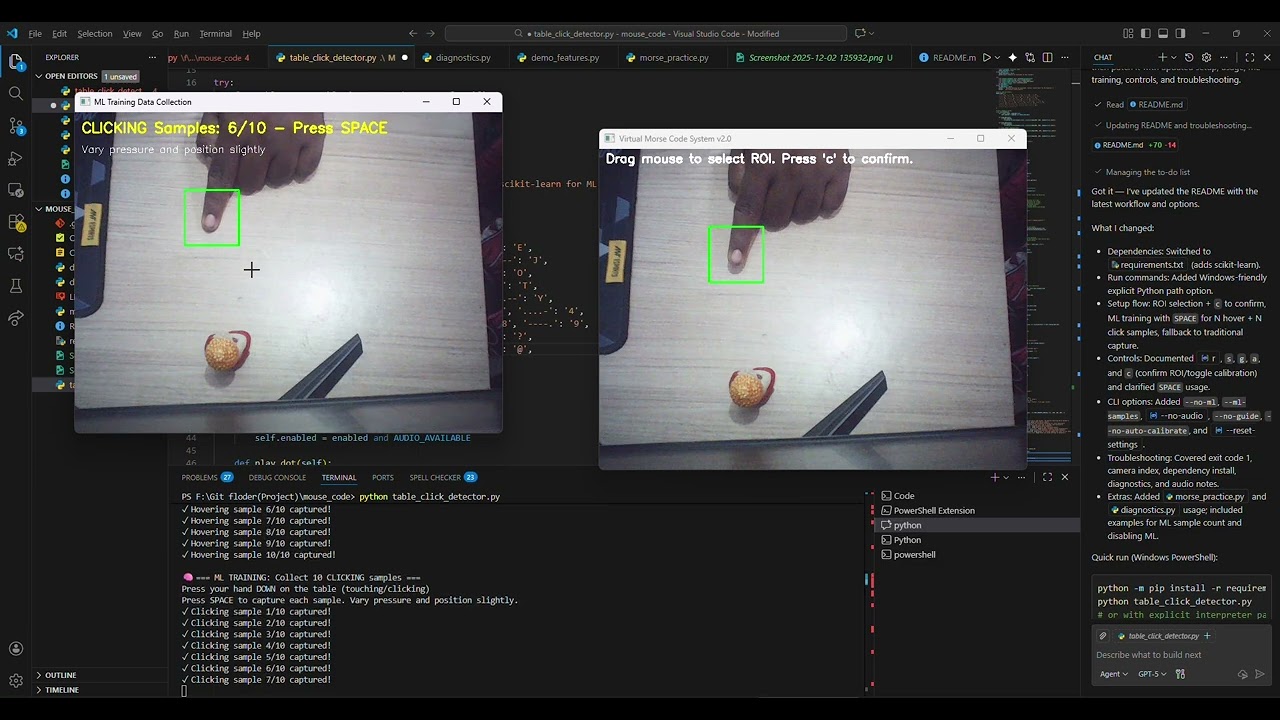
& "C:/Program Files/Python312/python.exe" "F:/Git floder(Project)/mouse_code/table_click_detector.py"- Draw ROI – Drag the mouse to select the table area to monitor.
- Confirm ROI – Press
cto confirm the ROI. - ML Training (default) – You will be prompted to collect samples:
- Collect
Nhovering samples (default 10). PressSPACEfor each sample. - Collect
Nclicking samples (default 10). PressSPACEfor each sample. - Move your hand slightly between captures for variety.
- After training, the ML model runs in real time.
- Collect
- Fallback (no-ML) – If ML is disabled or fails, you’ll capture 2 references:
- Hovering reference (hand above table), press
SPACEto capture. - Clicking reference (hand down on table), press
SPACEto capture.
- Hovering reference (hand above table), press
- Start tapping! – Begin tapping Morse code patterns.
- Dot (·): Quick tap (< 0.3 seconds)
- Dash (-): Long tap (0.5 - 1.2 seconds)
- Letter gap: 0.6 second pause between letters
- Word gap: 1.4 second pause between words
- Auto-decode: 2 second timeout automatically decodes current letter
| Letter | Code | Letter | Code | Number | Code |
|---|---|---|---|---|---|
| A | ·- | N | -· | 1 | ·---- |
| B | -··· | O | --- | 2 | ··--- |
| C | -·-· | P | ·--· | 3 | ···-- |
| D | -·· | Q | --·- | 4 | ····- |
| E | · | R | ·-· | 5 | ····· |
| F | ··-· | S | ··· | 6 | -···· |
| G | --· | T | - | 7 | --··· |
| H | ···· | U | ··- | 8 | ---·· |
| I | ·· | V | ···- | 9 | ----· |
| J | ·--- | W | ·-- | 0 | ----- |
| K | -·- | X | -··- | ||
| L | ·-·· | Y | -·-- | ||
| M | -- | Z | --·· |
"HELLO":
- H: ···· (4 quick taps)
- E: · (1 quick tap)
- L: ·-·· (quick-long-quick-quick)
- L: ·-·· (quick-long-quick-quick)
- O: --- (3 long taps)
"SOS":
- S: ··· (3 quick taps)
- O: --- (3 long taps)
- S: ··· (3 quick taps)
ESC: Quit the programr: Reset decoded text and current signals: Print detailed statistics to the consoleg: Toggle on-screen Morse guidea: Toggle audio feedback (Windows only)c: Toggle auto-calibration (during detection) / Confirm ROI (during selection)SPACE: Capture samples (only during training/capture screens)
python table_click_detector.py --help--camera 0: Select camera device (0 = default webcam)--unit-time 0.2: Set Morse unit time in seconds (dot duration)--confidence 0.1: Minimum confidence threshold for click detection--no-audio: Disable audio feedback--no-guide: Hide on-screen Morse guide--no-auto-calibrate: Disable automatic timing calibration--no-ml: Disable ML, use traditional two-reference method--ml-samples 10: Number of ML training samples per class--reset-settings: Reset saved settings to defaults
- Good lighting - Ensure table area is well-lit
- Stable camera - Mount webcam to avoid movement
- Clear surface - Use solid colored table/desk
- Consistent tapping - Try to tap in the same spot
- Practice timing - Start slow, speed up as you improve
Bonus:
- Prefer a mid-sized ROI: large enough to include hand/table contact, small enough for speed.
- Keep the camera stable and minimize background motion in the ROI.
Not detecting taps?
- Lower
--confidencevalue (try 0.05–0.1) - Ensure good contrast between hand and table
- Recapture reference states with better positioning
Getting wrong letters?
- Adjust
--unit-time(try 0.3 for slower timing) - Practice consistent dot/dash durations
- Use pauses between letters
Too many false positives?
- Increase
--confidencevalue (try 0.2–0.3) - Minimize background movement during use
- Ensure stable lighting conditions
Program exits immediately (exit code 1) or camera won’t open?
- Try a different camera index:
--camera 0,--camera 1, etc. - Close other apps using the camera (Teams, Zoom, browsers).
- Run with the explicit Python path shown above.
- Verify dependencies installed:
python -m pip install -r requirements.txt. - Run diagnostics:
python diagnostics.py(prints versions and camera info).
Audio not working?
- Audio beeps use Windows
winsound. On non-Windows, audio is disabled. - Toggle at runtime with
a.
Custom timing: Adjust the base unit time to match your tapping speed
python table_click_detector.py --unit-time 0.15  # Faster
python table_click_detector.py --unit-time 0.3   # Slower
High sensitivity mode: For subtle tapping
python table_click_detector.py --confidence 0.05Disable ML and use traditional detection
python table_click_detector.py --no-mlAdjust ML sample count
python table_click_detector.py --ml-samples 15Practice tool
python morse_practice.pyRun diagnostics
python diagnostics.pyHave fun learning Morse code! Start with simple letters like E (·) and T (-), then work your way up to full words and sentences. If you want, I can add model save/load for faster startup and temporal smoothing for even steadier detection.