The Chinese version in (中文版见) README_cn.md
Version:v2.00
Update:2025/10/17
Using RStudio open the pipeline.sh
Files description:
- Readme.md # Introduction and install
- PPT # Slide for amplicon background and practical tutorial
- docs # Wiki tutorial
For Illumina or BGI-seq next-generation sequencing amplicon
- pipeline.sh # Command-line analysis for Windows and Linux
- pipeline_mac.sh # Command-line analysis for MacOS
- result/ # Example result data
- seq # short-read sequencing amplicon
- result/Diversity.Rmd # Interactive diversity analysis in R and output reproducible report in HTML format
- qiime2 # Using QIIME 2 analysis amplicon data
- Accu16S_ITS # Absolute quantify amplicon analysis script
- advanced #
For PacBio or Nanopore third-generation long-read sequencing amplicon
- PacBio # Pipeline for PacBio long-read amplicon sequencing analysis
- Nanopore # Pipeline for Nanopore long-read amplicon sequencing analysis
- Mock # Synthetic community sequencing by Illumina and Pacbio for compare short and long amplicon
- snakemake # Pipeline for long-read sequencing amplicon
- Analysis and visualization of amplicon in microbiome, especially for 16S rDNA sequencing;
- From raw data into feature tables;
- Support all types of amplicon sequencing, such as Illumina, BGI, PacBio, Nanopore, Qitan, CycloneSeq, et al.;
- Support 20+ analysis methods and publish-ready visualization;
- Finish your project at your laptop in 3 hours;
- Chinese/English manual and video supported.
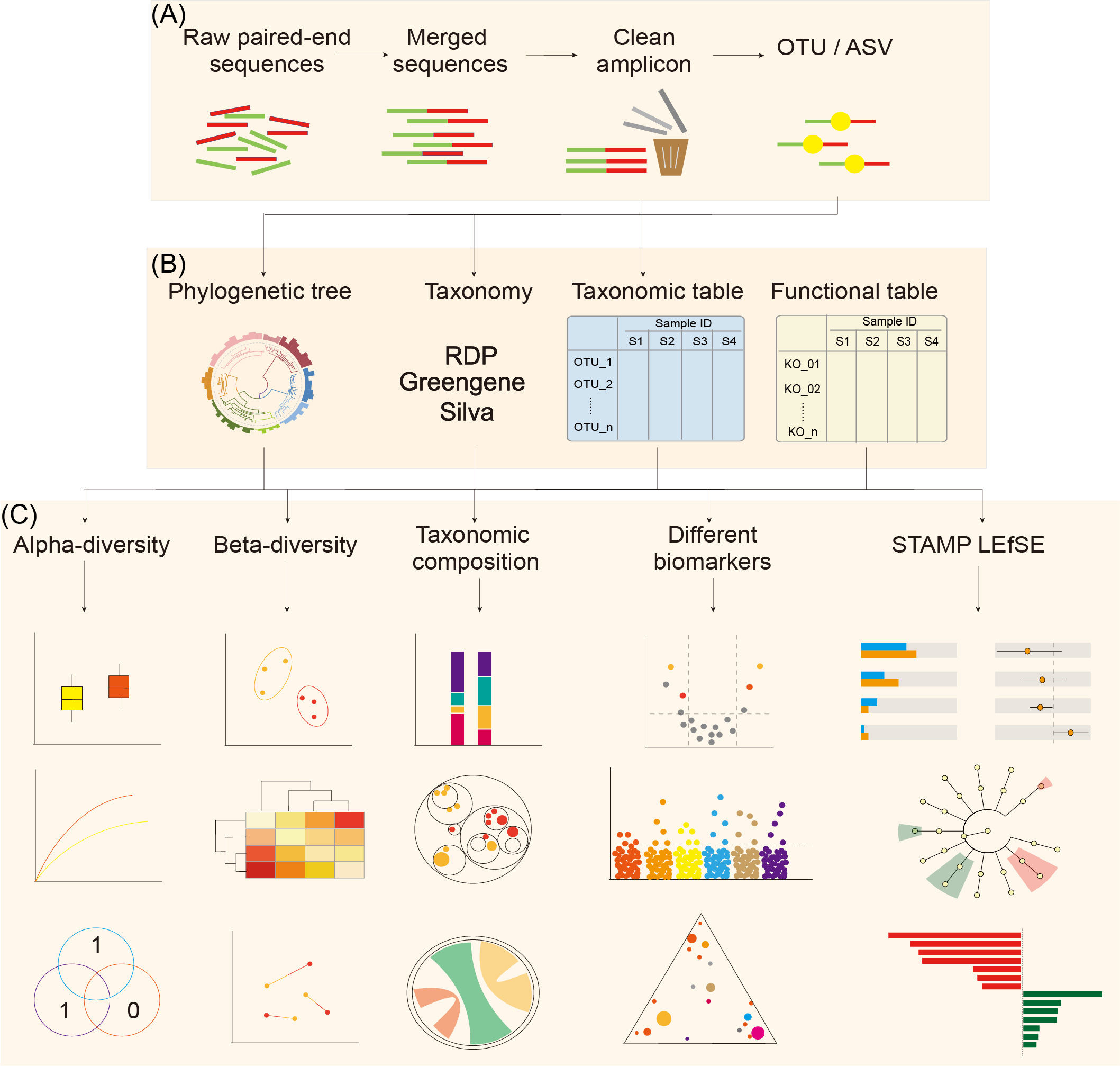
Figure 1. Pipeline of EasyAmplicon for analyzing paired-end amplicon sequences.
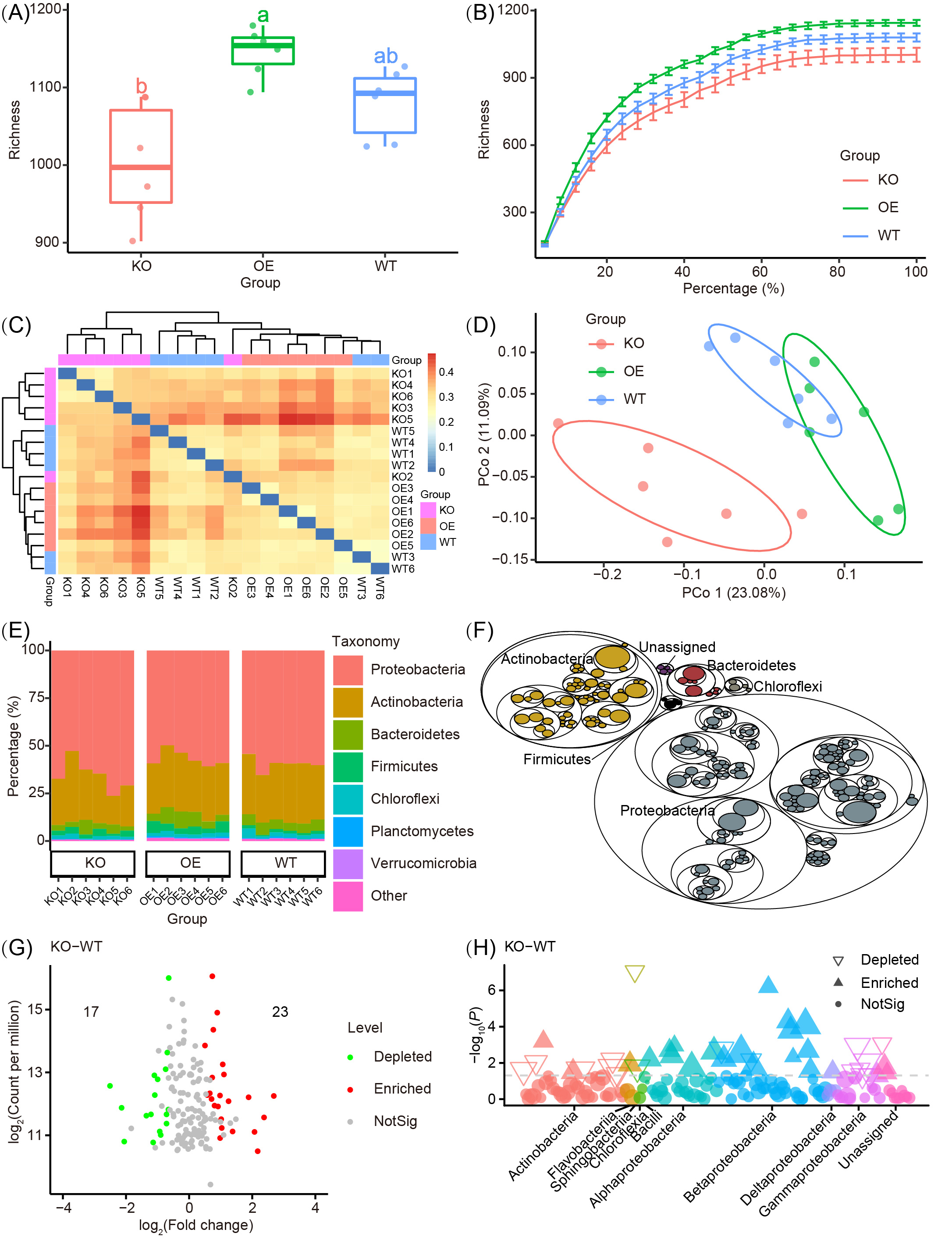
Figure 2. Examples of publication-quality visualizations.

Figure 3. Supplementary examples of publication-quality visualizations to Figure 2.

Figure 4. Visualizations generated by third-party software using the intermediate files of EasyAmplicon.
All the software backup can be found in
- FTP: Filezilla visiting FTP download.nmdc.cn in anonymous. In tools directory, you can find all the software and packages in amplicon and different system supporting such mac, win
- Baidu Net Disk:https://pan.baidu.com/s/1Ikd_47HHODOqC3Rcx6eJ6Q?pwd=0315
- Nature Microbiology Data Center: https://nmdc.cn/analyze/classification
Please install the dependency software according with you system (Win/Mac/Linux).
-
R 4.x.x for run R scripts https://www.r-project.org/, also recommended install Rtools for install source code packages.
-
RStudio 2025.xx.x is a integrated development environment for R https://posit.co/download/rstudio-desktop/
-
STAMP v2.1.3 http://kiwi.cs.dal.ca/Software/STAMP
-
Git for Windows 2.xx.x (Windows only) http://gitforwindows.org/
-
R packages quick install
The statistics and visualization may require > 500 R packages. Installation is time-consuming and may also rely on other compilation tools. You can download all needed R packages in https://pan.baidu.com/s/1Ikd_47HHODOqC3Rcx6eJ6Q?pwd=0315 db/win/4.x.zip or db/mac/R4.2_mac_libraryX86_64.zip, then unzip and take the 4.x folder in C:\Users[$UserName]\AppData\Local\R\win-library\
# Note: If an R package is missing, you can install it separately using the following methods
# For example, the DADA2 package is hosted on Bioconductor and needs to be installed via BiocManager.
# Please open your R or Rstudio, and enter and execute the following commands in the Console:
# First, install BiocManager's core management tool, BiocManager
if (!requireNamespace("BiocManager", quietly = TRUE))
    install.packages("BiocManager")
# Then, install DADA2 via BiocManager
BiocManager::install("dada2")
# In addition, some R packages can be installed in the conventional way. For example, if you need the argparse package to parse command line arguments, you can use:
install.packages("argparse")
When installing various R packages, a large amount of compilation and installation information may appear in the console. Please wait patiently for it to complete. If you encounter problems, please check your R language environment or network connection according to the prompt.
-
Method 1. Visit the GitHub homepage, Code -- Download
-
EasyAmplicon pipeline (Positive control) https://github.com/YongxinLiu/EasyAmplicon
-
EasyMicrobiome include scripts and databases https://github.com/YongxinLiu/EasyMicrobiome
Download the the project in C: or D:, then unzip (keep the directoray name exact the software name)
-
Method 2. Download by the mirror site in BaiduNetDisk: https://pan.baidu.com/s/1Ikd_47HHODOqC3Rcx6eJ6Q?pwd=0315 db/soft/EasyAmplicon.tar.gz or EasyMicrobiome.tar.gz
-
Method 3.
git clone https://github.com/YongxinLiu/EasyAmpliconandgit clone https://github.com/YongxinLiu/EasyMicrobiome. Note:fatal: unable to accesscan retry.
# Download the latest version of miniconda3 v24.9.2, installation date 2024/11/12, 141.47 Mb
wget -c https://repo.anaconda.com/miniconda/Miniconda3-latest-Linux-x86_64.sh

# Install, -b for batch, -f for no prompt, -p for directory, type yes for license agreement
bash Miniconda3-latest-Linux-x86_64.sh -b -f

# Activate, then close and reopen the terminal, success if (base) appears before the prompt
~/miniconda3/condabin/conda init
source ~/.bashrc

# Check version, conda 25.5.1, python 3.13.5
conda -V  # 25.5.1
python --version  # 3.13.5

# Add frequently used channels
conda config --add channels bioconda # 生物软件 / Bioconda for bioinformatics software
conda config --add channels conda-forge # Highest priority / Conda-forge has the highest priority

# The default conda configuration file is ~/.condarc. Check the configuration file location

# You are using a new version of Conda (≥24), which requires users to manually accept the Terms of Service (ToS) for each source, otherwise the corresponding channel cannot be used.
# conda tos accept --override-channels --channel https://repo.anaconda.com/pkgs/main
# conda tos accept --override-channels --channel https://repo.anaconda.com/pkgs/r

# mamba is a CLI tool for managing environments. Compared to conda, mamba rewrites some of conda's functions in C++, significantly improving operational efficiency. It can perform parallel downloads and uses libsolv from the rpm package management tool to resolve environment dependencies faster.
conda install mamba -y
mamba install pandas -y
mamba install conda-pack -y

#conda config --set channel_priority strict #设置严格的仓库优先级(最好不要使用)/ Set strict channel priority (better not to use)
#conda config --set channel_priority flexible #禁用仓库优先级 / Disable channel priority

conda config --show-sources

# List conda environments
conda env list
For more Chinese tutorials on conda installation and use, please refer to: Nature Method: Bioconda solves the trouble of biological software installation
**Note: Choose one of the two options: direct installation or download and unzip for installation. If one method fails, try the other.**
cd EasyAmplicon2

## Method 1. Direct installation
conda env create -f EasyAmplicon2.yaml
conda activate easyamplicon2

## Method 2. Download and install (recommended)
### Specify conda file name
s=easyamplicon2
soft=~/miniconda3

### Download and install
百度网盘下载链接:Baidu Net Disk:https://pan.baidu.com/s/1Ikd_47HHODOqC3Rcx6eJ6Q?pwd=0315
文件路径:db/amplicon/easyamplicon2.tar.gz
File path: db/amplicon/easyamplicon2.tar.gz

### Specify installation directory
mkdir -p ${soft}/envs/${s}
tar -xvzf ${s}.tar.gz -C ${soft}/envs/${s}

### Activate the environment
conda activate ${s}

### Initialize the environment

### The easyamplicon2 environment contains most of the analysis software
conda unpack
Using Windows 10+ as example:
- Open RStudio, set termianl as Git Bash (Tools -- Global Options -- Terminal -- New termianls -- Git Bash -- OK)
- File -- Open File --
EasyAmpliconfolder -- pipeline.sh (windows/linux) or pipeline_mac.sh (mac) - Setup the
work directory(wd), andEasyMicrobiome directory(db), then run each line by click run in top right corner
- seq/ # raw sequencing in zipped fastq format, backup can download by metadata from GSA https://ngdc.cncb.ac.cn/gsa/
- result/ # Example data and figures for standard pipeline, such as alpha, beta, tax
- advanced/ # Example of advanced analysis, included data, scripts and output figures
Frequenty Asked Questions in pipeline.sh
Note: All the .sh script is writting in markdown format, using Youdao Note or VSCode for better reading experience.
使用此脚本,请引用下文:
If used this script, please cited:
Hao Luo, et al. 2025. EasyAmplicon 2: Expanding PacBio and Nanopore Long Amplicon Sequencing Analysis Pipeline for Microbiome. Advanced Science 12: https://doi.org/https://doi.org/10.1002/advs.202512447
Salsabeel Yousuf, et al. 2024. Unveiling microbial communities with EasyAmplicon: A user-centric guide to perform amplicon sequencing data analysis. iMetaOmics 1: e42. https://doi.org/10.1002/imo2.42
Yong-Xin Liu, et al. 2023. EasyAmplicon: An easy-to-use, open-source, reproducible, and community-based pipeline for amplicon data analysis in microbiome research. iMeta 2: e83. https://doi.org/10.1002/imt2.83
Copyright 2016-2025 Yong-Xin Liu liuyongxin@caas.cn, Tao Wen taowen@njau.edu.cn, Tong Chen chent@nrc.ac.cn