










If you are looking for a final solution to get rid of ads, malware, and trackers forever, then Re-Malwack is the best choice for you and your family.
- Table of Contents
- Features // What makes this module special?
- Requirements
- How to use Re-Malwack
- Download
- How does it work? - Frequently Asked Questions (FAQ)
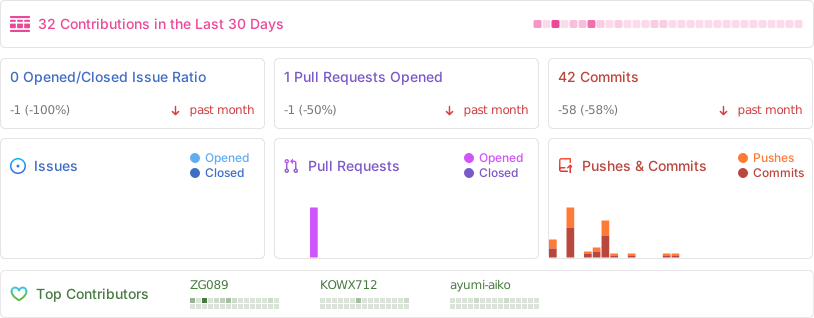
- Activity
- Credits List
- Donations
- ⛔ It blocks ads, malware and trackers By default, you can also block p*rn sites, fake news sites, gambling sites and social sites
- ⚙ Allows you to modify and manage hosts file (whitelist & blacklist urls, reset hosts, auto update adblock)
- 🎨 Allows you to add custom hosts sources, also modify default ones [*]
- 💫 Supprts wildcarded whitelisting
- 🧰 An elegant, yet simple WebUI (Thanks to @KOWX712 for his Awesome work)
- ⏸ Ability to pause/resume adblock without disabling the module
- ⛑ Can handle hosts mounts by itself
- ✨ Easy to use, Just set and forget!
- 📦 Supports zn-hostsredirect
- 🧲 Ability to import your adblock setup from AdAway, bindhosts, and Cubic-Adblock (Please refer to this page to get to know what can be imported exactly from those ad-block solutions)
- 📝 A detailed logging system to debug module behavior and to detect bugs
- 🛠 Supports Magisk, APatch and KernelSU (and their variants)
- 👀 Also can protect non-root devices
- 🔧 Regularly maintained & updated
- ❤ Made with love and care
Caution
[*] Please avoid adding hosts sources that blocks urls via 127.0.0.1 instead of 0.0.0.0, some critical problems might happen in module basic functionality if you do this
Also avoid using other types of adblock files, only adblock files in hosts format (Linux/Windows) are accepted
Important
- Stable internet connection.
- Mid-Range or high-end device.
Caution
- Do not use this module with any other ad blocker module/app, such as AdAway and Magisk's built-in systemless hosts module.
- Also, In case module is activated but ads are not blocked in browsers such as chrome, Please enable superuser mode for target browser app then check again
- Type
su -c rmlwkterminal to show up the next help message which will clarify how to use it:
        [i] Usage: rmlwk [--argument] OPTIONAL: [--quiet]
         --update-hosts, -u: Update the hosts file.
         --auto-update, -a <enable|disable>: Toggle auto hosts update.
         --custom-source, -c <add|remove> <domain1> [domain2] ...: Add/remove custom hosts sources.
         --reset, -r: Reset hosts file to default.
         --adblock-switch, -as: Toggle protections on/off.
         --block-trackers, -bt <disable>, block trackers, use disable to unblock.
         --block-porn, -bp <disable>: Block pornographic sites, use disable to unblock.
         --block-gambling, -bg <disable>: Block gambling sites, use disable to unblock.
         --block-fakenews, -bf <disable>: Block fake news sites, use disable to unblock.
         --block-social, -bs <disable>: Block social media sites, use disable to unblock.
         --whitelist, -w <add|remove> <domain|pattern> <domain2> ...: Whitelist domain(s), only whitelist one domain at a time, otherwise use wildcard or use multiple domains in case of unwhitelisting.
         --blacklist, -b <add|remove> <domain1> <domain2> ...: Blacklist domain(s).
         --help, -h: Display help.
Example command: su -c rmlwk --update-hosts- Re-Malwack's WebUI can be accesed using KSU, 5ec1cff's KSUWebUIStandalone/KOW's Fork of KSUWebUIStandalone, Apatch and MMRL
-
You can still protect your device without needing for root access, just copy paste this url into DNSnet, or AdAway, or any other app of your choice :
https://raw.githubusercontent.com/ZG089/Re-Malwack/refs/heads/hosts-update/hosts
Note
Default hosts sources used for non-root hosts can be found here You can also see default hosts sources used for the module itself here
Tip
- You can download the module from:
- Or from Github Releases section.

Tip
How does this module block websites and what modifications were made?
- How does it block websites: It modifies
hostsfile to block websites and malware by denying access for your phone to connect to it at all. It will just return a blank page.
Tip
Does it blocks in-app ads and in-game ads as well ?
- Yes, it does.
Tip
There's a problem when using the module
- Export logs via module WebUI, then create an issue explaining your problem and attach ss of the problem if there is any. You can also report your problem in our telegram support group
Tip
AdBlock doesn't work on some apps (ex: Chrome), or doesn't work completely
- Make sure you have disabled umount for the target app (if you use KernelSU), also make sure you disabled LiteMode (if you use APatch). If nothing works then create an issue about it or report the problem in our telegram support group
Tip
Can I help in something?
- You may suggest features via Github Issues or in our Telegram support group, You may also create your own fork of this repo, do your changes and then do a pull request.
Note
- For any inquiries or assistance, reach out to me at XDA or Telegram, I am active there more.
- If you want to reach out to @person0z, contact him using his email: root@person0z.me.
- @KOWX712
- @bocchi-the-dev
- @GalaxyA14user
- @myst-25 (Active tester)
- @person0z - Malwack Founder
- @topjohnwu - Magisk Founder
- jqlang/jq - Command-line JSON processor
As an 11th-grade student who have to study almost all the time, and at the same time taking care of projects like this, your support would mean the world to me. If you find this module useful, please consider making a small donation using the button below, this will make a difference in my life 😁❤️



![@github-actions[bot]](https://avatars.githubusercontent.com/in/15368?s=64&v=4)


![@vercel[bot]](https://avatars.githubusercontent.com/in/8329?s=64&v=4)

