This is an academic project developed as part of a Web Development course. Velvet Shop is a responsive e-commerce website built using HTML, CSS, and JavaScript, designed to simulate an online clothing and accessories store. The site features an interactive product slider, search functionality, and a simulated payment system for a smooth shopping experience.
- Product Slider: Browse various products such as hoodies, sneakers, jackets, cargo pants, and shirts through a dynamic slider.
- Interactive User Interface: Users can select product colors and sizes, and see immediate changes on the product display.
- Payment Simulation: A secure, simulated checkout process with input fields for personal and payment information.
- Responsive Design: The layout adjusts for different screen sizes using CSS media queries.
- Background Video: A looping background video to enhance the visual appeal of the homepage.
- Search Functionality: Users can search for products using the search bar at the top of the page.
- Additional Features: Delivery information, return policies, premium membership benefits, and secure payment features.
- HTML5
- CSS3
- JavaScript
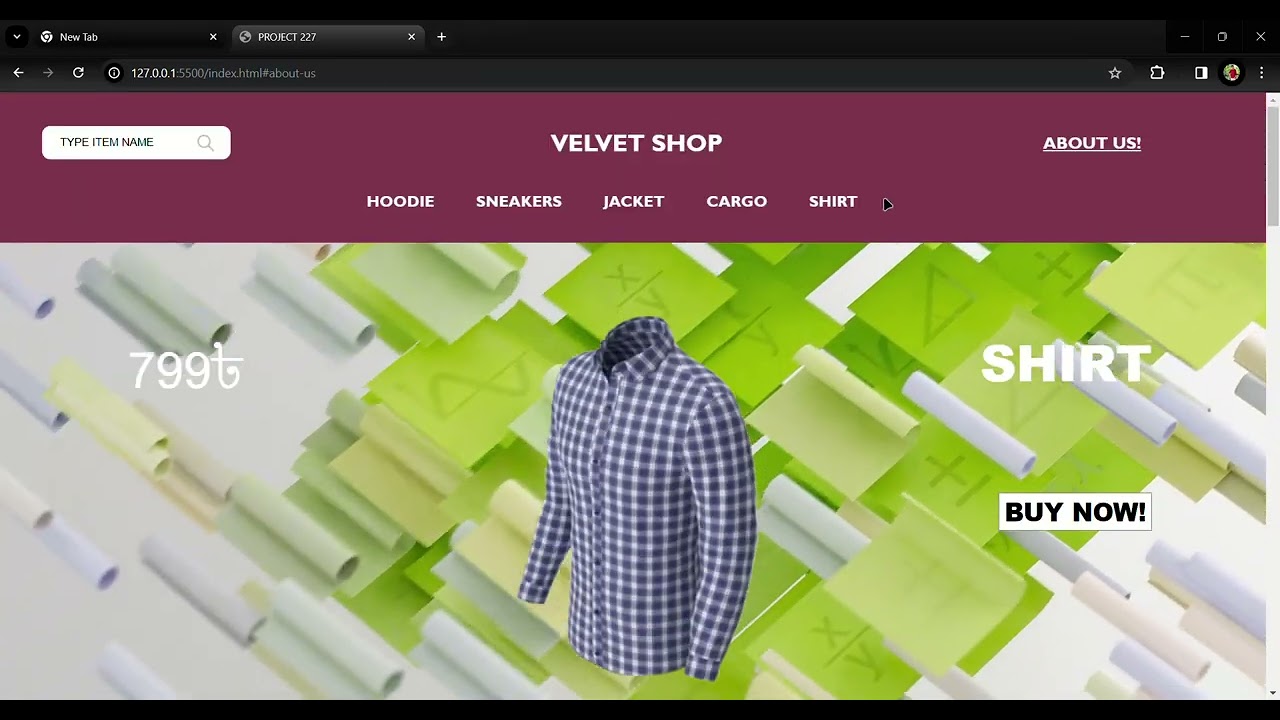
The product slider dynamically updates the product displayed based on user interaction with the navigation items (hoodies, sneakers, etc.).
menuItems.forEach((item, index) => {
  item.addEventListener("click", () => {
    wrapper.style.transform = `translateX(${-100 * index}vw)`;
    choosenProduct = products[index];
    currentProductTitle.textContent = choosenProduct.title;
    currentProductPrice.textContent = choosenProduct.price + "৳";
    currentProductImg.src = choosenProduct.colors[0].img;
    currentProductColors.forEach((color, index) => {
      color.style.backgroundColor = choosenProduct.colors[index].code;
    });
  });
});
- Functionality: This snippet adds a click event listener to each navigation item (e.g., Hoodie, Sneakers). When an item is clicked, the slider translates to display the corresponding product.
- Dynamic Update: It updates the product title, price, image, and color options based on the selected product.
Users can switch between different color options for a selected product.
currentProductColors.forEach((color, index) => {
  color.addEventListener("click", () => {
    currentProductImg.src = choosenProduct.colors[index].img;
  });
});
- Functionality: This part of the code listens for a click on the color options and changes the product image based on the selected color.
When users click on a product size, it is highlighted to show the selection.
currentProductSizes.forEach((size, index) => {
  size.addEventListener("click", () => {
    currentProductSizes.forEach((size) => {
      size.style.backgroundColor = "white";
      size.style.color = "black";
    });
    size.style.backgroundColor = "black";
    size.style.color = "white";
  });
});
- Functionality: This code highlights the selected size by changing its background color to black and the text color to white. Other sizes revert to their default colors.
When the user clicks the "Buy Now" button, the payment section is displayed.
productButton.addEventListener("click", () => {
  payment.style.display = "flex";
});
- Functionality: This code opens the payment modal when the user clicks the "Buy Now" button, allowing them to enter their personal and payment information.
The payment modal can be closed by clicking the 'X' button.
close.addEventListener("click", () => {
  payment.style.display = "none";
});
- Functionality: This snippet hides the payment modal when the close button ('X') is clicked, allowing the user to return to the product page.
Clone the repository
git clone https://github.com/abtaaahi/Velvet-Shop.git
Open index.html in any browser to explore the website.
- Add a fully functional backend to handle real payment processing and order management.
- Improve accessibility and SEO optimizations.
- Implement a user authentication system for personalized shopping experiences.