This repo contains the source code for the desktop app mLearn.

mLearn is an all-in-one immersion app that integrates well with Anki.
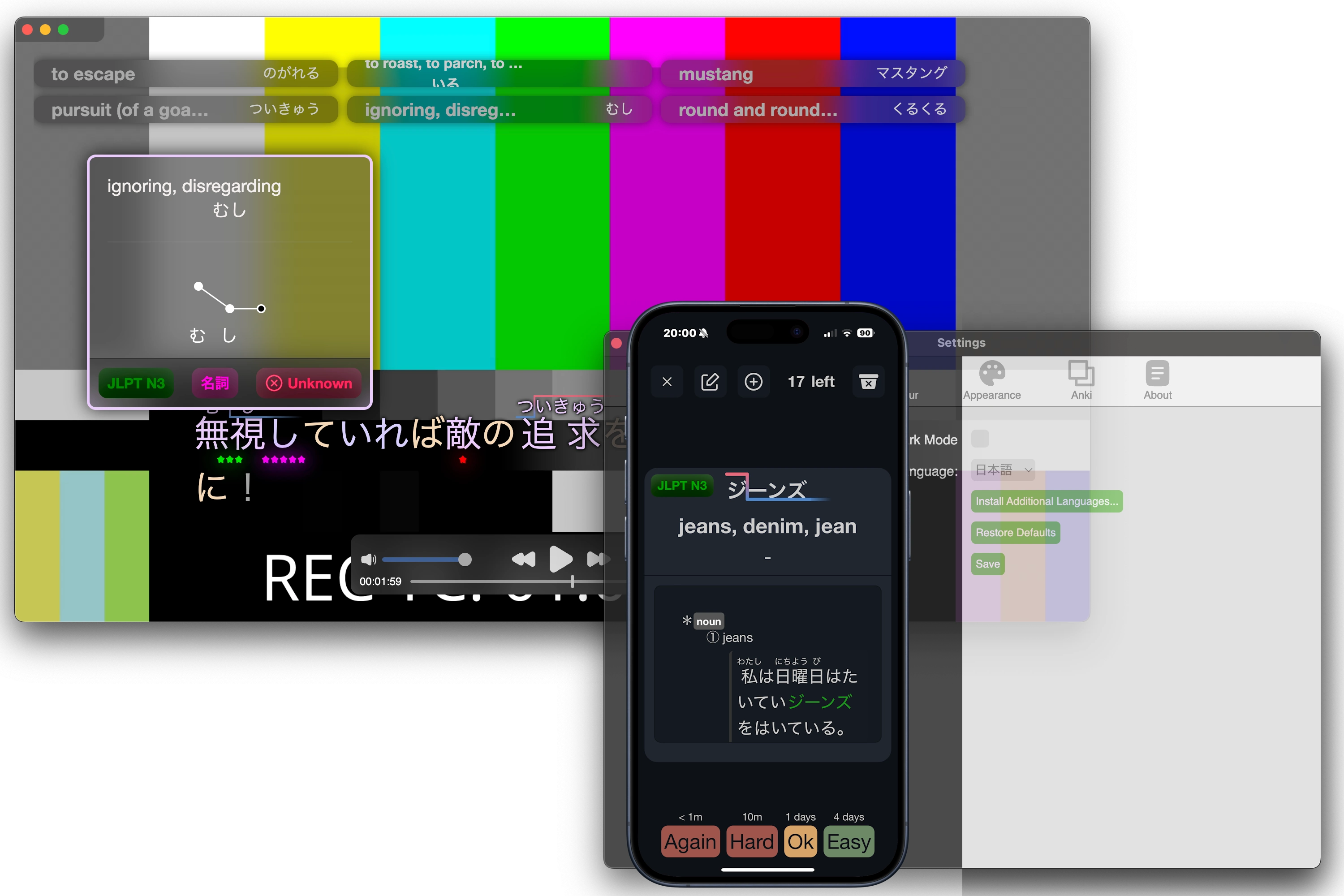


 # More info
Additional information can be found on [mLearn](https://mlearn.morisinc.net).
# More info
Additional information can be found on [mLearn](https://mlearn.morisinc.net).
- Electron.js
- JQuery.js
- HLS.js
mLearn ships with complete German and Japanese support. You can add your own languages too by following the guide on the GitHub page.
For now, Offline-mode is restricted to Japanese because no free open-source German dictionary was available at the time of writing this.
Yes, you'll just have to disable it by opening the settings menu.
macOS on Apple Silicon, macOS on x86, Linux on x86, Windows on x86
Since we wanted to make education free, mLearn is absolutely free forever and opensource.
If you have restarted the app recently, it may have not closed properly; open your task manager and kill the process named 'python3'.
By pasting a link to a streaming playlist (e.g. ending in .m3u8 or .mp4 or other video streaming formats), mLearn will automatically start playing that video.
To find the URL of a stream, download the CocoCut video downloader Google Chrome extension, then go to the website you want to stream from. CocoCut is going to list you streaming links ending in .m3u8. You can copy and paste them into mLearn.
Install the AnkiConnect plugin.
Since the Japanese version of mLearn doesn't send requests over the internet for each word definition, it has to load a HUGE dictionary into the computer's RAM for faster word access (which makes it use less power).
Just drag'n'drop them onto the mLearn video player.
Please open a GitHub issue.
The language install URL needs to have the following code (mLearn will parse the contents of it):
{
  "json": {...},
  "lang_py": "https://.../../.py",
  "lang": "LANGUAGE_NAME"
}
For example, for Japanese it would be:
{
  "json": {
    "name": "Japanese",
    "translatable": [
      "名詞",
      "動詞",
      "形状詞",
      "副詞",
      "副詞節",
      "形容詞"
    ],
    "name_translated": "日本語",
    "colour_codes": {
      "名詞": "#ebccfd",
      "動詞": "#d6cefd",
      "助詞": "#f5d7b8",
      "助動詞": "#ffefd1",
      "形状詞": "#def6ff",
      "副詞": "#b8cdf5",
      "接尾辞": "#aac8c4",
      "感動詞": "#eacbcb",
      "代名詞": "#f1ccfd",
      "補助記号": "#cccccccc",
      "連体詞": "#def6ff",
      "形容詞": "#def6ff",
      "形容動詞": "#def6ff"
    },
    "fixed_settings": {},
    "freq": [["N5", "N5"],
    ["会う", "あう"],
    ["青", "あお"],
    ["青い", "あおい"],
      ...(more)...
      ],
    "freq_level_names": {"5": "JLPT N5", "4": "JLPT N4", "3": "JLPT N3", "2": "JLPT N2", "1": "JLPT N1"}
  },
  "lang_py": "URL THAT POINTS TO THE SOURCE CODE OF JA.PY",
  "lang": "ja"
}
The python file must have the following functions:
- LANGUAGE_TOKENIZE(text):
This gets raw text and returns a tokenized version of the text. Each token has 3 fields: "word", which is the word in the same form as it is in the text, "actual_word", its original dictionary form, and "type" which is the grammatical type of the word.
For example, LANGUAGE_TOKENIZE("僕はテープを買ってきた") would return
[ {"word": "僕", "actual_word": "僕", "type": "代名詞"}, {"word": "は", "actual_word": "は", "type": "助詞"}, {"word": "テープ", "actual_word": "テープ", "type": "名詞"}, {"word": "を", "actual_word": "を", "type": "助詞"}, {"word": "買っ", "actual_word": "買う", "type": "動詞"}, {"word": "て", "actual_word": "て", "type": "助詞"}, {"word": "き", "actual_word": "くる", "type": "動詞"}, {"word": "た", "actual_word": "た", "type": "助動詞"} ] - LOAD_MODULE(folder), which is called when the module is loaded, where folder is the resources folder of the app. This is mainly used to cache dictionaries
- LANGUAGE_TRANSLATE(word) returns
{"data": [{'reading':'','definitions':''},{'reading': '', 'definitions': ''},{'reading':'','definitions':''},{'reading': '', 'definitions': ''},...]}that contain the definitions of the word.
Examples of such files can be found in the "languages" directory.
npm run dist:mac
npm run dist:win
npm run dist:linuxnpm install
npm run startAdditional licenses for libraries may be found in the "Settings → about" section of the app.
mLearn - Supercharge your language learning by immersing yourself in the language you want to learn.
Copyright (C) 2024-2025 Adrian Vlasov

"Adrian Vlasov" refers exclusively to the original creator and publisher of this software, identifiable by the associated repository and public history. Legal name changes by unrelated individuals do not confer any rights under this license.

To uniquely identify the author, a numerical fingerprint is applied:
> The sum of the author's birth year, month, and day equals 2034.
This clause serves as a unique identifier to prevent impersonation or unauthorized claims of authorship.

mLearn is dual-licensed:
---
For everyone else:
Licensed under the Creative Commons Attribution-NonCommercial 4.0 International (CC BY-NC 4.0).
See https://creativecommons.org/licenses/by-nc/4.0/

You may:
- Use, share, and modify for non-commercial purposes
- Must provide attribution

You may NOT:
- Sell, monetize, or offer this software as a paid product or service
- Distribute cracked/premium versions


Educational Use Exception:
Private or public schools, colleges, and educational institutions may use this software in classrooms or curricula, even if they charge tuition, as long as they do not sell, sublicense, or monetize this software itself.
---

For the author (Adrian Vlasov) and affiliated entities:
Adrian Vlasov, as the original author and copyright holder, retains full intellectual and
commercial rights to this software. This includes:

- The right to sell, sublicense, or distribute the software commercially
- The right to offer paid versions, subscriptions, or hosted services
- The right to relicense or use the software under any terms, at sole discretion

These rights also extend to any current or future company, organization, or legal entity
wholly owned or controlled by Adrian Vlasov.

All other commercial rights are reserved. No other individual or organization may
commercialize this software or its derivatives without explicit written permission.