

Canvas Roots brings professional genealogical tools to Obsidian—import, organize, visualize, and share family histories and fictional worlds without leaving your vault. From GEDCOM imports to PDF reports, interactive charts to map views, manage your research with the power of linked Markdown notes. Built for genealogists, historians, writers, and world-builders.
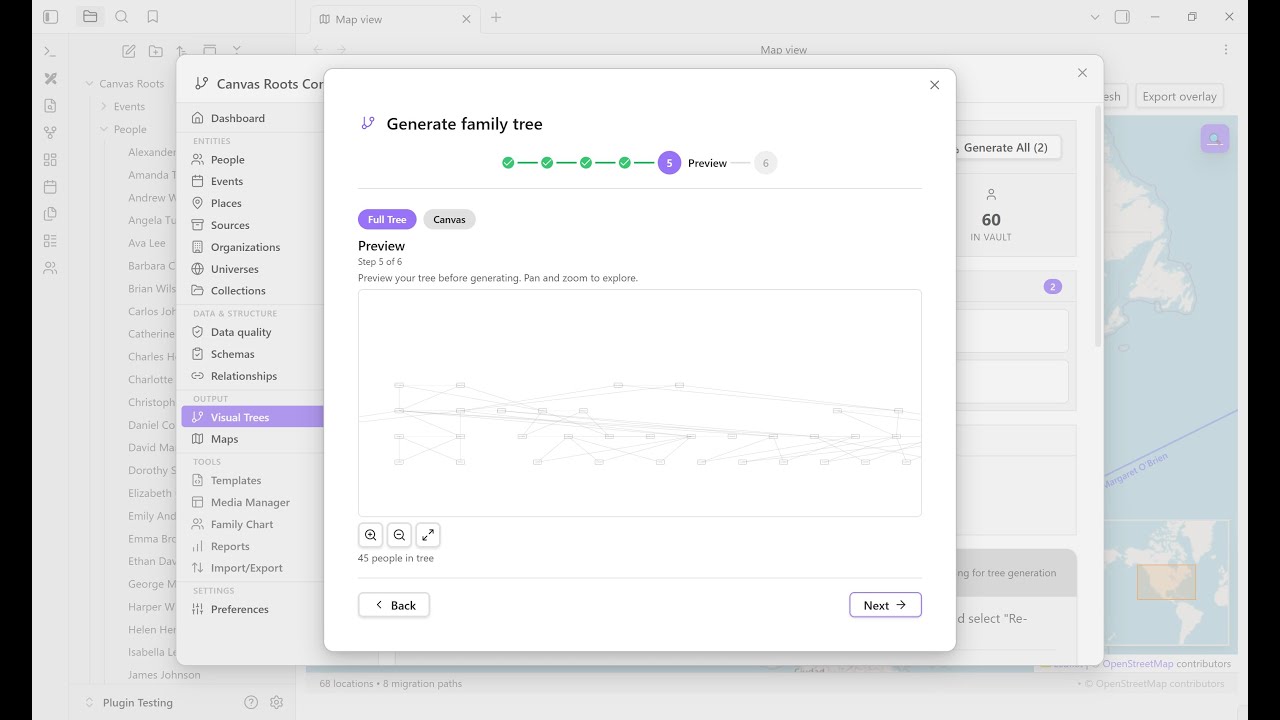
Watch: Import GEDCOM → Generate family tree → Interactive family chart → Geolocate places → Map view
| Feature | Description |
|---|---|
| Automated Layout | Non-overlapping pedigree and descendant charts using specialized genealogical algorithms |
| Multiple Tree Types | Ancestor trees, descendant trees, or full family trees with configurable generation limits |
| Layout Algorithms | Standard, Compact (50% tighter), Timeline (chronological), Hourglass (focused lineage) |
| Interactive Preview | Pan, zoom, and explore layouts before generating; export as PNG, SVG, or PDF |
| Multi-Family Detection | Automatically detects disconnected family groups |
| Regenerate Canvas | Update existing canvases with current data via right-click |
| Feature | Description |
|---|---|
| Full Entity Export | Export people, events, sources, places, and custom relationships to all formats |
| GEDCOM 5.5.1 | Full round-trip import/export with validation, UUID preservation, privacy protection, and PEDI tag parsing for step/adoptive parents |
| GEDCOM X | Import/export with FamilySearch JSON format and lineage type parsing for step/adoptive parents |
| Gramps XML | Import/export for Gramps genealogy software; .gpkg package import extracts bundled media files |
| CSV/TSV | Import/export for spreadsheet workflows with auto-detected column mapping |
| Excalidraw Export | Export canvases for manual annotation and hand-drawn styling |
| Enhanced Export UI | Real-time statistics, entity toggles, format selection, and progress tracking |
| Selective Branch Export | Export only ancestors or descendants of a specific person |
| Privacy-Aware Exports | Optional anonymization of living persons in all export formats |
| Feature | Description |
|---|---|
| Persistent View | Interactive visualization panel for exploring and editing trees in real-time |
| Direct Editing | Edit relationships in the chart with full undo/redo support |
| Bidirectional Sync | Chart edits update frontmatter; file changes refresh the chart |
| Multiple Color Schemes | Gender, Generation, Collection, or Monochrome |
| Export Options | High-quality PNG, SVG, PDF, or ODT with customizable filenames |
| Feature | Description |
|---|---|
| Bidirectional Sync | Reciprocal relationships auto-maintained across all notes |
| Dual Storage | Wikilinks for readability + cr_id references for robust tracking |
| Smart Duplicate Detection | Fuzzy name matching and date proximity analysis |
| Merge Wizard | Field-level conflict resolution with automatic relationship reconciliation |
| Staging Workflow | Dedicated Staging Manager for reviewing imports: batch cards, expandable file previews, duplicate detection, promote/delete actions |
| Data Quality Tools | Quality scores, 15+ issue types, batch normalization |
| Post-Import Cleanup Wizard | 14-step guided workflow for data quality after import (dates, genders, relationships, places, sources, property migrations) with batch progress indicators and keyboard navigation |
| Family Creation Wizard | 5-step guided workflow for creating interconnected family groups with automatic bidirectional relationship linking |
| Schema Validation | User-defined schemas with required properties, type validation, enum constraints, and custom rules |
| Generate Place Notes | Batch create place notes from references in person/event notes with hierarchy linking |
| Dynamic Note Content | Live-rendered timeline, relationships, and media gallery blocks within person notes |
| Feature | Description |
|---|---|
| Interactive Map View | Leaflet.js-powered map with markers, clustering, migration paths, heat maps, and time slider animation |
| Custom Image Maps | Load your own map images for fictional worlds with pixel or geographic coordinate systems |
| Map Creation Wizard | 4-step wizard to create custom maps: select image, configure settings, place markers interactively, review and create |
| Draggable Place Markers | Reposition markers by dragging on custom maps; changes saved automatically |
| Place Marker Context Menu | Right-click markers to open place notes, edit properties, or remove from map |
| Place Notes | Hierarchical places (city → state → country) with six categories |
| Place Categories | Real, historical, disputed, legendary, mythological, fictional |
| Place Statistics | Category breakdown, common locations, migration patterns |
| Migration Visualizations | D3-based network and arc diagrams with time/collection filters |
| Geocoding Lookup | Auto-lookup coordinates via Nominatim (OpenStreetMap) |
| Place-Based Filtering | Filter tree generation by birth/death/marriage locations |
| Feature | Description |
|---|---|
| Collections & Groups | Auto-detected family groups and user-defined collections |
| Reference Numbering | Ahnentafel, d'Aboville, Henry, and Generation systems |
| Lineage Tracking | Track patrilineal, matrilineal, or all descendants |
| Relationship Calculator | Find connections with proper genealogical terms (cousin, 2nd cousin once removed, etc.) |
| Relationship History | Track all changes with timestamps and one-click undo |
| Custom Relationships | Extended relationships beyond family (godparent, guardian, mentor, apprentice) with colored canvas edges |
| Step & Adoptive Parents | Dedicated fields for step-parents and adoptive parents with distinct line styles on canvas trees |
| Fictional Date Systems | Custom calendars and eras for world-building (Middle-earth, Westeros, Star Wars, or custom) |
| Organization Notes | Track non-genealogical hierarchies: noble houses, guilds, corporations, military units, religious orders |
| Universe Notes | First-class entities for organizing fictional worlds with metadata, linked calendars, maps, and validation schemas |
| Events & Timelines | Document life events with person/family/place timelines, visual exports, groups/factions filtering, and sort order computation |
| Feature | Description |
|---|---|
| Statistics Dashboard | Workspace view with entity counts, completeness metrics, gender distribution, and date range |
| Data Quality Analysis | Severity-coded alerts for date issues, missing data, orphaned people; expandable drill-down lists |
| Top Lists | Interactive lists for surnames, locations, occupations, sources with drill-down to matching people |
| Extended Statistics | Longevity analysis, family size patterns, marriage patterns, migration flows, timeline density |
| Visual Tree Charts | Printable PDF tree diagrams: Pedigree, Descendant, Hourglass, and Fan Chart with custom icons |
| Genealogical Reports | Family Group Sheet, Individual Summary, Ahnentafel, Gaps Report, Register Report, Pedigree/Descendant Charts |
| Extended Reports | Source Summary, Timeline Report, Place Summary, Media Inventory, Universe Overview, Collection Overview |
| PDF & ODT Export | All 17 report types exportable as styled PDFs or editable ODT files with customizable cover pages, logos, and date formats |
| Feature | Description |
|---|---|
| Source Notes | Dedicated notes for genealogical sources with structured metadata |
| Source Quality Classification | Rate sources as Primary, Secondary, or Derivative per GPS methodology |
| Fact-Level Source Tracking | Track which specific facts (birth, death, marriage) have source citations |
| Proof Summary Notes | Document reasoning chains for genealogical conclusions with evidence linking |
| Research Level Property | Track research progress (0-6 scale) based on GPS methodology—from unidentified to full biography |
| Research Gaps Report | Identify under-researched facts across your tree with priority ranking and research level filtering |
| Source Conflict Detection | Detect and track conflicting evidence requiring resolution |
| Source Media Gallery | Thumbnail grid of source media with search, filtering, and lightbox viewer |
| Citation Generator | Generate citations in Chicago, Evidence Explained, MLA, and Turabian formats |
| Canvas Research Indicators | Visual badges showing source count, coverage %, and conflict warnings |
| Feature | Description |
|---|---|
| Native Canvas Nodes | Every person is a linkable Obsidian file node |
| Canvas Styling | Node coloring, arrow styles, edge colors for parent-child and spouse relationships |
| Multiple Spouse Support | Indexed properties with marriage dates, locations, and status |
| Split Canvas Wizard | Split large trees by generation, branch, collection, surname, or lineage |
| Navigation Portals | Link between related canvases with optional master overview |
| Feature | Description |
|---|---|
| Calendarium Integration | Import calendar definitions from Calendarium for fictional dates |
| Type Customization | Full type managers for events, sources, organizations, relationships, and places; create, edit, hide, and customize types and categories |
| Property Aliases | Map custom property names to Canvas Roots fields without renaming frontmatter |
| Value Aliases | Map custom property values (event types, gender, place categories) to Canvas Roots canonical values |
| Obsidian Bases | Ready-to-use Base templates: People, Places, Events, Organizations, Sources, Universes; respects property aliases |
| Style Settings | Customize colors via Style Settings plugin |
| Context Menu Actions | Right-click person notes, folders, and canvases for quick actions |
| YAML-First Data | Compatible with Dataview, Bases, and other Obsidian tools |
| Privacy Protection | Optional anonymization of living persons in exports |
| Generate Tree Wizard | Generated Family Tree |
|---|---|
 |
 |
| Unified wizard with tree type, root person, layout, and output options | Automated genealogical layout with spouse and parent-child connections |

Real-time family tree visualization with pan/zoom, person details panel, and direct editing with bidirectional sync.

Leaflet-powered geographic visualization with color-coded markers (green=birth, red=death), marker clustering, migration paths with person labels, and mini-map overview.

Central hub for all Canvas Roots operations: vault statistics, import/export, tree generation, data quality tools, and quick actions.

Dashboard with entity counts, completeness metrics, gender distribution, date ranges, and data quality analysis.

Dedicated Maps tab with custom map thumbnail gallery, visualization tools, and geographic statistics.
- Install BRAT from Community Plugins
- Run command:
BRAT: Add a beta plugin for testing - Enter:
https://github.com/banisterious/obsidian-canvas-roots - Enable Canvas Roots in Settings → Community Plugins
- Download from Releases
- Extract to
<vault>/.obsidian/plugins/canvas-roots/ - Reload Obsidian and enable the plugin
git clone https://github.com/banisterious/obsidian-canvas-roots
cd obsidian-canvas-roots
npm install && npm run build
Copy main.js, styles.css, and manifest.json to your vault's plugins folder.
Import existing data: Control Center → Import/Export tab
- Supports GEDCOM 5.5.1, GEDCOM X, Gramps XML, and CSV
Or create notes manually:
---
cr_id: abc-123-def-456
name: John Robert Smith
father: "[[John Smith Sr]]"
mother: "[[Jane Doe]]"
spouse: ["[[Mary Jones]]"]
born: 1888-05-15
died: 1952-08-20
---
Or use Obsidian Bases: Control Center → Guide → "Create all bases"
Interactive Family Chart: Right-click a person note → "Open family chart"
- Pan, zoom, and click to explore
- Edit relationships directly in the chart
Or generate a canvas: Control Center → Canvas Trees tab
- Creates a static, shareable family tree document
- Right-click canvas → "Regenerate canvas" to update
- Map View: Visualize birth/death locations geographically
- Statistics: Open Statistics Dashboard view for vault health, metrics, and data quality analysis
- Reports: Generate 13 report types including Ahnentafel, family group sheets, timelines, and more—export as PDF or Markdown
See the Wiki for complete documentation.
If you find this plugin useful, please consider supporting its development!

📖 Full Documentation on the Wiki
- Getting Started - Installation and first steps
- Data Entry - Creating person notes
- Canvas Trees - Generating family trees
- Import & Export - GEDCOM 5.5.1, GEDCOM X (JSON), Gramps XML, and CSV
- Geographic Features - Maps and places
- Evidence & Sources - Source management and indicators
- Events & Timelines - Life events and timeline visualization
- Settings & Configuration - All settings and property aliases
- FAQ - Common questions
- Troubleshooting - Problem solving
- Universe Notes - Organize fictional worlds with metadata and linked resources
- Organization Notes - Noble houses, guilds, military units, and hierarchies
- Fictional Date Systems - Custom calendars and eras
- Getting Started - Development environment setup
- Project Structure - Directory layout and component map
- Implementation Details - Technical deep-dive into all features
- Coding Standards - TypeScript and CSS style guidelines
- Design Decisions - Architecture decision records
- Styling Guide - CSS architecture and theming
- Contributing Guide - How to contribute
Contributions welcome! See CONTRIBUTING.md for guidelines.
MIT License - see LICENSE
- Bug Reports: GitHub Issues
- Feature Requests: GitHub Discussions
- Security: See SECURITY.md
- Obsidian Plugin API
- family-chart library
- JSON Canvas 1.0 specification
- Compatible with Obsidian Bases and Advanced Canvas
