Authentication
Simple Asp.Net Core Library to add support for Authentication via Identity and JWT. In order to use this library inside your Asp.Net Core you need to follow these steps.
Add the following NuGet package inside your Asp.Net Core project.
Inside your Asp.Net Core project just open the Startup.cs file and inside the Startup.cs file you'll see the ConfigureServices method. You need to add the following lines of code inside the ConfigureServices method.
     services.AddAuthentication(JwtBearerDefaults.AuthenticationScheme)
                .AddJwtBearer(options =>
                {
                    options.TokenValidationParameters = new TokenValidationParameters
                    {
                        ValidateIssuer = true,
                        ValidateAudience = true,
                        ValidateLifetime = true,
                        ValidateIssuerSigningKey = true,
                        ValidIssuer = Configuration["Tokens:Issuer"],
                        ValidAudience = Configuration["Tokens:Issuer"],
                        IssuerSigningKey = new SymmetricSecurityKey(Encoding.UTF8.GetBytes(Configuration["Tokens:Key"])),
                        ClockSkew = TimeSpan.Zero,
                    };
                });
Once you add the above lines of code then you'll be asked to resolve the namespaces. You need to add the following namespaces.
- using Microsoft.IdentityModel.Tokens;
- using Microsoft.AspNetCore.Authentication.JwtBearer;
After adding the namespaces if you'll see some errors then that's because your project has missing some packages. So just go to the Nuget package and then install the following Nuget package.
Microsoft.AspNetCore.Authentication.JwtBearer
Once you import all the namespaces then just go the Configure method that present below the Configure Services method. Then inside the Configure method just add the following line of code before app.UseAuthorization();
app.UseAuthentication();
Your Asp.Net Core Project also has an appsettings.json file. You just need to open this appsettings.json file and then add the following code.
"Tokens": {
    "Key": "ASPNETCORESECRETKEYFORAUTHENTICATIONANDAUTHORIZATION",
    "Issuer": "localhost.com",
    "AccessExpireSeconds": "86400"
  },
IMPORTANT: The "Key" property is used by the api to sign and verify JWT tokens for authentication, update it with your own random string to ensure nobody else can generate a JWT to gain unauthorised access to your application. The "AccessExpireSeconds" property is set to be 86400 seconds which is equivalent to 24 hours or 1 day. If you want to increase or decrease the JWT token expiration time then you can add the time according to your choice.
Now once you add the above code inside the appsettings.json file then your appsettings.json file will look like this...
{
  "Tokens": {
    "Key": "ASPNETCORESECRETKEYFORAUTHENTICATIONANDAUTHORIZATION",
    "Issuer": "localhost.com",
    "AccessExpireSeconds": "86400"
  },
  "Logging": {
    "LogLevel": {
      "Default": "Information",
      "Microsoft": "Warning",
      "Microsoft.Hosting.Lifetime": "Information"
    }
  },
  "AllowedHosts": "*"
}
Once you have setup every thing then it's just a piece of cake to generate the access token. All you need to do is just open your Controller class where you want to add the GetToken method. Let's say we have Accounts Controller so we'll open the AccountsController and then add these private fields.
- private IConfiguration _configuration;
- private readonly AuthService _auth;
Then you need to change the constructor of your controller class just like this...
public AccountsController(IConfiguration configuration)
{
  _configuration = configuration;
  _auth = new AuthService(_configuration);
}
Now once you add the above code then you need to pass the claims in the GenerateAccessToken method to get the access token.
 var claims = new[]
 {
   new Claim(JwtRegisteredClaimNames.Email, "abc@email.com"),
   new Claim(ClaimTypes.Email, "abc@email.com"),
 };
Then pass the claims in the GenerateAccessToken method to get the access token.
var token = _auth.GenerateAccessToken(claims);
This one line of code will take the user claims like email and will generate the access token. You can register the claims according to your choice.
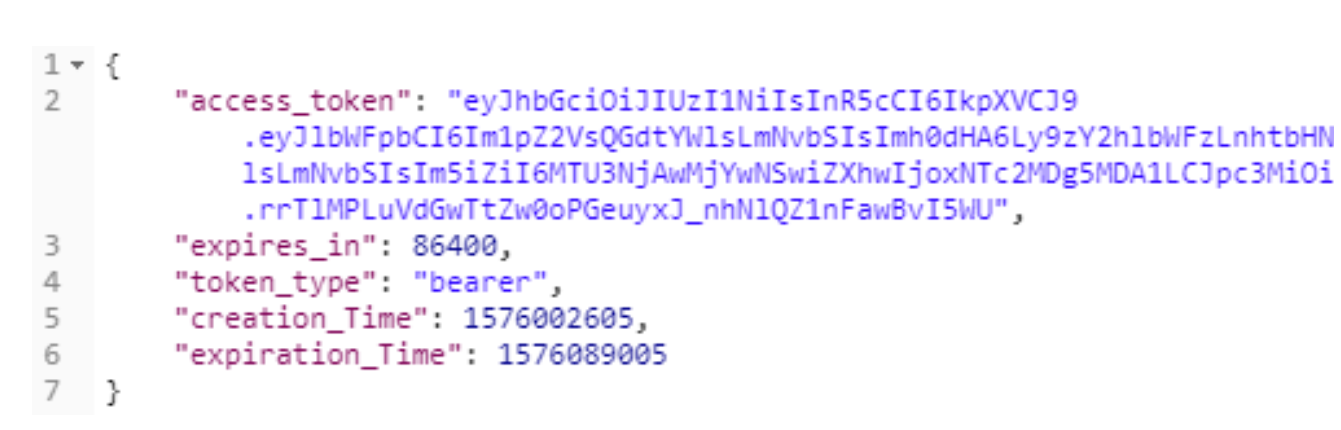
To display the token in the json format just use.
 return new ObjectResult(new
  {
     access_token = token.AccessToken,
     expires_in = token.ExpiresIn,
     token_type = token.TokenType,
     creation_Time = token.ValidFrom,
     expiration_Time = token.ValidTo,
  });
And this code will return the following json data.