Add Couchbase Lite Retail Demo learning path and tutorials#93
Conversation

 pulkit-couchbase
commented
pulkit-couchbase
commented
Feb 19, 2026
pulkit-couchbase
commented
- Add learning path file: learn/markdown/mobile/couchbase-lite-retail-demo/
- Add 4 individual tutorials under tutorial/markdown/mobile/:
  - retail-demo-getting-started
  - retail-demo-capella-setup
  - retail-demo-app-services-sync
  - retail-demo-peer-to-peer-sync
- All tutorials marked with exclude_tutorials: true
- Images use absolute raw GitHub URLs

- Add learning path file: learn/markdown/mobile/couchbase-lite-retail-demo/ - Add 4 individual tutorials under tutorial/markdown/mobile/: - retail-demo-getting-started - retail-demo-capella-setup - retail-demo-app-services-sync - retail-demo-peer-to-peer-sync - All tutorials marked with exclude_tutorials: true - Images use absolute raw GitHub URLs


Summary of ChangesHello @pulkit-couchbase, I'm Gemini Code Assist1! I'm currently reviewing this pull request and will post my feedback shortly. In the meantime, here's a summary to help you and other reviewers quickly get up to speed! This pull request significantly expands the documentation for the Couchbase Lite Retail Demo by introducing a dedicated learning path and a series of detailed tutorials. These resources guide users through the application's architecture, backend setup with Couchbase Capella, and the implementation of both cloud-based and peer-to-peer data synchronization, thereby enhancing the overall learning experience and ease of adoption for the demo application. Highlights
🧠 New Feature in Public Preview: You can now enable Memory to help Gemini Code Assist learn from your team's feedback. This makes future code reviews more consistent and personalized to your project's style. Click here to enable Memory in your admin console. Changelog
Using Gemini Code AssistThe full guide for Gemini Code Assist can be found on our documentation page, here are some quick tips. Invoking Gemini You can request assistance from Gemini at any point by creating a comment using either
Customization To customize Gemini Code Assist for GitHub experience, repository maintainers can create a configuration file and/or provide a custom code review style guide (such as PEP-8 for Python) by creating and adding files to a Limitations & Feedback Gemini Code Assist may make mistakes. Please leave feedback on any instances where its feedback is incorrect or counter productive. You can react with 👍 and 👎 on @gemini-code-assist comments. If you're interested in giving your feedback about your experience with Gemini Code Assist for Github and other Google products, sign up here. You can also get AI-powered code generation, chat, as well as code reviews directly in the IDE at no cost with the Gemini Code Assist IDE Extension. Footnotes
|
![gemini-code-assist[bot]](https://avatars.githubusercontent.com/in/956858?s=60&v=4)

There was a problem hiding this comment.
Code Review
The pull request introduces a new learning path and four associated tutorials for the Couchbase Lite Retail Demo. The tutorials cover getting started, Capella setup, App Services sync, and peer-to-peer sync. The content is well-structured and provides clear instructions for setting up and using the demo application. The use of absolute raw GitHub URLs for images is noted in the description, which is generally acceptable for documentation but could be improved for long-term stability by hosting them within the documentation system itself. All tutorials are correctly marked with exclude_tutorials: true as per the description.

 nithishr
left a comment
nithishr
left a comment
nithishr
left a comment
There was a problem hiding this comment.
The tutorial looks good overall.
Have some minor recommendations for adapting it to the Developer Portal.
| path: "/learn/couchbase-lite-retail-demo" | ||
| title: Couchbase Lite Retail Demo | ||
| short_title: Couchbase Lite Retail Demo |
There was a problem hiding this comment.
Can we add a more descriptive title & path here so that we get some SEO?
Something along the lines of "Couchbase Lite and Offline First Applications"
| - swift | ||
| download_file: null | ||
| length: 1 Hour 45 Mins | ||
| --- |
There was a problem hiding this comment.
You can add some overview of this learning path here. This is the landing page for the learning path guiding users on what this learning path is about & the prerequisites & outcomes.
Example of how it looks: https://developer.couchbase.com/learn/flutter-dart-sdk-app-services/
| ## Introduction | ||
|
|
||
| Welcome to the Couchbase Lite Retail Demo! This tutorial series will guide you through building and understanding a retail inventory management application that demonstrates Couchbase Lite's powerful features. | ||
|
|
||
| In this first tutorial, you will learn: | ||
|
|
||
| * The architecture of the retail demo application | ||
| * Key features including offline-first data storage, real-time sync, and peer-to-peer sync | ||
| * How to set up your development environment | ||
|
|
||
| ## Application Overview | ||
|
|
||
| The Couchbase Lite Retail Demo is a multi-platform retail inventory management application built for: | ||
|
|
||
| * **iOS** (Swift/SwiftUI) | ||
| * **Android** (Kotlin/Jetpack Compose) | ||
| * **Web** (React/TypeScript) | ||
|
|
||
| ### Key Features | ||
|
|
||
| | Feature | Description | | ||
| |---------|-------------| | ||
| | **Offline-First** | Full functionality without internet using Couchbase Lite as a local database | | ||
| | **Real-Time Sync** | Bidirectional sync with Couchbase Capella via App Services | | ||
| | **Peer-to-Peer Sync** | Direct device-to-device sync over local network (iOS & Android) | | ||
| | **Multi-Store Support** | Manage inventory across multiple retail locations | | ||
|
|
There was a problem hiding this comment.
You could consider moving some of this into the Learning Path landing page (learn/markdown/)
|
|
||
| The complete setup looks like this: | ||
|
|
||
| 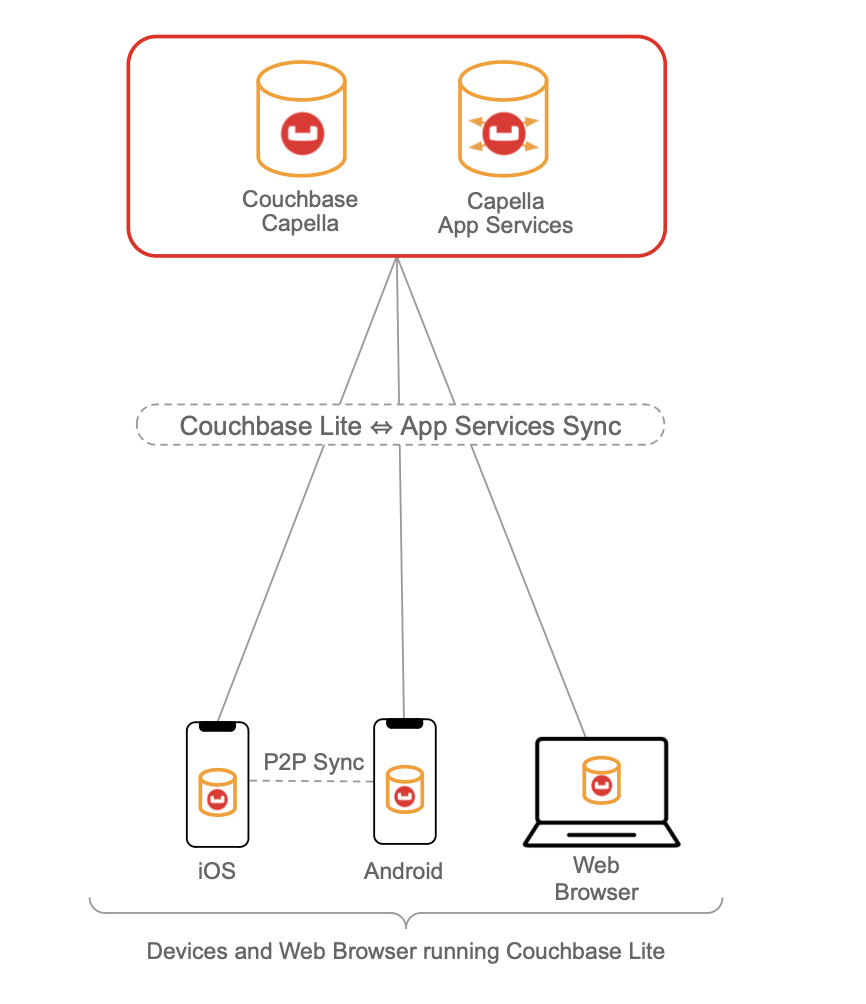 |
There was a problem hiding this comment.
Can you move these images to the tutorials repo so that we don't need to update the content in two repos? You can copy the images into the tutorial folder & link them.
| * [iOS README](https://github.com/couchbase-examples/couchbase-lite-retail-demo/blob/main/iOS/README.md) | ||
| * [Web README](https://github.com/couchbase-examples/couchbase-lite-retail-demo/blob/main/web/README.md) | ||
|
|
||
| ## Learn More |
There was a problem hiding this comment.
You could add a line here guiding them onto the next step of the learning path.
An example from one of the existing tutorials
Congratulations on completing this step of our learning path!
This step of the learning path walked you through an example of how to use a pre-built Couchbase Lite database. Check out the following links for further documenation and continue on to the next step that covers how to insert documents into the database using Batch operations.
|
|
||
| Watch P2P sync in action between two Android devices and an iPhone: | ||
|
|
||
|  |
There was a problem hiding this comment.
We would need to test this out on staging to see how the video works. In the past, we used to load them from YouTube.
| 3. Set `ENABLE_P2P_SYNC = false` | ||
|
|
||
| ## Learn More | ||
|
|
There was a problem hiding this comment.
Would be nice to say something nice on finishing the learning path here.
Example: https://developer.couchbase.com/tutorial-quickstart-ios-uikit-sync/?learningPath=learn/swift
| @@ -0,0 +1,184 @@ | |||
| --- | |||
| path: "/retail-demo-getting-started" | |||
There was a problem hiding this comment.
I wonder if we could make it more descriptive. Something like /offline-first-app-getting-started
| @@ -0,0 +1,184 @@ | |||
| --- | |||
| path: "/retail-demo-getting-started" | |||
| title: Getting Started with the Couchbase Lite Retail Demo | |||
…essages

- Update learning path: SEO-friendly path/title, add overview body content
  with prerequisites, app description and learning agenda
- Rename getting-started tutorial to offline-first-app-getting-started
  with more descriptive SEO title; add "What's Next?" section
- Add images/assets into each tutorial folder (relative paths)
- Add congratulations/completion message to peer-to-peer-sync tutorial
- Update all image references to relative paths (co-located with markdown)
3 participants


