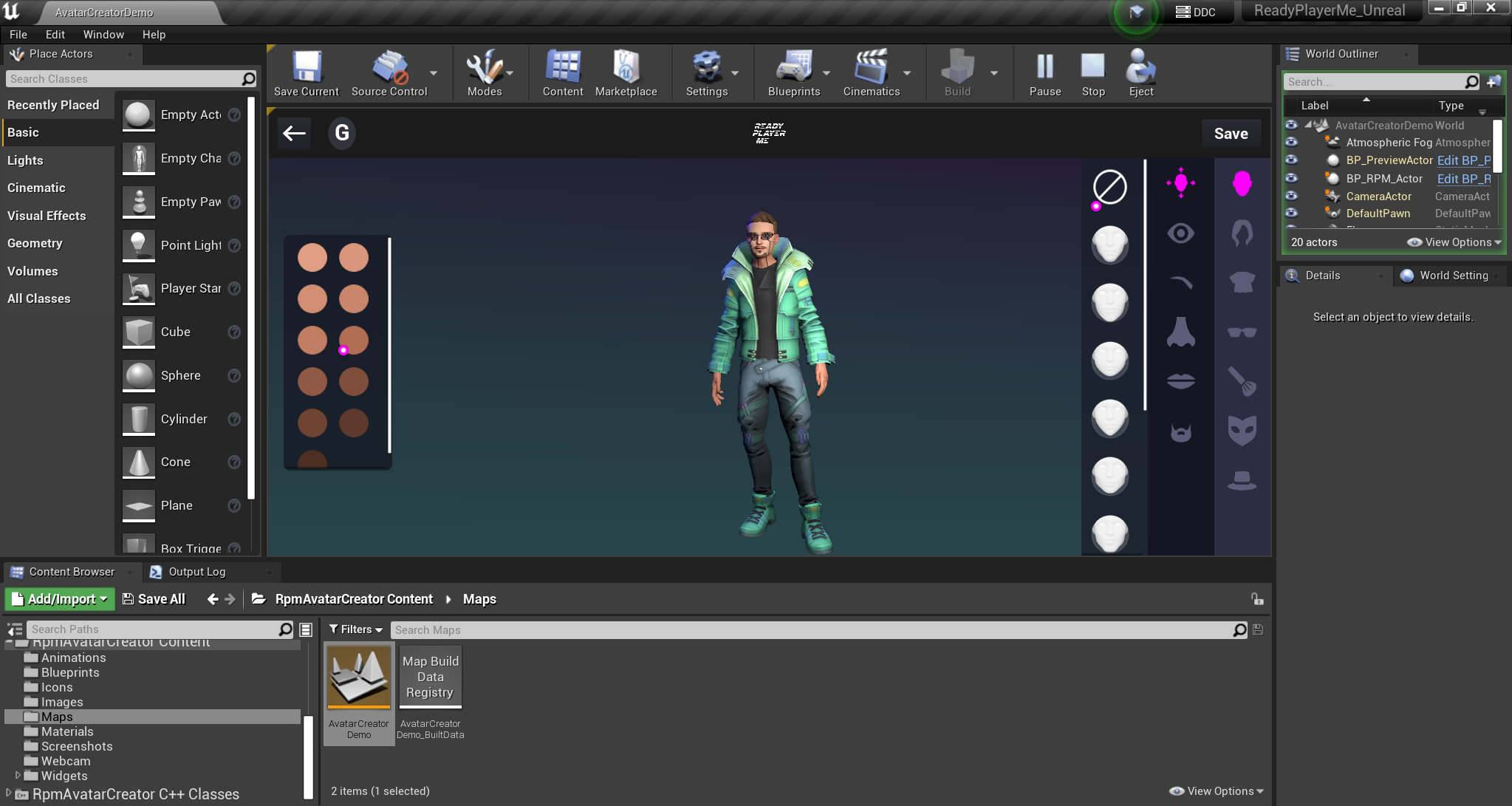
Ready Player Me Avatar Creator is an extension to www.readyplayer.me avatar platform, which helps you create avatars.
RpmAvatarCreator plugin is an in-engine implementation of the web avatar creator.
Please visit the online documentation and join our public discord community.


The plugin is currently in alpha stage. We recommend not to use it in the production until the stable version is released.
- ReadyPlayerMe Unreal SDK, an open source plugin that contains all the core functionality required for loading and displaying avatars. The plugin can be found on GitHub here.
- glTFRuntime An open source third party plugin with functionality for downloading and importing assets from GLTF and GLB files. The plugin can be found on GitHub here, but can also be purchased from the Unreal Marketplace.
- Unreal Engine Version 4.27 or higher
Avatar Creator plugin depends on the Ready Player Me Unreal SDK, follow the setup steps in the Documentation or the Readme for setting it up before adding the RpmAvatarCreator plugin.
There are three ways you can add the RpmAvatarCreator plugin to your project. Add as submodules, paste the plugin inside of the Plugins folder, or add the blueprint version of the plugin to the Engine.
-
To add the plugin to your project as a submodules, run the following command in the terminal from your project folder. This is preferred way of setting up the plugin.
git submodule add --name Plugins/RpmAvatarCreator -- https://github.com/readyplayerme/rpm-unreal-avatar-creator.git Plugins/RpmAvatarCreator -
To clone the plugin into your project, run the following command in the terminal from your project folder.
-
To paste the plugin inside of the Plugins folder, create a Plugins folder from the root of your project, download the latest tags of the RpmAvatarCreator plugins into it. Rename the rpm-unreal-avatar-creator plugin folder to the RpmAvatarCreator.
-
To add the blueprint version of the plugin, find the plugin attached in the Latest Release, add it to the Plugins/Runtime folder of the installed Unreal Engine.
To update the plugin submodule paste the following command in the terminal from your project folder. This will fetch and switch the plugin repositories to the latest stable release.
cd Plugins/RpmAvatarCreator ; git fetch --tags ; git checkout $(git describe --tags $(git rev-list --tags --max-count=1)) ; cd ../..
A demo map is included in the plugin for demonstrating how the Sample Avatar Creator opens at runtime. It is located in the RpmAvatarCreator\Content\Maps folder.
To add the AvatarCreator widget to your project simply copy the existing blueprint logic from the demo map into your project.
AvatarCreator is a widget that can be added to a map or another widget. Inside the AvatarCreatorDemo map we create and add the widget to the viewport. AvatarCreator can be customized by providing default values when the widget is created. We need to subscribe to the Avatar Saved event to get the URL when the avatar is saved. We need to subscribe to the Avatar Selected event as well to get the URL when the avatar is selected from the list of user avatars. Additionally, we can load an avatar with this URL afterward.
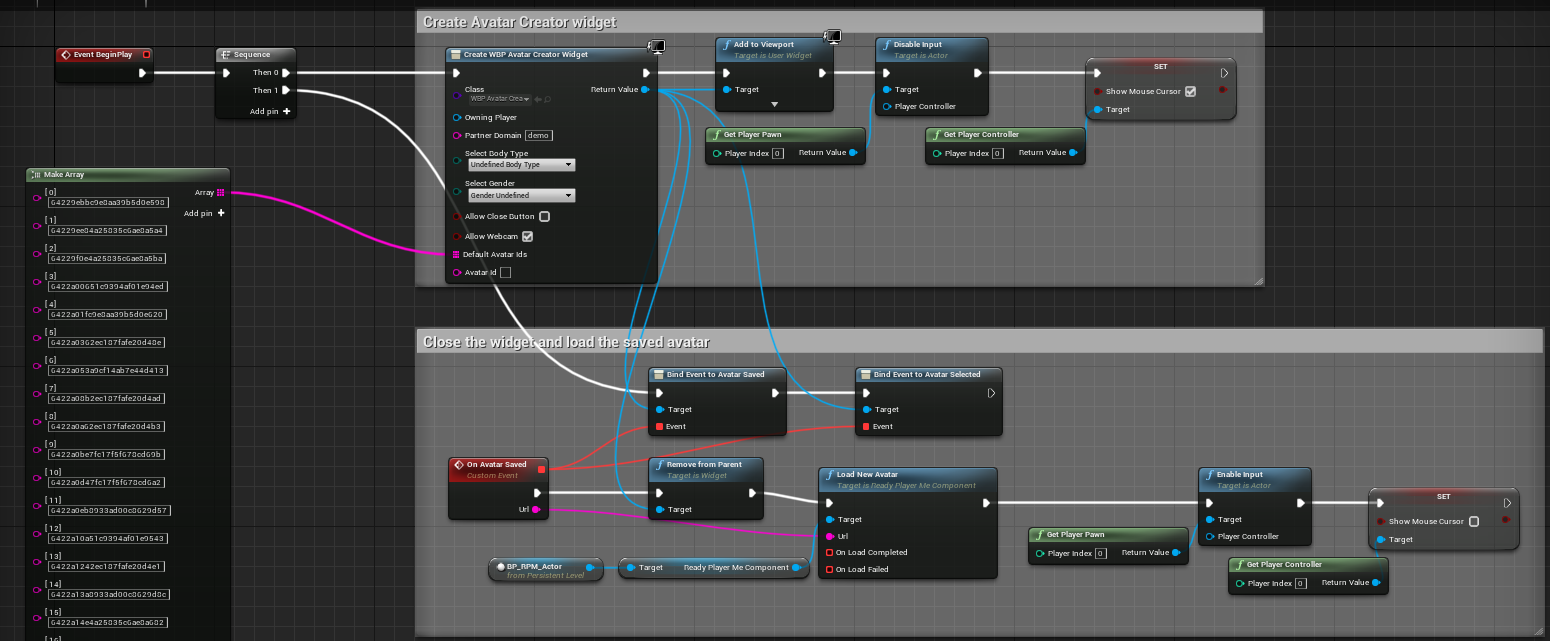
Additionally if close button is enabled, we can subscribe to the Close Button Clicked event to be notified when the close button is clicked. This way we can close the widget and perform other actions.
When spawning the Avatar Creator widget, it's possible to configure it with the specified parameters.
Customization options:
- Partner Domain Specify your partner domain
- Select Body Type Allows skipping the body type selection screen
- Select Gender Allows skipping the gender selection screen
- Allow Close Button Hides the close button
- Allow Webcam Enables the selfie selection screen if the webcam is available
- Default Avatar Ids Specify the avatar ids that will be shown on the Pick An Avatar page. Important this field needs to be filled with the avatar ids from the demo map.
The plugin Content represents a sample project, if you want to have a completely different UI, you can duplicate the sample project and change the UI. In this case, you will not be able to get the latest changes of this sample project UI.
Avatar Creator sample uses AvatarCreatorApi C++ class for communicating with the Ready Player Me Backend. The plugin Content can be completely rewritten to suit your project needs while using the AvatarCreatorApi for communication with the Backend.
- Fix the webcam support for Android
- Fix the webcam support for UE5
- Add shadow for the avatar in the avatar editor
- Add a sample for the VR
If you are using a version of glTFRuntime 20230225 or prior, you might encounter a visual artifact where the avatar's head material looks dark or shadowed. Please update glTFRuntime to the latest to avoid this issue.
Webcam functionality is currently available only on the Windows platform when using Unreal Engine 4.27. However, Unreal Engine 5 experiences issues with Webcam support. To make the webcam work in Unreal Engine 5, a workaround is available, which involves changing the Default RHI property to DirectX 11. However, this change may result in the disabling of certain Unreal Engine 5 features. if webcam support is required for mobile platforms, you will need to either create a platform-specific webcam functionality or add an external plugin.
The sample doesn't provide an option to pick an image file that would be used for generating an avatar according to the image. This is done to keep the sample project simple. Depending on the target platform, the file picker functionality and dependencies will be different.
In case you require file picker functionality, you can either add an external plugin or create a platform-specific file picker. After implementing the platform-side file picking functionality, convert the selected image to a base64 string and pass it to the Base64Image property of the AvatarProperties in the AvatarCreatorApi. After implementing the file picking logic, you will need to modify the WBP_SelfieSuggestion widget and include a button for picking images.