Elad Richardson, Kfir Goldberg, Yuval Alaluf, Daniel Cohen-Or
Tel Aviv University, Bria AIAdvanced generative models excel at synthesizing images but often rely on text-based conditioning. Visual designers, however, often work beyond language, directly drawing inspiration from existing visual elements. In many cases, these elements represent only fragments of a potential concept-such as an uniquely structured wing, or a specific hairstyle-serving as inspiration for the artist to explore how they can come together creatively into a coherent whole. Recognizing this need, we introduce a generative framework that seamlessly integrates a partial set of user-provided visual components into a coherent composition while simultaneously sampling the missing parts needed to generate a plausible and complete concept. Our approach builds on a strong and underexplored representation space, extracted from IP-Adapter+, on which we train IP-Prior, a lightweight flow-matching model that synthesizes coherent compositions based on domain-specific priors, enabling diverse and context-aware generations. Additionally, we present a LoRA-based fine-tuning strategy that significantly improves prompt adherence in IP-Adapter+ for a given task, addressing its common trade-off between reconstruction quality and prompt adherence.


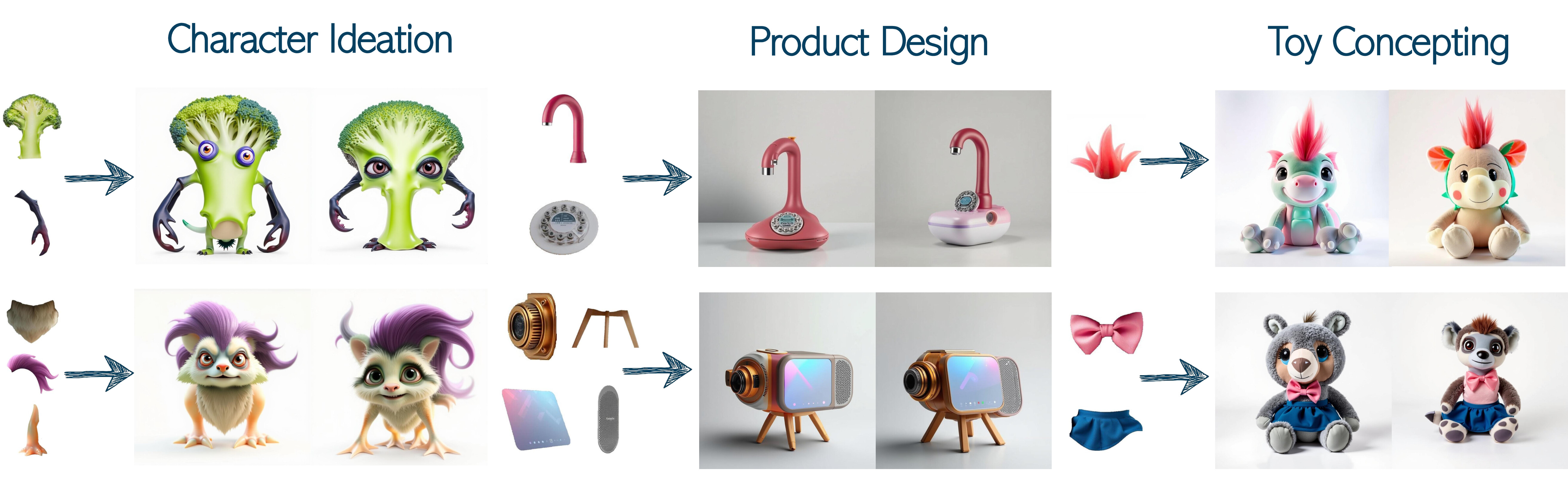
Using a dedicated prior for the target domain, our method, Piece it Together (PiT), effectively completes missing information by seamlessly integrating given elements into a coherent composition while adding the necessary missing pieces needed for the complete concept to reside in the prior domain.
Official implementation of the paper "Piece it Together: Part-Based Concepting with IP-Priors"
- Piece it Together: Part-Based Concepting with IP-Priors
- Clone the repo:
git clone https://github.com/eladrich/PiT
cd PiT- Install
uv:
Instructions taken from here.
For linux systems this should be:
curl -LsSf https://astral.sh/uv/install.sh | sh
source $HOME/.local/bin/env- Install the dependencies:
uv sync- Activate your
.venvand set the Python env:
source .venv/bin/activate
export PYTHONPATH=${PYTHONPATH}:${PWD}| Domain | Examples | Link |
|---|---|---|
| Characters | 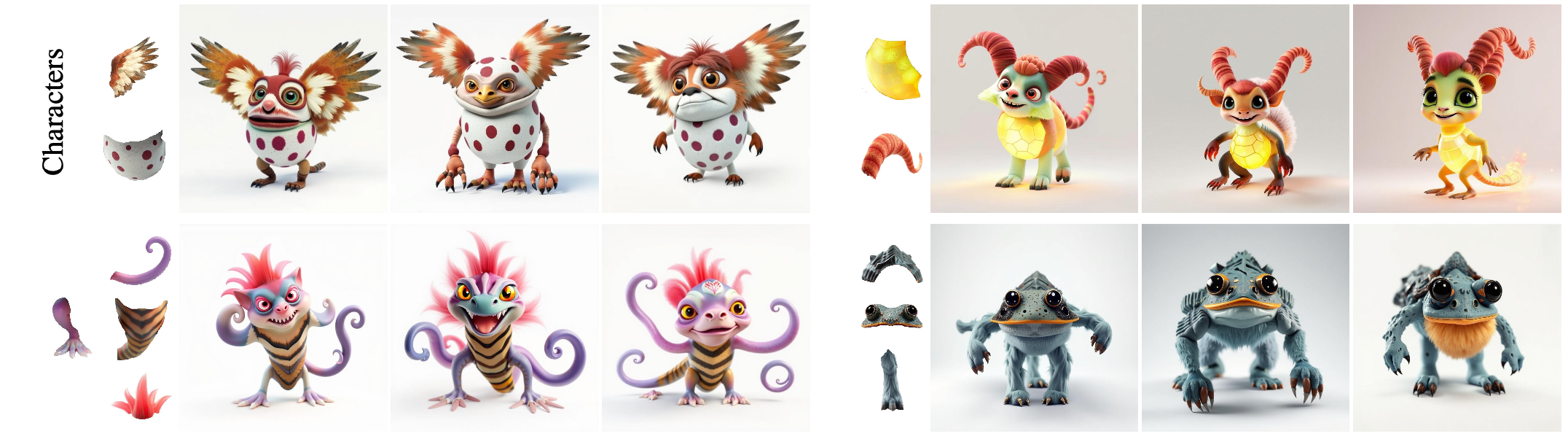 |
Here |
| Products | 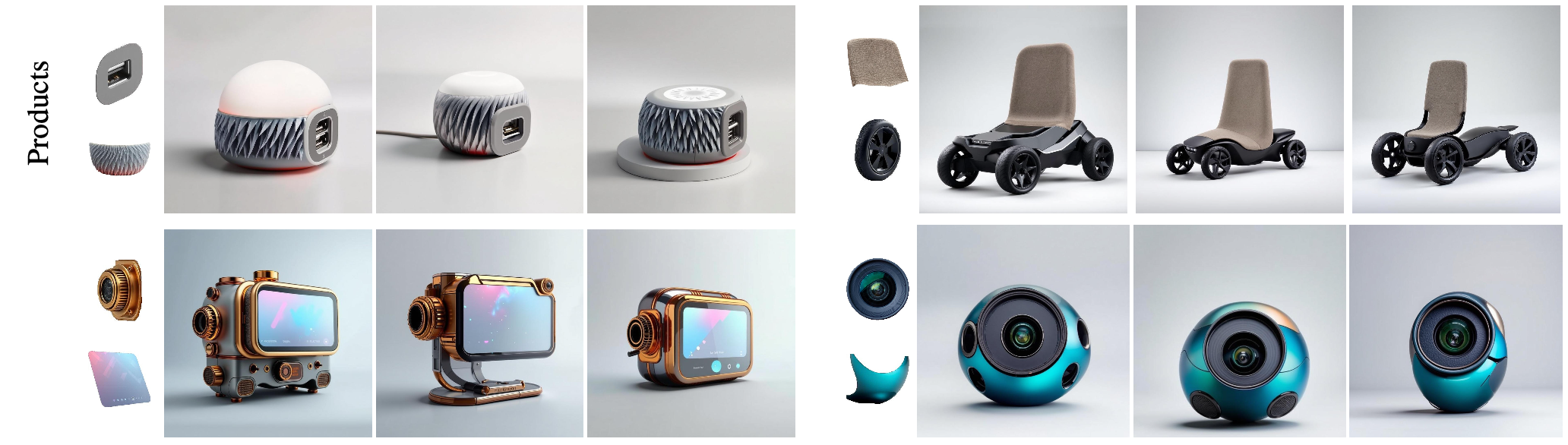 |
Here |
| Toys | 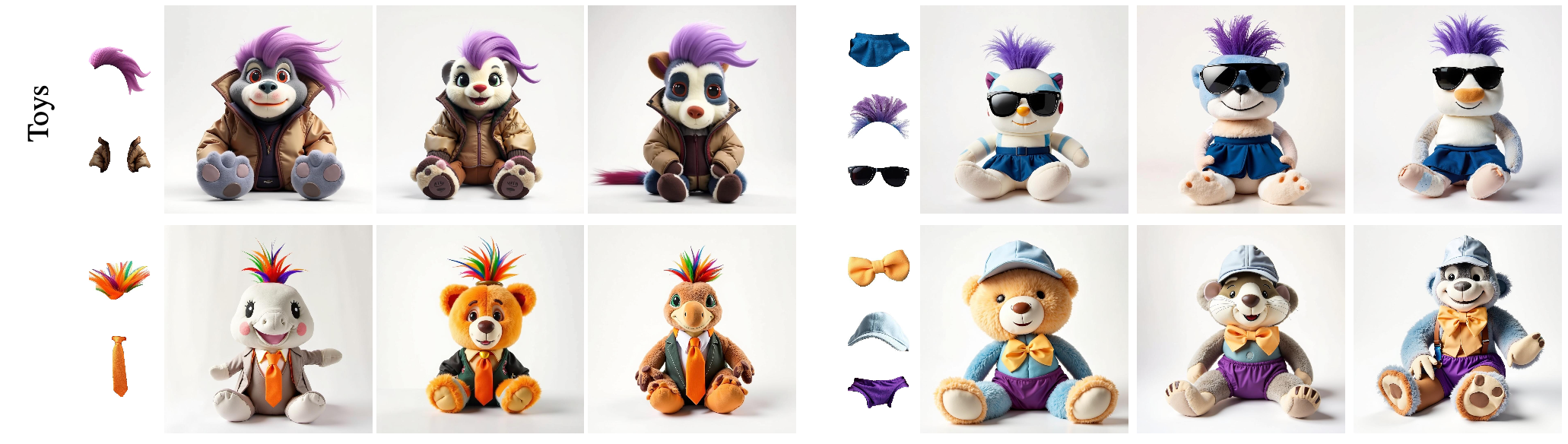 |
Here |
PiT assumes that the data is structured so that the the target images and part images are in the same directory with the naming convention being image_name.jpg for hte base image and image_name_i.jpg for the parts.
To use a generated data see the sample scripts
python -m scripts.generate_characterspython -m scripts.generate_productsFor training see the training/coach.py file and the example below
bash python -m scripts.train --config_path=configs/train/train_characters.yaml
For inference see scripts.infer.py with the corresponding configs under configs/infer
python -m scripts.infer --config_path=configs/infer/infer_characters.yaml- Download the IP checkpoint and the LoRAs
ip_lora_inference/download_ip_adapter.sh
ip_lora_inference/download_loras.sh- Run inference with your preferred model
example for running the styled-generation LoRA
python ip_lora_inference/inference_ip_lora.py --lora_type "character_sheet" --lora_path "weights/character_sheet/pytorch_lora_weights.safetensors" --prompt "a character sheet displaying a creature, from several angles with 1 large front view in the middle, clean white background. In the background we can see half-completed, partially colored, sketches of different parts of the object" --output_dir "ip_lora_inference/character_sheet/" --ref_images_paths "assets/character_sheet_default_ref.jpg"
--ip_adapter_path "weights/ip_adapter/sdxl_models/ip-adapter-plus_sdxl_vit-h.bin"The expected data format for the training script is as follows:
--base_dir/
----targets/
------img1.jpg
------img1.txt
------img2.jpg
------img2.txt
------img3.jpg
------img3.txt
.
.
.
----refs/
------img1_ref.jpg
------img2_ref.jpg
------img3_ref.jpg
.
.
.
Where imgX.jpg is the target image for the input reference image imgX_ref.jpg with the prompt imgX.txt
For training a character-sheet styled generation LoRA, run the following command:
 python ./ip_lora_train/train_ip_lora.py \
 --rank 64 \
 --resolution 1024 \
 --validation_epochs 1 \
 --num_train_epochs 100 \
 --checkpointing_steps 50 \
 --train_batch_size 2 \
 --learning_rate 1e-4 \
 --dataloader_num_workers 1 \
 --gradient_accumulation_steps 8 \
 --dataset_base_dir <base_dir> \
 --prompt_mode character_sheet \
 --output_dir ./output/train_ip_lora/character_sheet
and for the text adherence LoRA, run the following command:
 python ./ip_lora_train/train_ip_lora.py \
 --rank 64 \
 --resolution 1024 \
 --validation_epochs 1 \
 --num_train_epochs 100 \
 --checkpointing_steps 50 \
 --train_batch_size 2 \
 --learning_rate 1e-4 \
 --dataloader_num_workers 1 \
 --gradient_accumulation_steps 8 \
 --dataset_base_dir <base_dir> \
 --prompt_mode creature_in_scene \
--output_dir ./output/train_ip_lora/creature_in_sceneStart by downloading the needed IP+ checkpoint and the directions presented in the paper:
ip_plus_space_exploration/download_directions.sh
ip_plus_space_exploration/download_ip_adapter.shTo find a direction in the IP+ space from "class1" (e.g. "scrawny") to "class2" (e.g. "muscular"):
-
Create
class1_dirandclass2_dircontaining images of the source and target classes respectively -
Run the
find_directionscript:
python ip_plus_space_exploration/find_direction.py --class1_dir <path_to_source_class> --class2_dir <path_to_target_class> --output_dir ./ip_directions --ip_model_type "plus"Use the direction found in the previous stage, or one downloaded from HuggingFace in the previous stage.
python ip_plus_space_exploration/edit_by_direction.py --ip_model_type "plus" --image_path <source_image> --direction_path <path_to_chosen_direction> --direction_type "ip" --output_dir "./edit_by_direction/"Code is based on
If you use this code for your research, please cite the following paper:
@misc{richardson2025piece,
      title={Piece it Together: Part-Based Concepting with IP-Priors},
      author={Richardson, Elad and Goldberg, Kfir and Alaluf, Yuval and Cohen-Or, Daniel},
      year={2025},
      eprint={2503.10365},
      archivePrefix={arXiv},
      primaryClass={cs.CV},
      url={https://arxiv.org/abs/2503.10365},
}