The package builds a mart of tables and views describing the project it is installed in.
This package is a modification of the dbt_artifacts (v2.2.2) package developed by Brooklyn Data Co.
The package currently supports
- Snowflake ✅
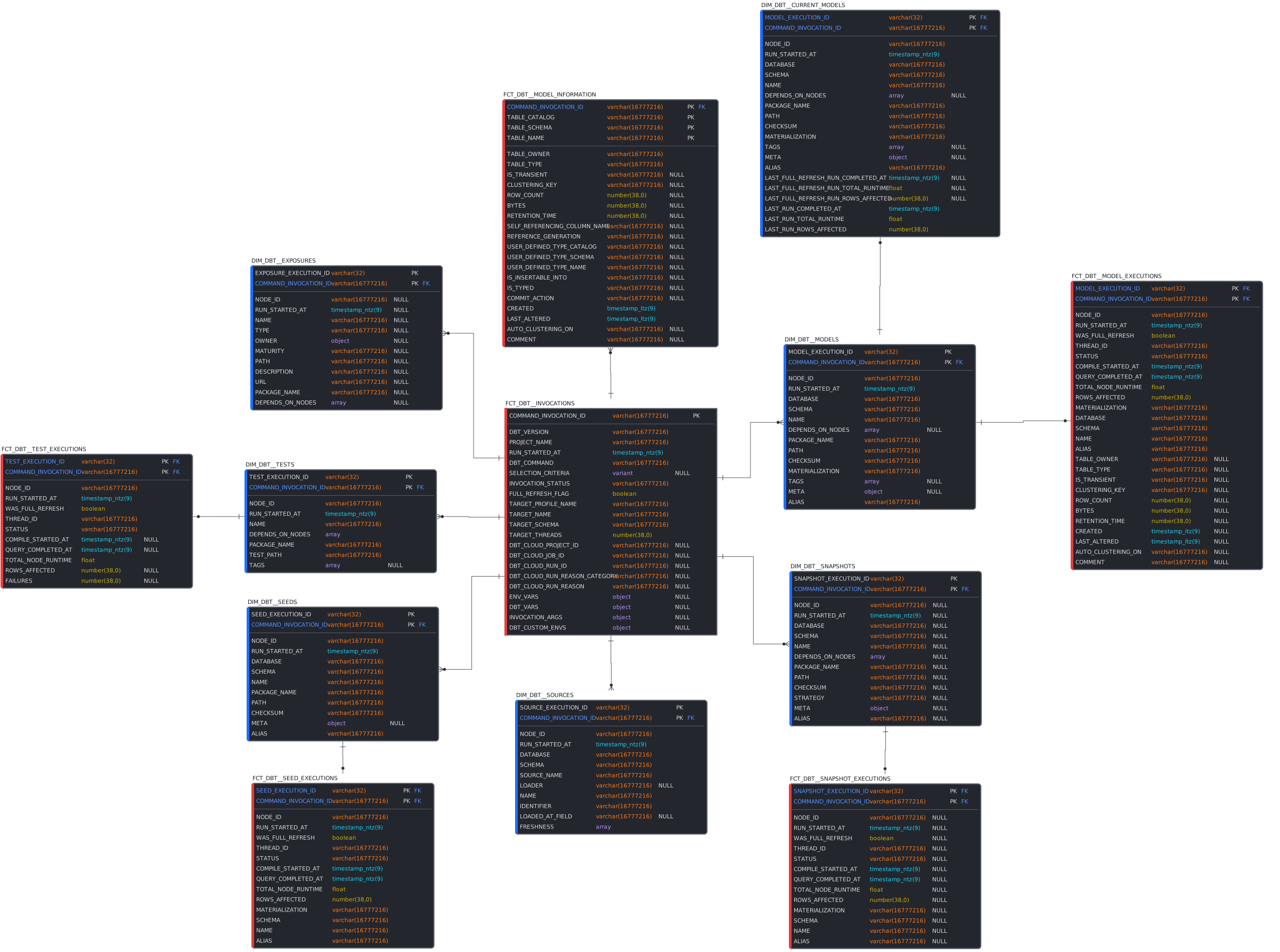
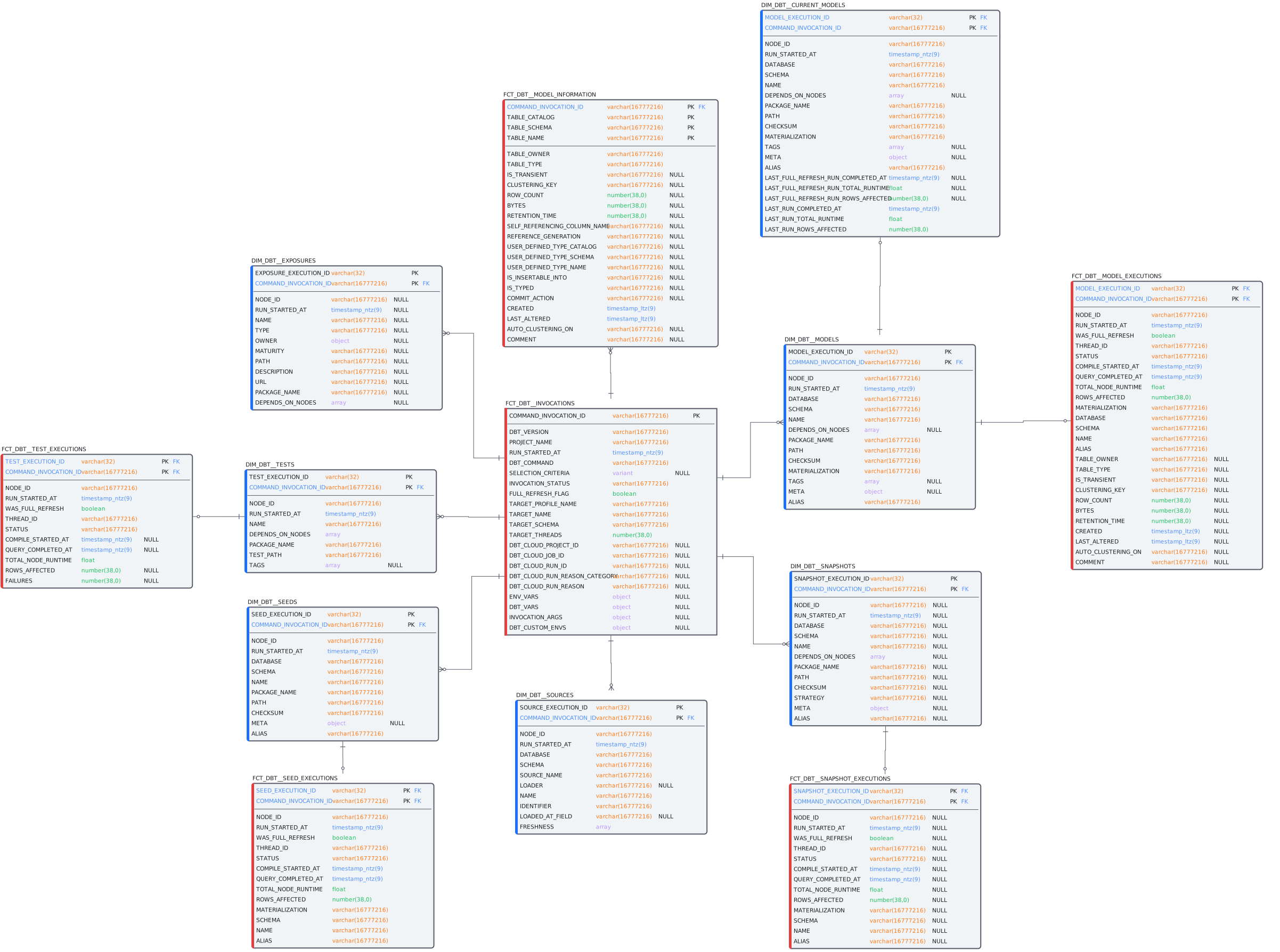
Final Data Mart Models:
dim_dbt__current_models
dim_dbt__exposures
dim_dbt__models
dim_dbt__seeds
dim_dbt__snapshots
dim_dbt__sources
dim_dbt__tests
fct_dbt__invocations
fct_dbt__model_executions
fct_dbt__model_information
fct_dbt__seed_executions
fct_dbt__snapshot_executions
fct_dbt__test_executions
Logical Data Mart Model (White Version)
Note: The Data Model is a visualization tool to help understand how the output models are related. Within the database, the models DO NOT have "formally" defined constraints on them.
- Add this package to your
packages.yml:
packages:
  - git: "https://github.com/eon-collective/dbt_artifacts_eon.git"
    revision: <latest.release.number>
-
Run
dbt depsto install the package -
Add an on-run-end hook to your
dbt_project.yml:on-run-end: "{{ dbt_artifacts.upload_results(results) }}"(We recommend adding a conditional here so that the upload only occurs in your production environment, such ason-run-end: "{% if target.name == 'prod' %}{{ dbt_artifacts.upload_results(results) }}{% endif %}") -
If you are using selectors, be sure to include the
dbt_artifactsmodels in your dbt invocation step. -
Run your project!
👷 Always run the dbt_artifacts models in every dbt invocation which uses the
upload_resultsmacro. This ensures that the source models always have the correct fields in case of an update.
💡 To run the package without pulling data from the
INFORMATION_SCHEMA.TABLESusedbt_project.yml:on-run-end: "{{ dbt_artifacts.upload_results(results, include_information=true) }}"
The following configuration can be used to specify where the raw (sources) data is uploaded, and where the dbt models are created:
models:
  ...
  dbt_artifacts:
    +database: your_destination_database # optional, default is your target database
    +schema: your_destination_schema # optional, default is your target schema
    staging:
      +database: your_destination_database # optional, default is your target database
      +schema: your_destination_schema # optional, default is your target schema
    sources:
      +database: your_sources_database # optional, default is your target database
      +schema: your sources_database # optional, default is your target schema
💡 A Recommendation is that the models be outputted to a seperate schema from the target (DBT_AUDIT). Although there are only 13 Facts & Dimensions, the package creates 37 Total Objects.
Note that model materializations and on_schema_change configs are defined in this package's dbt_project.yml, so do not set them globally in your dbt_project.yml (see docs on configuring packages):
Configurations made in your dbt_project.yml file will override any configurations in a package (either in the dbt_project.yml file of the package, or in config blocks).
Configurations Inside the Package (source)
models:
  dbt_artifacts:
    +materialized: view
    +file_format: delta # Used for Spark configurations
    sources:
      +materialized: incremental
      +on_schema_change: append_new_columns
+full_refresh: falseIf the project is running in dbt Cloud, the following five columns (https://docs.getdbt.com/docs/dbt-cloud/using-dbt-cloud/cloud-environment-variables#special-environment-variables) will be automatically populated in the fct_dbt__invocations model:
- dbt_cloud_project_id
- dbt_cloud_job_id
- dbt_cloud_run_id
- dbt_cloud_run_reason_category
- dbt_cloud_run_reason
To capture other environment variables in the fct_dbt__invocations model in the env_vars column, add them to the env_vars variable in your dbt_project.yml. Note that environment variables with secrets (DBT_ENV_SECRET_) can't be logged.
vars:
  env_vars: [
    'ENV_VAR_1',
    'ENV_VAR_2',
    '...'
]To capture dbt variables in the fct_dbt__invocations model in the dbt_vars column, add them to the dbt_vars variable in your dbt_project.yml.
vars:
  dbt_vars: [
    'var_1',
    'var_2',
    '...'
]Thank you to Tails.com for initial development and maintenance of this package. On 2021/12/20, the repository was transferred from the Tails.com GitHub organization to Brooklyn Data Co.. On 2022/12/16, the repository was forked by EON Collective.
The macros in the early versions package were adapted from code shared by Kevin Chan and Jonathan Talmi of Snaptravel.
Thank you for sharing your work with the community!
The original dbt Artifacts package is compatible with Databricks, Spark, Snowflake, & BigQuery. To integrate code changes into the repository those changes have to compatible with all four services. Our development efforts are Snowflake specific.
Note - The package creates another two sets of tables (the source models and the stage views) Note: There is a potential error if the model information query text goes over the 1MB