




⚠️ WARNING: Selfbots violate Discord's Terms of Service
- Selfbots can result in account termination only when used extensively
- Use at your own risk and responsibility
- We are not responsible for any consequences
- Consider using alternative accounts for testing
- Use responsibly and avoid spam or excessive automation
Vexil is an experimental, open-source, multifunctional Discord selfbot built with modern JavaScript and Discord.js-selfbot-v13. It features comprehensive command handling, advanced task management, and a wide array of utilities designed for power users.
| 🎯 Core Features | 🛠️ Advanced Tools | 🎮 Fun & Games |
|---|---|---|
| 120+ Commands | Task Management | Mini Games |
| Rate Limit Protection | Relationship Logging | ASCII Art Generator |
| Anti-Crash System | Nitro Sniper | 8Ball & Dice |
| Graceful Shutdown | Voice Channel Tools | Fake Typing |
| Custom Prefix | Rich Presence | Clownify Text |
- Node.js v20 or higher
- npm or yarn package manager
- Discord account
# Clone the repository
git clone https://github.com/faiz4sure/Vexil.git

# Navigate to project directory
cd Vexil

# Install dependencies
npm installIf git clone doesn't work for you:
- Go to the GitHub repository: https://github.com/faiz4sure/Vexil
- Click the green "Code" button at the top
- Select "Download ZIP"
- Extract the ZIP file to your desired location
- Open the extracted folder in your terminal/command prompt
- Run
npm installto install dependencies
Both methods work the same way! 🎯
- Get your Discord token - See 📖 Token Guide
- Edit
config.yaml:
selfbot:
  token: "YOUR_DISCORD_TOKEN_HERE"  # Replace with your token
  prefix: "+"                      # Your command prefix
status: "dnd" # Your status (dnd recommended)- Start the selfbot:
npm start
# or
node index.js🤖 AI Commands
+ask- Ask AI questions using Groq API
🎉 Fun Commands
+8ball- Magic 8-ball responses+ascii- Convert text to ASCII art+choose- Choose between options+clownify- Clownify your text 🤡+coinflip- Flip a coin+dice- Roll dice+emojify- Convert text to emojis+fact- Random facts+gay- Gay percentage calculator+iq- IQ calculator+mock- mOcK tExT lIkE tHiS+pp- PP size calculator+reverse- Reverse text+rps- Rock Paper Scissors
🔧 General Commands
+help- Show help menu+ping- Check bot latency+avatar- Get user avatar+banner- Get user banner+userinfo- Get user information+serverinfo- Get server information+afk- Set AFK status+fakehack- Fake hacking animation+faketyping- Fake typing indicator+nitrosniper- Toggle nitro sniping+tokencheck- Check token validity
🛡️ Moderation Commands
+ban- Ban a user+kick- Kick a user+mute- Mute a user+purge- Delete messages+lock- Lock a channel+slowmode- Set channel slowmode+steal- Steal emojis+role- Manage user roles
🎮 Server Management
+clone- Clone channels/servers+nuke- Nuke server (DANGEROUS)+massnick- Mass nickname change+lockall- Lock all channels+leave- Leave server+snipe- View deleted messages
🎭 Troll Commands
+spam- Spam messages+stalk- Stalk users+badreply- Send random insults+ghostping- Ghost ping users
🔧 Utility Commands
+backup- Backup server data+prefix- Change command prefix+reload- Reload commands+status- Change bot status+rpc- Rich presence control
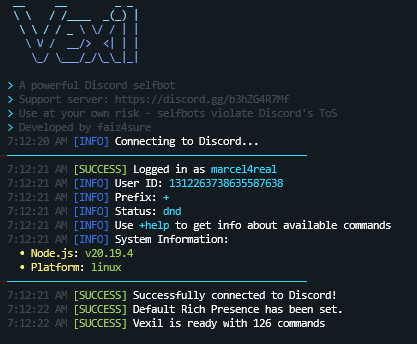
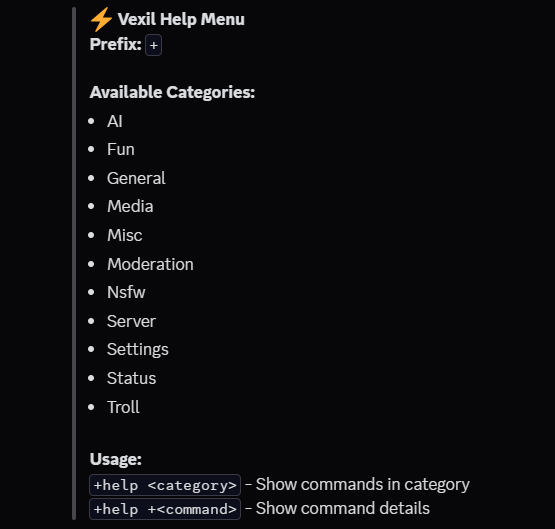
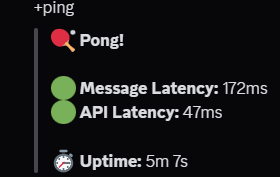
Vexil/
├── 📁 commands/          # Command modules (organized by category)
│   ├── 🤖 AI/           # AI-powered commands
│   ├── 🎉 fun/          # Fun and entertainment commands
│   ├── 🔧 general/      # General utilities and info commands
│   ├── 🛡️ moderation/   # Server moderation tools
│   ├── 🎮 server/       # Server management commands
│   ├── 🎭 troll/        # Troll and prank commands
│   ├── 💥 misc/         # Miscellaneous utilities
│   ├── 📱 media/        # Media and image commands
│   ├── 🔞 nsfw/         # 18+ content commands
│   └── 📊 settings/     # Bot configuration commands
│   └── 🎮 status/       # Status and Rich Presence commands
├── 📁 events/           # Discord event handlers
│   └── 📁 relationship/ # Relationship/friend event handlers
├── 📁 handlers/         # Core system handlers
├── 📁 utils/            # Utility functions and managers
├── 📁 docs/             # Documentation files
├── ⚙️ config.yaml       # Main configuration file
├── 🎨 rpc.yml          # Rich Presence configuration
├── 📄 package.json      # Project dependencies
├── 🚀 index.js         # Main entry point
├── 🔰 start.bat        # Windows startup script
└── 📜 LICENSE          # MIT License
🎨 Rich Presence Setup
Full RPC Guide: docs/RPC.md
# Rich Presence configuration in rpc.yml
rpc:
  enabled: true
  application_id: "1306468377539379241"
  default:
    type: "PLAYING"
    name: "Vexil Selfbot"
    details: "Summoning Silence"
    state: "github.com/faiz4sure"
    assets:
      large_image: "vexil"
      large_text: "Vexil Selfbot"
      small_image: "thunder"
      small_text: "github.com/faiz4sure"
    buttons:
      - label: "GitHub"
        url: "https://github.com/faiz4sure/Vexil"
Commands: +rpc enable, +rpc setType, +rpc setLargeImage, etc.
🤖 AI Integration
ai:
  groq_api_key: "your_groq_api_key_here"  # Get free at console.groq.com
Command: +ask - Ask AI questions using Groq API
🔊 Voice Channel Settings
vc_command:
  mute: true        # Auto-mute when joining voice
  deafen: true      # Auto-deafen when joining voice
  auto_reconnect: true
  reconnect_delay: 5
  max_attempts: 3
Commands: +joinVC, +leaveVC, voice moderation commands
💥 Server Protection Settings
# Anti-nuke protection settings
nuke:
  nuke_message: "@everyone Vexil was here!"
  server_name: "Vexil owns this server!"
  channels:
    - "Nuked by self"
- "crushed"+nuke command - use responsibly!
🔞 NSFW Content
nsfw:
  enabled: false  # Enable 18+ content commands
Commands: Various NSFW commands (18+ only)
🎭 Troll Commands
bad_phrases:
  enabled: true
  phrases:
    - "Your custom phrase here"
    - "Another troll phrase"
Commands: +badreply, +spam, +stalk, etc.
# Clone repository
git clone https://github.com/faiz4sure/Vexil.git
cd Vexil

# Install dependencies
npm install

# Run in development mode
npm run dev# Run tests
npm test
# Check code style
npm run lint- Fork the repository
- Create a feature branch
- Commit your changes
- Push to the branch
- Open a Pull Request
| 📄 Guide | 📝 Description |
|---|---|
| 🔑 Getting Your Token | Step-by-step token extraction guide |
| ⚙️ Configuration Guide | Complete config.yaml setup tutorial |
| 📱 Android Setup | Mobile device setup instructions |
| 🎨 Image Generation | AI image generation guide |
| 🎮 Rich Presence Guide | Complete RPC setup and customization guide |


- 🎮 Discord Server: Join our community - I'm waiting for your suggestions for more features!
- 🐛 Bug Reports & Error Fixing: I'm available on Discord at our support server for guidance
- 💡 Feature Requests: Share your ideas with me on Discord - I love hearing from users!
- 📧 Direct Contact:
faiz4sureon Discord - ⭐ Reviews: I'm waiting for your reviews and feedback on our Discord server!
- ⭐ 120+ Commands implemented
- 🚀 Advanced task management system
- 🛡️ Robust error handling and anti-crash
- 🎯 Rate limit protection
- 🔄 Graceful shutdown handling
- 📱 Cross-platform compatibility
| 📈 Metric | 📊 Value |
|---|---|
| ⏱️ Total Development Time | 2.5 Months |
| 📝 Lines of Code | 20,234 |
| 🎯 Commands Implemented | 120+ |
| 📁 Files Created | 100+ |
Special thanks to the amazing services and contributors that make Vexil possible:
- 🎨 Pollinations.ai - For providing free AI image generation API that powers our image commands
- 💻 Zencoder - For writing easy-to-understand comments inside the code, making it developer-friendly for other contributors
- 🌟 Community - All the users who provide feedback, suggestions, and support on our Discord server
This project is licensed under the MIT License - see the LICENSE file for details.
DISCLAIMER: This project is for educational purposes only. Selfbots violate Discord's Terms of Service and may result in account termination. The developers are not responsible for any consequences arising from the use of this software. Use at your own risk and consider using alternative accounts.
If you find Vexil useful, please consider supporting the project:


Show your support by giving this project a ⭐ star!
I'm also waiting for your reviews and feedback on our Discord server!