Click on one of the items to scroll to the described section.
- General
- Plugin internals
When upgrading your plugin to a patch version, e.g. x.x.1 to x.x.4, or upgrading your plugin to a minor version, e.g. x.1.x to x.4.x, a plugin can always be updated without any manual changes. After an upgrade configurations will persist and the plugin will work as before.
In case you experience any issues after the update, please let us know immediately (via E-Mail support@findologic.com).
When upgrading your plugin to a major version, e.g. 1.x.x to 2.x.x, you usually do not need any additional changes and an upgrade should work, without causing any issues. We still suggest checking the Release Changelogs and the UPGRADE-x.x.md files in our repository, in case manual changes may be required.
In case you have an Extension Plugin installed, extension code may break after a major update. To make the update as easy as possible, please check the UPGRADE-x.x.md in our repository, to see which parts of the plugin have been changed.
Yes, in Shopware 6, "usergroups" are called "Customer Groups".
Shopware 6 documentation
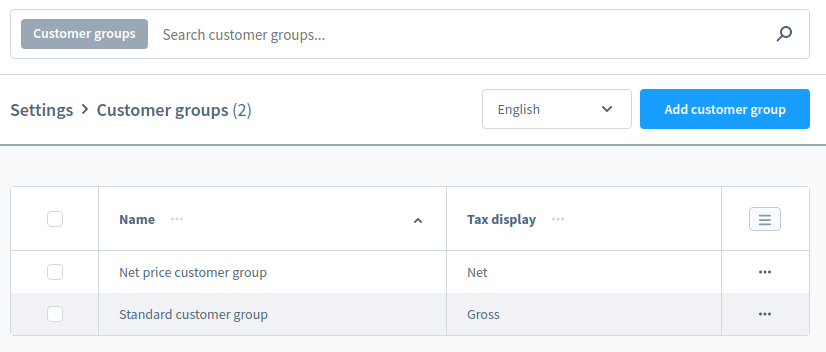
Via the customer groups you have the possibility to define whether the prices in the shop are displayed net or gross.
Example:
-
Configured customer groups (Settings > Customer Groups):
-
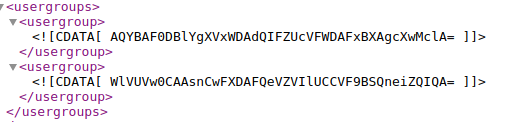
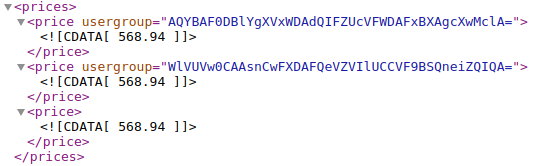
In the export, the
<usergroups>element contains all Customer Groups (hashed), and the<prices>element contains all calculated prices for the relevant Customer Group.
- In case of an API integration, the plugin will automatically detect the customers' Customer Group and will send it to Findologic via the
usergrouphashrequest query parameter.