


Generate a fast, filterable, shuffleable HTML image gallery from a directory, CSV, or JSON file. Great for exploring large image datasets with pandas-style filters in the browser.
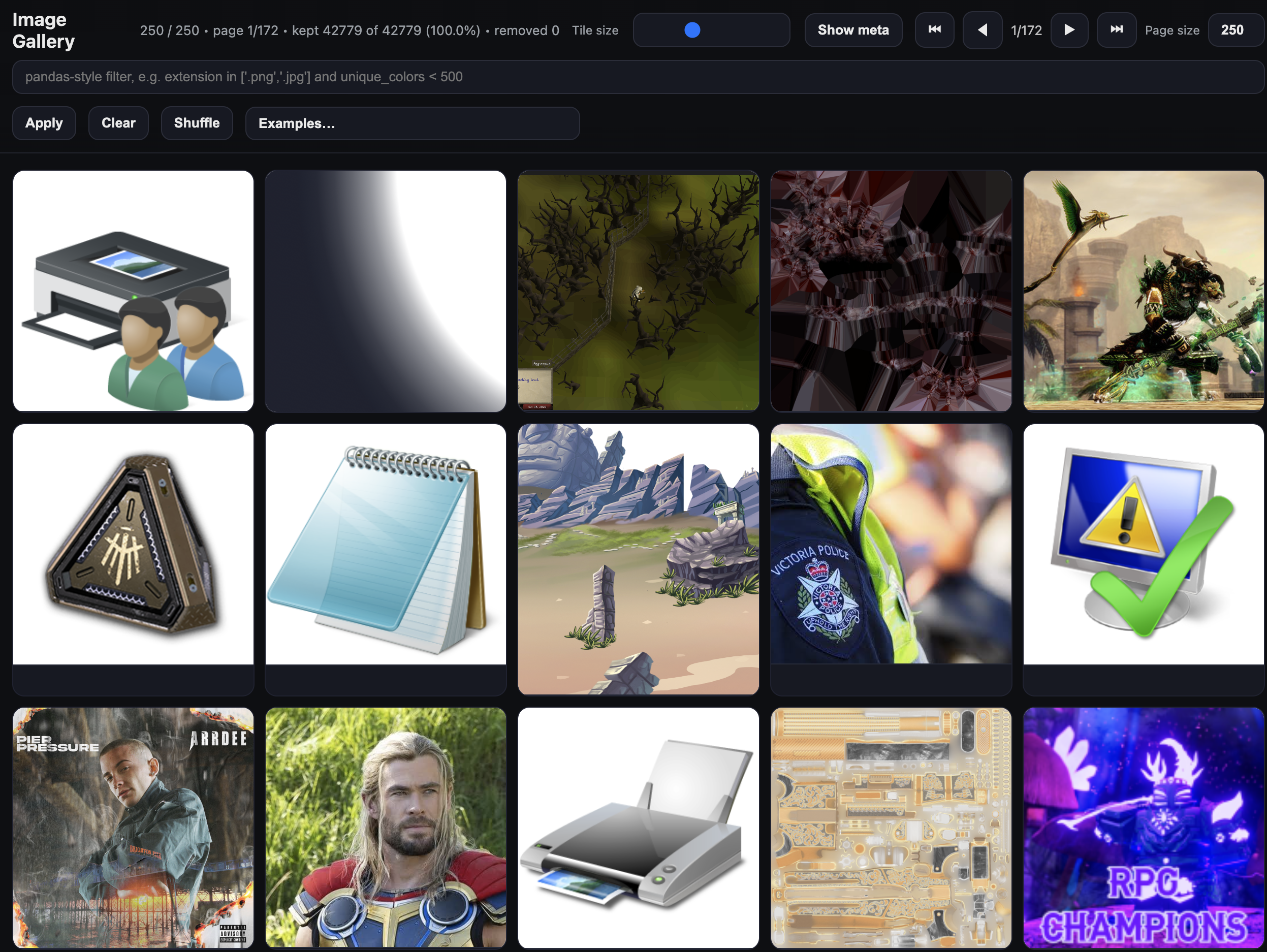
Most image work eventually involves staring at a folder of files and trying to understand what's in it — which ones are broken, which are mislabelled, which have unusual dimensions, which belong to a particular class. Standard tools make this painful: file browsers don't know about your metadata, notebooks require code for every query, and dedicated annotation tools are heavy and opinionated.
df-gallery is a lightweight escape hatch. Point it at a directory and get an instant browsable gallery. Point it at a CSV or JSON with per-image metadata and get a filterable, queryable view of your dataset — with the same pandas-style syntax you're already using. The output is a single self-contained HTML file you can share with anyone, no server required.
pip install df-galleryPoint it at a folder of images:
dfg serve /path/to/images/The gallery will open automatically in your browser. If it doesn't, navigate to http://127.0.0.1:8010 manually. Use --port to change the port.
# Serve a directory of images (auto-scans for jpg, png, gif, webp, etc.)
dfg serve /path/to/images/

# Serve a previously built gallery HTML
dfg serve gallery.html

# Serve a directory and extract image dimensions/format (requires Pillow)
dfg serve /path/to/images/ --extract-metadataUse build when your images already have metadata you care about — class labels, confidence scores, train/val/test splits, annotation flags, anything. You bring the metadata as a CSV or JSON file, and every column becomes a filterable field in the gallery UI.
The typical workflow is: run your pipeline, save results to a CSV alongside your image paths, then point build at that file to get an instant visual audit of what came out. The output is a single portable HTML file — no server needed to view it, just open it in a browser or share it with someone else.
# Basic: CSV with a 'filename' column containing image paths
dfg build annotations.csv --out gallery.html

# If your paths are relative to an image root directory
dfg build annotations.csv \
  --out gallery.html \
  --path-col filename \
  --img-root /path/to/images \
  --relative-to-html \
  --title "My Dataset"

# Build and immediately serve locally
dfg build annotations.csv --out gallery.html --serve

# Build, serve, and auto-rebuild whenever the CSV changes (useful during active labelling)
dfg build annotations.csv --out gallery.html --watch
The CSV or JSON must contain one column with image paths or URLs (default: filename). All other columns become filterable fields in the UI. JSON files should be a top-level array of objects.
| Flag | Default | Description |
|---|---|---|
--out, -o |
gallery.html |
Output HTML file |
--path-col |
filename |
Column containing image paths or URLs |
--img-root |
Prefix prepended to each image path | |
--relative-to-html |
Make paths relative to the output HTML location | |
--title |
Image Gallery |
Page title |
--tile |
200 |
Base tile size in px |
--chunk |
500 |
Images rendered per idle batch |
--page-size |
250 |
Images per page |
--show-cols |
all | Subset of columns to show in metadata |
--collapse-meta |
Hide metadata by default | |
--serve |
Start a local server after building | |
--watch |
Rebuild when the source file changes (implies --serve) |
|
--port |
8000 |
Server port |
--host |
127.0.0.1 |
Server host |
--open / --no-open |
open | Open browser on start |
| Flag | Default | Description |
|---|---|---|
--title |
Image Gallery |
Page title (directory mode) |
--extract-metadata |
Extract width, height, format via Pillow | |
--tile |
200 |
Base tile size in px |
--chunk |
500 |
Images rendered per idle batch |
--page-size |
250 |
Images per page |
--show-cols |
all | Subset of columns to show |
--collapse-meta |
Hide metadata by default | |
--port |
8010 |
Server port |
--host |
127.0.0.1 |
Server host |
--open / --no-open |
open | Open browser on start |
The filter bar accepts pandas-style expressions evaluated in the browser:
extension in ['.png', '.jpg']
unique_colors < 500
filename.str.icontains('cat')
(width > 512) and (height > 512)
uses_transparency == True
Supported operators: and, or, not, in, is null, is not null, ==, !=, <, >, <=, >=
String methods: .str.contains(), .str.icontains(), .str.lower(), .str.upper()
- Zero runtime dependencies — output is a single self-contained HTML file
- Chunked lazy rendering so large datasets stay responsive
- Tile size slider, pagination, shuffle
- Distributions tab with histograms, bar charts, violin plots, and grouped breakdowns by category
- Works with local paths, absolute paths, or remote URLs
uv venv && uv pip install -e .[dev]
uv run pytest
uv build       # builds wheel + sdist
uv publish # publish to PyPI (set UV_PUBLISH_TOKEN first)MIT — Copyright (c) 2025 Freddie Lichtenstein