Generate diagram sequences (mermaid format), markdown tables and more based on your code directly.
Current version: 0.4.7
Setup to draw a UML-like graph is flexible and supports regexes and include/exclude rules.
@file:K2DMermaidGraph(
    name = "Shapes23", // file name generated in build/generated/ksp/**/resources/
    symbolSelector = K2DSymbolSelectorAnnotation(
        includesCurrentPackage = true, // take all symbols in the current package
        excludesClasses = [Position::class], // Exclude explicitely Position class
        excludesFqnRegex = "sample\\.[a-z]+.*", // another rule based on regex for example
    )
)
package sample
Another more complex example:
@file:K2DMermaidGraph(
    name = "Shape_inheritance",
    symbolSelector = K2DSymbolSelectorAnnotation(
        includesCurrentPackage = false,
        includesClassesInheritingFrom = [Shape::class],
        excludesClasses = [Direction::class],
    ),
    configuration = K2DMermaidRendererConfiguration(
        showClassType = false,
        basicIsDown = true,
    )
)
can generate
classDiagram
    class Rectangle {
        +width Float
        +height Float
        +rotate(Float)
    }
    Rectangle --|> Shape: implements
    click Rectangle href "./sample/-rectangle/index.html"
    class Polygon {
        +howMuchSides() Int
    }
    Polygon --|> Shape: implements
    click Polygon href "./sample/-polygon/index.html"
    class Circle {
        +radius Float
    }
    Circle --|> Shape: implements
    click Circle href "./sample/-circle/index.html"
    class Oval {
        +centerOne Position
        +centerTwo Position
        +distanceBetweenPoints Float
        +angle Float
        +radius Float
    }
    Oval --|> Shape: implements
    click Oval href "./sample.another/-oval/index.html"
With a simple setup, you can generate a classes diagram for an entire package, and produce similar diagrams in your documentation.

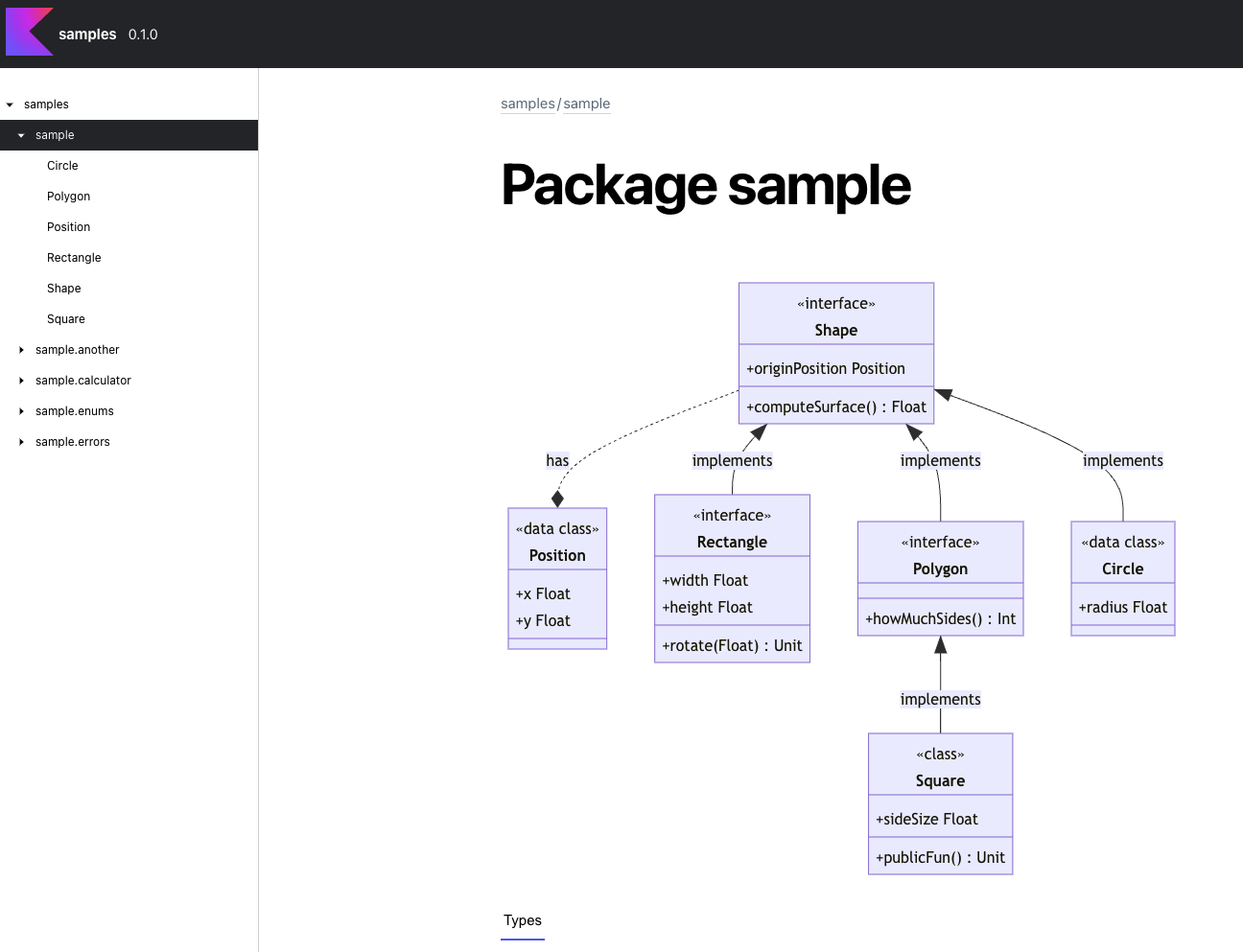
This plugin generates markdown file so you can use it with Dokka (as screenshots above) or any other documentation tool supporting mermaid diagrams.
You can also generate a more basic tables based on comments and property/function signatures:
@file:K2DMarkdownClassTable(
    name = "Circle_no_functions",
    symbolSelector = K2DSymbolSelectorAnnotation(
        includesCurrentPackage = false,
        includesClasses = [Circle::class],
    ),
    configuration = K2DMarkdownClassTableConfiguration(
        showClassFunctions = false,
    )
)
will generate
Name Type Comments originPosition [Position] radius [Float]
| K2D | KSP | Java |
|---|---|---|
| 0.4.1 | 1.8.0-1.0.9 | 1.8 |
| 0.4.2 | 1.8.10-1.0.9 | 11 |
| 0.4.3 | 1.8.10-1.0.9 | 11 |
| 0.4.4 | 1.8.10-1.0.9 | 11 |
| 2.0.21-1.0.27 | 17 | |
| 2.0.21-1.0.27 | 17 | |
| 0.4.7 | 2.0.21-1.0.27 | 17 |
Add the K2D plugin to your build.gradle.kts:
plugins {
    id("com.glureau.k2d") version "0.1.2"
}
Then, in the module where you want to generate diagrams or tables, add the KSP dependency:
dependencies {
    ksp("com.glureau.k2d:k2d-processor:0.1.2")
}
And add annotations in the files where you want to generate diagrams or tables.