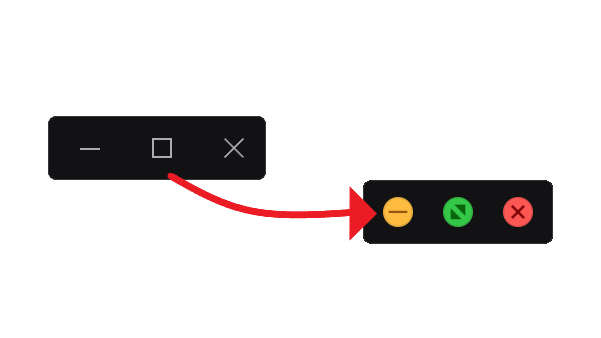
Replaces the standard Windows "Close", "Minimize" and "Maximize" buttons with the MacOS buttons and their logos.
- Paste the downloaded file into
%appdata%\Vencord\themes - Open the Vencord Themes Tab inside the Discord settings
- Go to the Themes tab
- Search for MacOs Controls (if you don't see the Theme click on "⟳ Load Missing Themes" symbol)
- Switch the checkbox from ✗ to ✓
- Reload Discord to apply changes
Paste the link https://raw.githubusercontent.com/itsmarianmc/MacOS-Controls/refs/heads/main/MacOS-Controls.theme.css to your theme import links.
More supported plugins and themes, as well as updated will be coming soon...
If you want to have a plugin or certain elements animated, you can also contact me via Discord and, if you have already designed your own animation, send me your code snippet.
Star and Watch this project to stay updated!
© 2025 itsmarian | All rights reserved.
Vencord, as well as BetterDiscord are against Discord's Terms of Service and can potentially ban your Discord account. I do not endorse Vencord or BetterDiscord and disassociate myself from these services and am merely providing a service and am not affiliated with these services.