


A fast, embeddable graph database for Python — no server required, SQLite-backed, Cypher-powered, and optional semantic search.

GrafitoDB implements the Property Graph Model (Neo4j-like) with:
- Cypher queries and pattern matching
- Vector/semantic search (optional ANN backends)
- Full-text search (FTS5) and hybrid workflows
- RDF/Turtle export (optional)
- Visualization helpers (optional, via PyVis)
Read the full documentation at: https://jpmanson.github.io/GrafitoDB/
- Multi-labeled Nodes: Nodes can have multiple labels (e.g.,
Person,Employee,Manager) - Rich Properties: Both nodes and relationships support JSON-serializable properties
- Directed Relationships: Type-safe relationships with optional properties
- Cypher Query Language: Full Cypher parser and executor for graph queries
- Pattern Matching: Query nodes and relationships by labels, types, and properties
- Graph Traversal:
- Find shortest path (BFS algorithm)
- Find any path with optional depth limit (DFS algorithm)
- Get neighbors (incoming, outgoing, or both directions)
- Metadata Queries: Inspect labels, relationship types, and counts
- Full-Text Search (FTS5): BM25-ranked keyword search over configured text properties
- Semantic/Vector Search: Optional ANN backends with similarity search and reranker hooks
- Transactions: Full ACID transaction support with context managers
- Storage: SQLite with normalized schema
- Data Model: Property Graph Model (Neo4j-compatible concepts)
- Python Version: 3.11+
- Dependencies: None (uses standard library only)
- Performance: Efficient indexing on relationships and labels
- Text Search: SQLite FTS5 virtual tables with BM25 ranking (requires FTS5-enabled SQLite build)
# Install from PyPI
pip install grafito
uv pip install grafito

# Install in development mode
git clone <repository-url>
cd grafito
pip install -e ".[dev]"
uv pip install -e ".[dev]"
Optional extras:
uv pip install grafito[all]
uv pip install grafito[rdf]
uv pip install grafito[viz]
uv pip install grafito[netgraph]
uv pip install grafito[faiss]
uv pip install grafito[hnswlib]
uv pip install grafito[annoy]
uv pip install grafito[leann]
Note: grafito[all] may fail on some OS/Python combinations depending on native wheels
for optional backends. In that case, install only the extras you need.
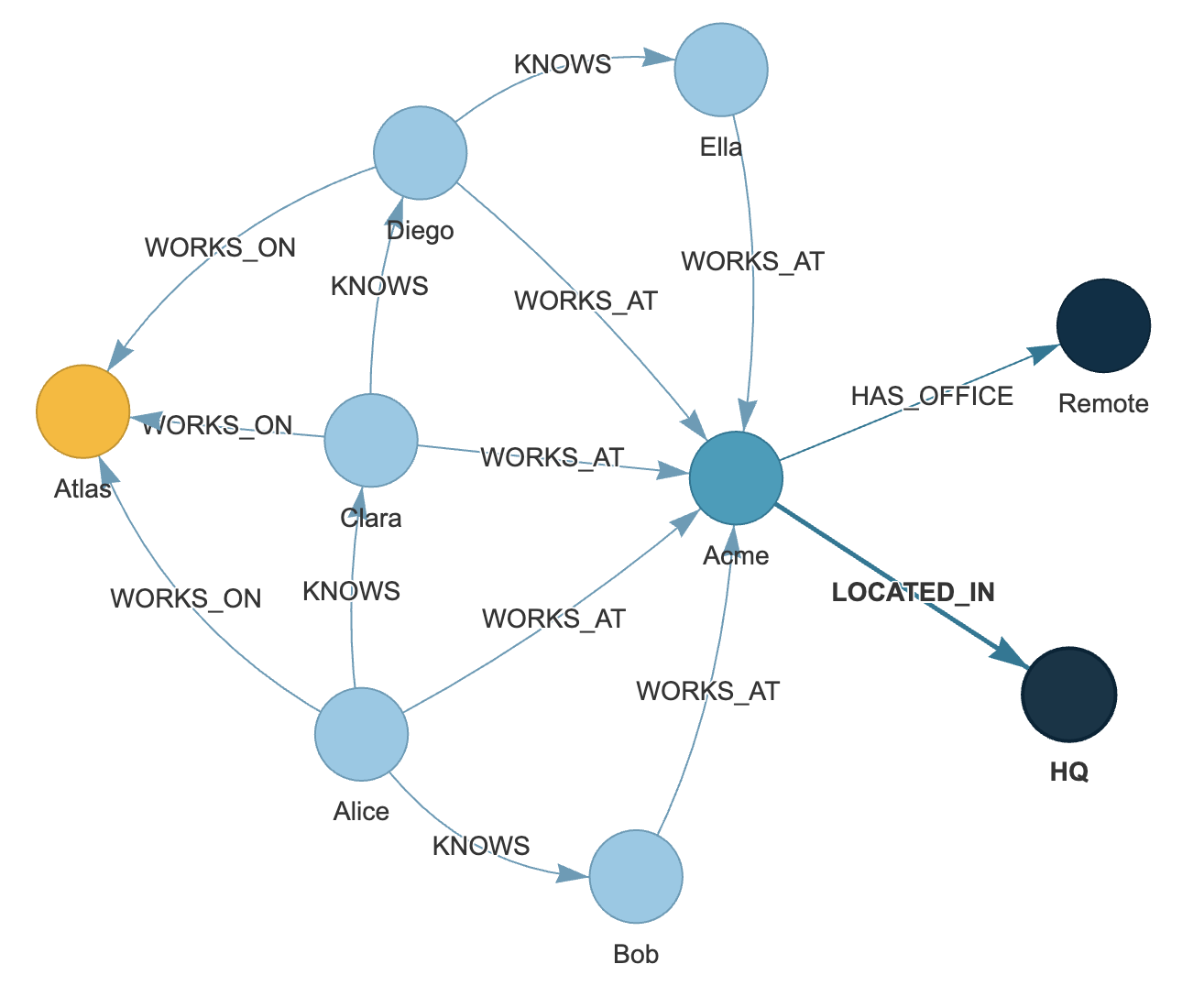
PyVis visualization helpers (node labels + colors + physics presets):
from grafito.integrations import save_pyvis_html, available_viz_backends

print(available_viz_backends())

graph = db.to_networkx()
save_pyvis_html(
    graph,
    path="grafito_graph.html",
    node_label="name",
    color_by_label=True,
    physics="compact",  # or "spread"
)
D2 export (text) and optional render via CLI:
from grafito.integrations import export_graph

graph = db.to_networkx()
export_graph(graph, "graph.d2", backend="d2", node_label="label_and_name")
# If you have the `d2` CLI installed:
export_graph(graph, "graph.d2", backend="d2", render="svg")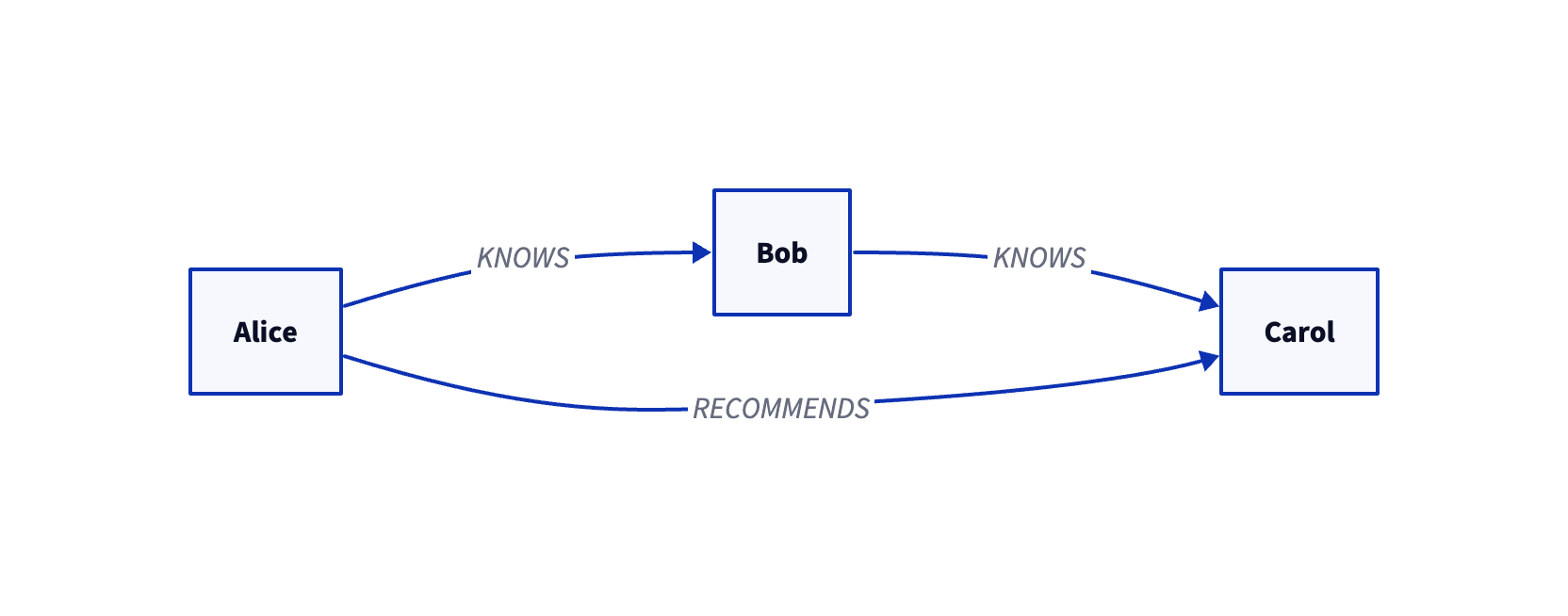
Note: the D2 renderer is a separate CLI (brew install d2 on macOS). The Python
package does not bundle it.
Mermaid export (text) and optional render via mermaid-cli:
from grafito.integrations import export_graph

graph = db.to_networkx()
export_graph(graph, "graph.mmd", backend="mermaid", node_label="label_and_name")
# If you have mermaid-cli installed:
export_graph(graph, "graph.mmd", backend="mermaid", render="svg")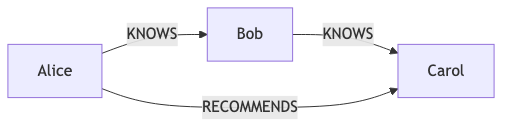
Note: Mermaid rendering requires mmdc (npm i -g @mermaid-js/mermaid-cli).
Graphviz DOT export (text) and optional render via dot:
from grafito.integrations import export_graph

graph = db.to_networkx()
export_graph(graph, "graph.dot", backend="graphviz", node_label="label_and_name")
# If you have Graphviz installed:
export_graph(graph, "graph.dot", backend="graphviz", render="svg", engine="dot")
export_graph(graph, "graph.dot", backend="graphviz", render="svg", engine="neato")
export_graph(graph, "graph.dot", backend="graphviz", render="svg", engine="sfdp")
Example script:
python examples/graphviz_visualize.pyNote: Graphviz rendering requires dot (brew install graphviz).
D3 HTML export (self-contained, no build step):
from grafito.integrations import export_graph

graph = db.to_networkx()
export_graph(graph, "graph.html", backend="d3", node_label="label_and_name")
Cytoscape.js HTML export (self-contained, no build step):
from grafito.integrations import export_graph

graph = db.to_networkx()
export_graph(graph, "graph.html", backend="cytoscape", node_label="label_and_name", layout="cose")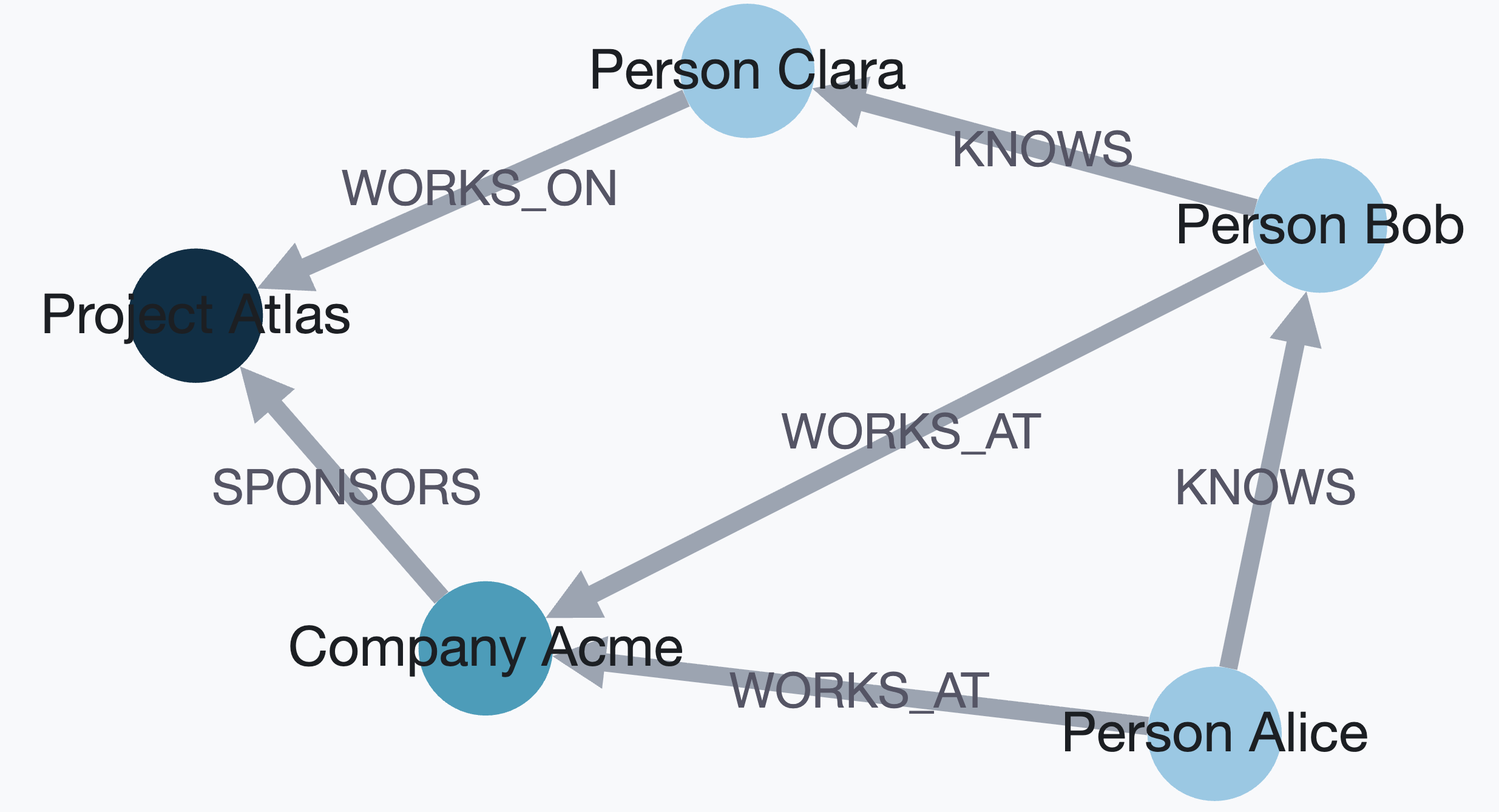
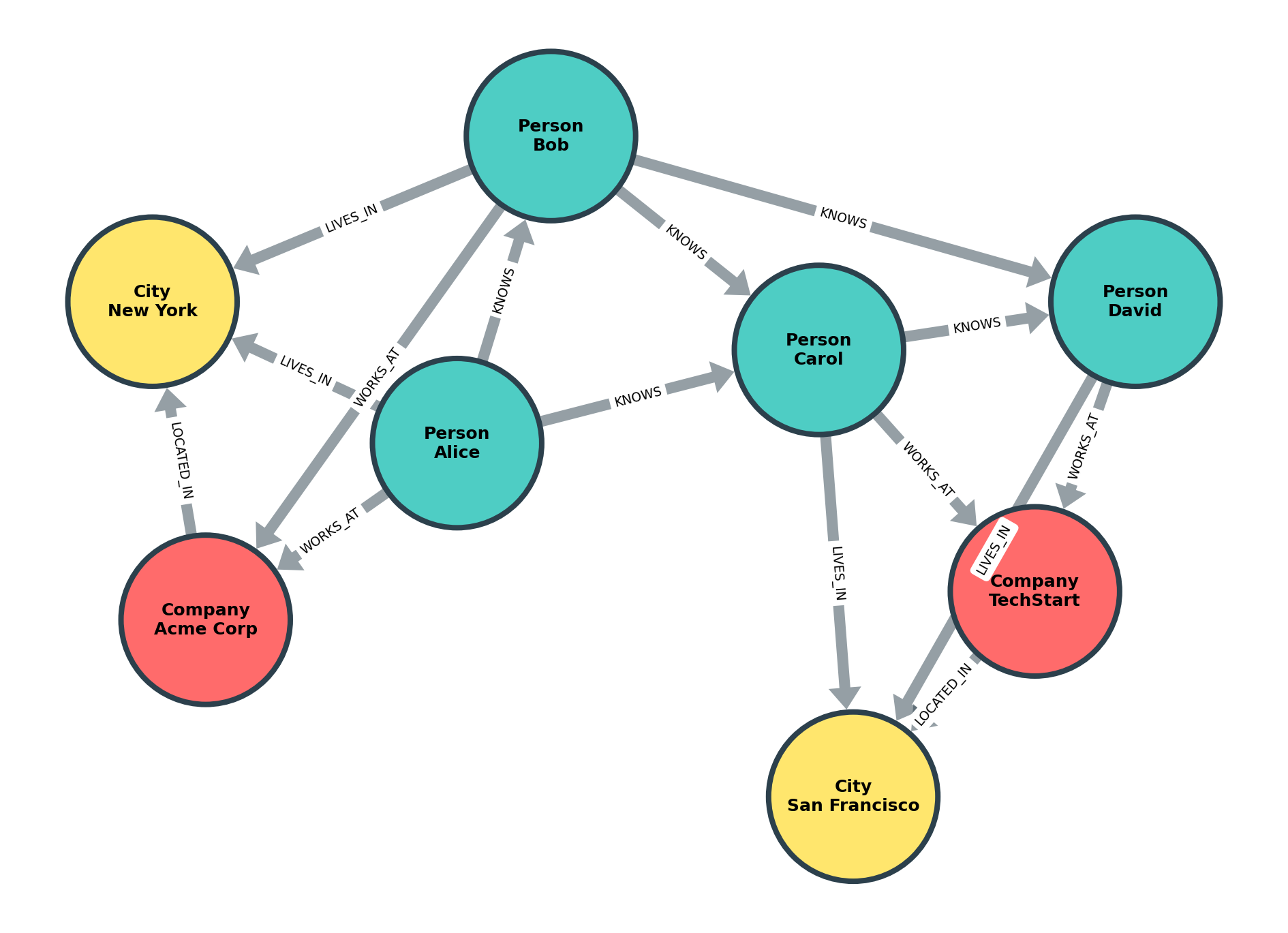
Netgraph export (publication-quality PNG/SVG/PDF via matplotlib):
from grafito.integrations import export_graph

def label_with_wrap(node_id, attrs):
    labels = attrs.get("labels", [])
    name = attrs.get("properties", {}).get("name", str(node_id))
    return f"{labels[0]}\n{name}" if labels else name

graph = db.to_networkx()
export_graph(
    graph,
    "graph.png",
    backend="netgraph",
    label_fn=label_with_wrap,
    color_map={"Person": "#4ecdc4", "Company": "#ff6b6b", "City": "#ffe66d"},
    node_size=8,
    node_label_fontdict={"size": 12, "fontweight": "bold"},
)
from grafito import GrafitoDatabase

# Initialize database (in-memory or file-based)
db = GrafitoDatabase(':memory:')  # or 'mydb.db' for persistence

# Create nodes with labels and properties
alice = db.create_node(
    labels=['Person', 'Employee'],
    properties={'name': 'Alice', 'age': 30}
)

bob = db.create_node(
    labels=['Person'],
    properties={'name': 'Bob', 'age': 25}
)

company = db.create_node(
    labels=['Company'],
    properties={'name': 'TechCorp', 'founded': 2010}
)

# Create relationships
works_at = db.create_relationship(
    alice.id, company.id, 'WORKS_AT',
    properties={'since': 2020, 'position': 'Engineer'}
)

knows = db.create_relationship(alice.id, bob.id, 'KNOWS')

# Query nodes by labels and properties
persons = db.match_nodes(labels=['Person'])
employees = db.match_nodes(labels=['Employee'], properties={'age': 30})

# Get neighbors
alice_connections = db.get_neighbors(alice.id, direction='outgoing')

# Find shortest path
path = db.find_shortest_path(alice.id, bob.id)
if path:
    print(f"Path: {' -> '.join(node.properties['name'] for node in path)}")

# Metadata queries
print(f"Total nodes: {db.get_node_count()}")
print(f"All labels: {db.get_all_labels()}")

# Use transactions
with db:
    node1 = db.create_node(labels=['Test'])
    node2 = db.create_node(labels=['Test'])
    db.create_relationship(node1.id, node2.id, 'CONNECTS')
# Auto-commits on success, rolls back on exception

# Close when done
db.close()GrafitoDB includes a complete Cypher query language parser and executor, allowing you to use Neo4j-style declarative queries alongside the programmatic API.
from grafito import GrafitoDatabase

db = GrafitoDatabase(':memory:')

# Execute Cypher queries
results = db.execute("CREATE (n:Person {name: 'Alice', age: 30})")
results = db.execute("MATCH (n:Person) WHERE n.age > 25 RETURN n.name, n.age")

for row in results:
print(f"{row['n.name']} is {row['n.age']} years old")Unbounded variable-length patterns (e.g., [:KNOWS*..]) use a default max hop limit.
Configure it when creating the database:
db = GrafitoDatabase(':memory:', cypher_max_hops=5)# Create simple node
db.execute("CREATE (n:Person {name: 'Alice'})")
# Create node with multiple labels
db.execute("CREATE (n:Person:Employee {name: 'Bob', age: 30})")
# Create node with list/map property literals
db.execute("CREATE (n:Person {tags: ['a', 'b'], meta: {score: 1}})")
# Create relationship pattern
db.execute("""
CREATE (a:Person {name: 'Alice'})
-[r:KNOWS {since: 2020}]->
(b:Person {name: 'Bob'})
""")
# Note: list/map property literals can be nested; map keys must be strings.
# Create multiple patterns
db.execute("""
CREATE (a:Person {name: 'Alice'}),
(b:Person {name: 'Bob'}),
(c:Company {name: 'TechCorp'})
""")# Match all nodes with label
results = db.execute("MATCH (n:Person) RETURN n")
# Match nodes with properties
results = db.execute("MATCH (n:Person {name: 'Alice'}) RETURN n")
# Match relationship patterns
results = db.execute("""
MATCH (a:Person)-[r:KNOWS]->(b:Person)
RETURN a.name, b.name, r.since
""")
# Match with multiple labels
results = db.execute("MATCH (n:Person:Employee) RETURN n.name")
# Variable-length paths (bounded and unbounded)
results = db.execute("MATCH (a:Person)-[:KNOWS*1..3]->(b:Person) RETURN a.name, b.name")
results = db.execute("MATCH (a:Person)-[:KNOWS*..]->(b:Person) RETURN a.name, b.name")
# UNION and UNION ALL
results = db.execute("""
MATCH (n:Person) RETURN n.name
UNION
MATCH (n:Company) RETURN n.name
""")
results = db.execute("""
MATCH (n:Person {name: 'Alice'}) RETURN n.name
UNION ALL
MATCH (n:Person {name: 'Alice'}) RETURN n.name
""")
# Subqueries with CALL { ... }
results = db.execute("""
MATCH (n:Person {name: 'Alice'})
WITH n
CALL {
WITH n
MATCH (n)-[:KNOWS]->(m)
RETURN m.name AS friend
}
RETURN n.name, friend
""")
# shortestPath/allShortestPaths (single relationship pattern)
results = db.execute("""
MATCH p=shortestPath((a:Person {name: 'A'})-[:KNOWS*1..3]->(b:Person {name: 'C'}))
RETURN p
""")
results = db.execute("""
MATCH p=allShortestPaths((a:Person {name: 'A'})-[:KNOWS*1..3]->(b:Person {name: 'C'}))
RETURN p
""")
# Note: shortestPath/allShortestPaths support a single relationship pattern,
# respect relationship direction/type and hop bounds, and avoid node cycles.
# Lists, IN, and list comprehensions
results = db.execute("""
MATCH (n:Person)
WHERE n.name IN ['Alice', 'Bob']
RETURN n.name
""")
results = db.execute("""
WITH 1 AS dummy
RETURN [x IN [1,2,3] WHERE x > 1 | x] AS nums
""")
# Pattern comprehensions
results = db.execute("""
MATCH (a:Person {name: 'Alice'})
RETURN [(a)-[:KNOWS]->(b) WHERE b.active | b.name] AS friends
""")
results = db.execute("""
MATCH (a:Person {name: 'Alice'})
RETURN [(a)-[:KNOWS]->(b)-[:WORKS_AT]->(c)
WHERE c.name = 'Acme' | b.name] AS coworkers
""")
results = db.execute("""
MATCH (a:Person {name: 'A'})
RETURN [(a)-[r:KNOWS*1..2]->(b)
WHERE ALL(rel IN r WHERE rel.since >= 2020)
| b.name] AS trusted
""")
# List indexing, concatenation, and slicing
results = db.execute("""
WITH 1 AS dummy
RETURN [1,2,3][1] AS second,
[1,2] + [3] AS combined,
[1,2,3,4][1..3] AS middle
""")
# List predicates
results = db.execute("""
WITH [1,2,3] AS xs
RETURN ANY(x IN xs WHERE x > 2) AS any,
ALL(x IN xs WHERE x > 0) AS all,
NONE(x IN xs WHERE x < 0) AS none,
SINGLE(x IN xs WHERE x = 2) AS single
""")
# List predicates over node lists
results = db.execute("""
MATCH (a:Person {name: 'Alice'})
MATCH (b:Person {name: 'Bob'})
WITH [a,b] AS people
RETURN ANY(n IN people WHERE n.age > 25) AS any
""")
# List predicates over relationship lists (truthy semantics)
results = db.execute("""
MATCH (a:Person {name: 'A'})-[r:KNOWS*1..2]->(b:Person)
RETURN ANY(rel IN r) AS any,
ALL(rel IN r) AS all,
NONE(rel IN r) AS none,
SINGLE(rel IN r) AS single
""")API usage:
db.create_node_index('Person', 'name')
db.create_relationship_index('KNOWS', 'since')
db.list_indexes()
db.drop_index('idx_node_person_name')
Cypher usage:
db.execute("CREATE INDEX FOR NODE :Person(name)")
db.execute("CREATE INDEX FOR RELATIONSHIP :KNOWS(since)")
db.execute("CREATE INDEX IF NOT EXISTS FOR NODE :Person(name)")
db.execute("CREATE UNIQUE INDEX FOR NODE :Person(email)")
db.execute("SHOW INDEXES")
db.execute("SHOW INDEXES WHERE entity = 'node'")
db.execute("DROP INDEX idx_node_person_name")
db.execute("DROP INDEX IF EXISTS idx_node_person_name")

# Neo4j-style syntax
db.execute("CREATE INDEX FOR (n:Person) ON (n.name)")
db.execute("CREATE INDEX FOR ()-[r:KNOWS]-() ON (r.since)")

# URI index (optional)
db.execute("CALL db.uri_index.create('node')")
db.execute("CALL db.uri_index.create('relationship')")
URI index helpers:
db.create_node_uri_index()
db.create_relationship_uri_index()# Create constraints
db.execute("CREATE CONSTRAINT FOR NODE :Person REQUIRE email IS UNIQUE")
db.execute("CREATE CONSTRAINT FOR NODE :Person REQUIRE name IS NOT NULL")
db.execute("CREATE CONSTRAINT FOR NODE :Person REQUIRE age IS INTEGER")
db.execute("CREATE CONSTRAINT IF NOT EXISTS FOR NODE :Person REQUIRE email IS UNIQUE")
db.execute("CREATE CONSTRAINT person_email_unique FOR NODE :Person REQUIRE email IS UNIQUE")
# Neo4j-style syntax
db.execute("CREATE CONSTRAINT FOR (n:Person) REQUIRE n.email IS UNIQUE")
db.execute("CREATE CONSTRAINT FOR ()-[r:KNOWS]-() REQUIRE r.since IS INTEGER")
db.execute("CREATE CONSTRAINT FOR (n:Person) ON (n.email) IS UNIQUE")
db.execute("CREATE CONSTRAINT FOR ()-[r:KNOWS]-() ON (r.since) IS INTEGER")
# List and drop
db.execute("SHOW CONSTRAINTS")
db.execute("SHOW CONSTRAINTS WHERE entity = 'node'")
db.execute("DROP CONSTRAINT IF EXISTS constraint_node_person_email_unique")
db.execute("DROP CONSTRAINT person_email_unique")Notes:
- Supported types:
STRING,INTEGER,FLOAT,BOOLEAN,LIST,MAP. - Type and existence constraints require a non-null property value.
- Uniqueness allows
nullvalues (no duplicate check onnull).
Notes:
- Index identifiers (label/type/property) must be alphanumeric or
_. - Indexes are stored as SQLite expression indexes on
propertiesJSON fields. - Label/type is currently stored for metadata/naming; the executor still filters in Python.
- Case-sensitive string filters use
instr/substrto avoid SQLiteLIKEcase-folding quirks.
Optional backends (for backend="faiss", backend="annoy", backend="leann"):
pip install grafito[faiss](CPU build)pip install grafito[annoy]pip install grafito[leann]pip install grafito[hnswlib](forbackend="hnswlib")
Optional integrations:
pip install grafito[rdf](RDF/Turtle import/export)pip install grafito[viz](PyVis visualization)pip install grafito[netgraph](publication-quality matplotlib graphs)
NetworkX export example:
db = GrafitoDatabase(":memory:")
db.create_node(labels=["Person"], properties={"name": "Alice"})
graph = db.to_networkx()
NetworkX import example:
import networkx as nx

graph = nx.MultiDiGraph()
graph.add_node("a", labels=["Person"], properties={"name": "Alice"})
graph.add_node("b", labels=["Person"], properties={"name": "Bob"})
graph.add_edge("a", "b", type="KNOWS", properties={"since": 2021})

db = GrafitoDatabase(":memory:")
node_map = db.from_networkx(graph)
RDF/Turtle export example:
from grafito.integrations import export_turtle

turtle = export_turtle(
    db,
    base_uri="grafito:",
    prefixes={"schema": "http://schema.org/"}
)
print(turtle)
Typed RDF export example:
python examples/rdf_export_typed.pyOntology + data export example:
python examples/rdf_ontology_example.pyVisualization example (PyVis):
from grafito.integrations import save_pyvis_html

graph = db.to_networkx()
save_pyvis_html(graph, path="grafito_graph.html")
FAISS GPU note:
- We use
faiss-cpubecause PyPIfaiss-gpuwheels are not available. See faiss docs - GPU support typically requires a Conda install, which is more complex in this environment.
HNSWlib note:
- Deletes are soft (in-memory) and require a rebuild to fully purge removed items.
# Create a FAISS index (exact flat L2)
db.create_vector_index(
    "people_vec",
    dim=384,
    backend="faiss",
    method="flat",
    options={"metric": "l2"}
)

# Persist FAISS index to disk
db.create_vector_index(
    "people_vec",
    dim=384,
    backend="faiss",
    method="flat",
    options={"metric": "l2", "index_path": ".grafito/indexes/people_vec.faiss.idx"}
)

# Insert/update embeddings
db.upsert_embedding(node_id, vector, index="people_vec")

# Query
results = db.semantic_search(vector, k=10, index="people_vec")
Default k behavior:
- If
kis omitted, GrafitoDB usesoptions.default_kfor the index. - Otherwise it falls back to
default_top_kfromGrafitoDB.
Example:
# Global fallback
db = GrafitoDatabase(":memory:", default_top_k=20)

# Per-index override
db.create_vector_index(
    "people_vec",
    dim=384,
    backend="faiss",
    method="flat",
    options={"metric": "ip", "default_k": 5}
)

# Uses default_k=5 from the index
results = db.semantic_search(vector, index="people_vec")
Cypher procedure (Neo4j-style):
results = db.execute("""
    CALL db.vector.search('people_vec', [1.0, 0.0], 5, {labels: ['Person']})
    YIELD node, score
    RETURN node.name AS name, score
""")
APOC-style loaders (HTML/XML):
results = db.execute("""
    WITH "examples/belgian_beers.xml" AS path
    CALL apoc.load.xml(path, ".//beer") YIELD value
    RETURN value.brand._text AS brand, value.brewery._text AS brewery
""")
results = db.execute("""
WITH "https://example.com/beers.html" AS url
CALL apoc.load.html(url, {
brand: "table.wikitable tbody tr td:eq(0)",
brewery: "table.wikitable tbody tr td:eq(3)"
}) YIELD value
RETURN value.brand[0].text AS first_brand, value.brewery[0].text AS first_brewery
""")results = db.execute("""
WITH "https://api.example.com/beers" AS url
CALL apoc.load.jsonParams(
url,
{type: "lager"},
{"X-Api-Key": "token"},
{method: "GET", timeout: 10, retry: 2, failOnError: true}
) YIELD value
RETURN value.items AS items
""")results = db.execute("""
WITH "examples/belgian_beers.xml" AS path
CALL apoc.load.xmlParams(
path,
".//beer",
{type: "lager"},
{"X-Api-Key": "token"},
{method: "GET", timeout: 10, retry: 2, failOnError: true}
) YIELD value
RETURN value.brand._text AS brand
""")results = db.execute("""
WITH "https://api.example.com/private" AS url
CALL apoc.load.jsonParams(
url,
{},
{},
{method: "GET", auth: {user: "alice", password: "secret"}}
) YIELD value
RETURN value
""")results = db.execute("""
WITH "https://example.com/testload.tgz?raw=true!person.json" AS url
CALL apoc.load.json(url) YIELD value
RETURN value.person.name AS name
""")Supported tar formats for !member loading: .tar, .tgz, .tar.gz, .tar.bz2, .tar.xz.
results = db.execute("""
    WITH "examples/people.jsonl" AS url
    CALL apoc.import.json(url) YIELD nodes, relationships
    RETURN nodes, relationships
""")
results = db.execute("""
WITH apoc.util.compress(
'{"type":"node","id":"2","labels":["User"],"properties":{"age":12}}',
{compression: "DEFLATE"}
) AS jsonCompressed
CALL apoc.import.json(jsonCompressed, {compression: "DEFLATE"})
YIELD nodes, relationships
RETURN nodes, relationships
""")Compressed XML (same options across URL or local file):
results = db.execute("""
    WITH "examples/beers.xml.gz" AS path
    CALL apoc.load.xml(path, ".//beer", {compression: "gzip"}) YIELD value
    RETURN value.name._text AS name
""")
Supported compression values: gzip, bz2, xz, zip. For zip, set path to the XML entry name.
# Check FTS5 availability
if not db.has_fts5():
    raise RuntimeError("SQLite FTS5 is required for text search")

# Configure which properties to index
db.create_text_index("node", "Person", ["name", "bio"])
db.create_text_index("relationship", "WORKS_AT", ["role"])

# Rebuild after adding config (or use insert triggers going forward)
db.rebuild_text_index()

# Keyword search with BM25 ranking
results = db.text_search("engineer", k=10, labels=["Person"])
Options:
labels: label filter applied before search (list of strings).properties: property filter map (same shape asMATCHfilters).rerank: re-score candidates using stored embeddings when available.reranker: registered reranker name (overrides internal rerank).candidate_multiplier: expands candidate pool before rerank (e.g.,k * 3).
Custom reranker (Python API):
def my_reranker(query_vector, candidates):
    # candidates: [{"id": int, "vector": [...], "score": float, "node": Node}, ...]
    return [{"id": item["id"], "score": item["score"]} for item in candidates]

db.register_reranker("my_reranker", my_reranker)
results = db.semantic_search(vector, k=10, index="people_vec", reranker="my_reranker")
Errors:
- Unknown
rerankernames raiseDatabaseError(Python API) orCypherExecutionError(Cypher). - Error message includes
Unknown reranker '<name>'for easy matching.
Vector literal helper:
from grafito.cypher import format_vector_literal

vector_literal = format_vector_literal(query_vec, precision=8)
cypher = f"""
CALL db.vector.search('docs_vec', {vector_literal}, 2, {{labels: ['Doc'], rerank: true}})
YIELD node, score
RETURN node.title AS title, score
"""
Notes:
- Cypher numeric literals accept scientific notation (e.g.,
1e-3,-2.5E2). - Non-finite values (
NaN,Infinity) are not valid literals and raise a syntax error.
FAISS options:
method="flat": exact search withmetricl2orip.method="ivf_flat": ANN search. Options:nlist(clusters),nprobe(search probes).method="hnsw": ANN search. Options:hnsw_m,ef_search,ef_construction.index_path: optional persistence path for FAISS indexes.
LEANN auto-build control:
db.create_vector_index(
    "leann_vec",
    dim=384,
    backend="leann",
    method="leann",
    options={"auto_build": False, "index_path": ".grafito/indexes/leann_vec.leann"},
)

# After batch upserts, rebuild explicitly
db.rebuild_vector_index("leann_vec")
Neo4j dump import (programmatic):
from grafito import GrafitoDatabase

db = GrafitoDatabase(":memory:")
db.import_neo4j_dump("examples/recommendations-5.26.dump")
Notes:
- Requires
zstandard(included by default). - Imports a Neo4j dump database file; no running Neo4j instance is needed.
Note: store_embeddings=True persists raw vectors in SQLite (vector_entries). This is independent of FAISS
index_path. You can enable both (FAISS index persistence + stored vectors) or just one, depending on your
durability and rebuild needs. If the database is :memory:, both the SQLite-stored vectors and FAISS indexes
are in-memory; use index_path (and a file-backed DB) if you need persistence across restarts.
results = db.execute("""
    UNWIND [1,2,3] AS x
    RETURN x
""")

results = db.execute("""
    UNWIND [1,2,3] AS x
    WITH SUM(x) AS total
    RETURN total
""")# Path values and helpers
results = db.execute("""
MATCH p=(a:Person {name: 'A'})-[:KNOWS]->(b:Person {name: 'B'})
RETURN p, nodes(p) AS nodes, relationships(p) AS rels
""")
# Map literals and access
results = db.execute("""
WITH {a: 1, b: 2} AS m
RETURN m.a AS a, m.b AS b
""")results = db.execute("""
MATCH (n:Person {name: 'Alice'})
WITH n, {a: 1, b: 2} AS m
RETURN keys(n) AS nkeys,
values(n) AS nvalues,
keys(m) AS mkeys,
values(m) AS mvalues
""")results = db.execute("""
WITH [1,1,2] AS xs, {a: 1} AS m
RETURN apoc.text.join(['a','b'], ',') AS joined,
apoc.text.split('a,b,c', ',') AS parts,
apoc.text.replace('a-b-c', '-', '_') AS replaced,
apoc.map.merge(m, {b: 2}) AS merged,
apoc.map.removeKey({a: 1, b: 2}, 'a') AS removed,
apoc.map.get(m, 'missing', 9) AS fallback,
apoc.coll.contains(xs, 2) AS has_two,
apoc.coll.toSet(xs) AS set
""")Notes:
keys()/values()accept maps, nodes, and relationships; invalid types raiseCypherExecutionError.apoc.text.join()/apoc.text.split()require string inputs; invalid regex raisesCypherExecutionError.apoc.map.get()returns the provided default when map/key isnull.apoc.coll.contains()returnsnullif the list or search value isnull.
# ISO-8601 parsing for temporal types
results = db.execute("""
    WITH 1 AS dummy
    RETURN date('2024-01-02') AS d,
           time('10:11:12') AS t,
           datetime('2024-01-02T10:11:12') AS dt,
           localdatetime('2024-01-02T10:11:12') AS ldt,
           duration('P1DT2H') AS dur
""")

# Truncate and duration between
results = db.execute("""
    WITH 1 AS dummy
    RETURN date.truncate('month', date('2024-02-20')) AS d,
           duration.between(date('2024-01-01'), date('2024-01-03')) AS diff
""")

# Basic arithmetic with durations
results = db.execute("""
    WITH 1 AS dummy
    RETURN date('2024-01-01') + duration('P2D') AS d,
           datetime('2024-01-01T00:00:00') - duration('PT1H') AS dt
""")

# Temporal comparisons and ordering
results = db.execute("""
    WITH 1 AS dummy
    WHERE date('2024-01-01') < date('2024-01-02')
    RETURN date('2024-01-01') AS d
""")
results = db.execute("""
    MATCH (n:Person)
    RETURN n.name,
           CASE WHEN n.name = 'A' THEN date('2024-01-02') ELSE date('2024-01-01') END AS d
    ORDER BY CASE WHEN n.name = 'A' THEN date('2024-01-02') ELSE date('2024-01-01') END ASC
""")

# Timezone-aware comparisons
results = db.execute("""
    WITH 1 AS dummy
    RETURN datetime('2024-01-01T00:00:00Z') = datetime('2024-01-01T01:00:00+01:00') AS eq
""")results = db.execute("""
WITH 1 AS dummy
RETURN point({x: 0, y: 3}) AS p,
distance(point({x: 0, y: 3}), point({x: 0, y: 0})) AS d
""")Current casting behavior:
toInteger(value)accepts integers, floats, booleans, and numeric strings (floats are truncated);nullstaysnull.toFloat(value)accepts integers, floats, booleans, and numeric strings;nullstaysnull.toString(value)uses Python string conversion;nullbecomesNone.
results = db.execute("""
    WITH 1 AS dummy
    RETURN toInteger('42') AS i,
           toFloat('3.5') AS f,
           toString(123) AS s,
           toInteger(null) AS n
""")Current string function behavior:
toUpper(text),toLower(text),trim(text)returnnullwhen input isnull.split(text, delimiter)returns a list of strings ornullif any input isnull.substring(text, start, length?)uses 0-based indexing; length is optional.regex(text, pattern)andmatches(text, pattern)return boolean match results;nullif any input isnull.- Invalid argument types raise a
CypherExecutionError. substring()rejects negativestartorlength.- Invalid regex patterns raise a
CypherExecutionError.
results = db.execute("""
    WITH 1 AS dummy
    RETURN toUpper('hi') AS up,
           toLower('HI') AS low,
           trim('  hi  ') AS trimmed,
           split('a,b,c', ',') AS parts,
           substring('abcdef', 1, 3) AS sub,
           substring('abcdef', 2) AS tail,
           regex('abc', 'a.c') AS re1,
           matches('abc', '^d') AS re2
""")
# Error cases (raise CypherExecutionError)
db.execute("WITH 1 AS dummy RETURN split(1, ',') AS parts")
db.execute("WITH 1 AS dummy RETURN substring('abc', 0 - 1) AS sub")
db.execute("WITH 1 AS dummy RETURN regex('abc', '[') AS ok")results = db.execute("""
WITH [1,2,3] AS xs
RETURN filter(x IN xs WHERE x > 1) AS filtered,
extract(x IN xs | x + 1) AS extracted,
reduce(acc = 0, x IN xs | acc + x) AS total
""")results = db.execute("""
WITH 1 AS dummy
RETURN coalesce(null, 'fallback', 'value') AS chosen
""")# Simple comparisons
results = db.execute("MATCH (n:Person) WHERE n.age > 25 RETURN n.name")
# Multiple conditions with AND/OR
results = db.execute("""
MATCH (n:Person)
WHERE n.age > 25 AND n.city = 'NYC'
RETURN n.name
""")
results = db.execute("""
MATCH (n:Person)
WHERE n.age > 30 OR n.city = 'LA'
RETURN n.name
""")
# NOT operator
results = db.execute("""
MATCH (n:Person)
WHERE NOT n.active
RETURN n.name
""")
# IS NULL / IS NOT NULL
results = db.execute("""
MATCH (n:Person)
WHERE n.age IS NULL
RETURN n.name
""")
results = db.execute("""
MATCH (n:Person)
WHERE n.age IS NOT NULL
RETURN n.name
""")
# Complex expressions with parentheses
results = db.execute("""
MATCH (n:Person)
WHERE n.age > 25 AND (n.city = 'NYC' OR n.city = 'LA')
RETURN n.name
""")
# NULL comparison note: NULL comparisons return NULL (treated as false in WHERE)
results = db.execute("""
WITH 1 AS dummy
WHERE null = null
RETURN 1 AS ok
""")
# Comparison operators: =, !=, <, >, <=, >=
results = db.execute("MATCH (n) WHERE n.age >= 18 AND n.age <= 65 RETURN n")# Return nodes
results = db.execute("MATCH (n:Person) RETURN n")
# Return properties
results = db.execute("MATCH (n:Person) RETURN n.name, n.age")
# Return with aggregations
results = db.execute("MATCH (n:Person) RETURN COUNT(n)")
results = db.execute("MATCH (n:Person) RETURN AVG(n.age)")
results = db.execute("MATCH (n:Person) RETURN SUM(n.salary), MIN(n.age), MAX(n.age)")
results = db.execute("MATCH (n:Person) RETURN COLLECT(n.name) AS names")
results = db.execute("MATCH (n:Person) RETURN COUNT(DISTINCT n.name) AS unique_names")
results = db.execute("MATCH (n:Person) RETURN stdDev(n.age) AS std_dev")
results = db.execute("MATCH (n:Person) RETURN percentileCont(n.age, 0.5) AS median")
# COUNT(*) - count all matches
results = db.execute("MATCH (n:Person) RETURN COUNT(*)")
results = db.execute("MATCH (n:Person) RETURN DISTINCT n.name")# Set single property
db.execute("MATCH (n:Person {name: 'Alice'}) SET n.age = 31")
# Set multiple properties
db.execute("""
MATCH (n:Person {name: 'Alice'})
SET n.age = 31, n.city = 'NYC'
""")
# Set properties with expressions
db.execute("MATCH (n:Person) WHERE n.age > 30 SET n.senior = true")# Delete nodes (cascades to relationships)
db.execute("MATCH (n:Person {name: 'Alice'}) DELETE n")
# Delete specific relationships
db.execute("MATCH (a)-[r:KNOWS]->(b) WHERE a.name = 'Alice' DELETE r")
# Delete nodes and relationships
db.execute("MATCH (n:Test)-[r]-() DELETE r, n")# Remove a property
db.execute("MATCH (n:Person {name: 'Alice'}) REMOVE n.age")
# Remove multiple properties
db.execute("MATCH (n:Person) REMOVE n.temp, n.cache")
# Remove a label
db.execute("MATCH (n:Person:Employee) REMOVE n:Employee")
# Remove with WHERE condition
db.execute("MATCH (n:Person) WHERE n.age > 65 REMOVE n:Employee")
# Remove and return in same query
db.execute("MATCH (n:Person) REMOVE n.age RETURN n.name")# Simple merge - finds existing or creates new
db.execute("MERGE (n:Person {email: 'alice@example.com'})")
# MERGE with ON CREATE SET
db.execute("""
MERGE (n:Person {email: 'bob@example.com'})
ON CREATE SET n.created = 2024, n.name = 'Bob'
""")
# MERGE with ON MATCH SET
db.execute("""
MERGE (n:Person {email: 'alice@example.com'})
ON MATCH SET n.lastSeen = 2025
""")
# MERGE with list/map property literals
db.execute("MERGE (n:Person {tags: ['a', 'b'], meta: {score: 1}})")
# Note: list/map property literals can be nested; map keys must be strings.
# MERGE with both ON CREATE and ON MATCH
db.execute("""
MERGE (n:Person {email: 'charlie@example.com'})
ON CREATE SET n.created = 2024, n.visits = 1
ON MATCH SET n.visits = n.visits + 1, n.lastSeen = 2025
""")results = db.execute("""
MATCH (a:Person {name: 'Alice'})
OPTIONAL MATCH (a)-[:KNOWS]->(b:Person)
RETURN a.name, b.name
""")db.execute("""
MATCH (n:Person {name: 'Alice'})
WITH n
FOREACH (x IN [1,2,3] | SET n.age = x)
""")# Order by single property (ascending)
results = db.execute("MATCH (n:Person) RETURN n.name ORDER BY n.age")
# Explicit ASC/DESC
results = db.execute("MATCH (n:Person) RETURN n.name ORDER BY n.age DESC")
# Order by multiple properties
results = db.execute("""
MATCH (n:Person)
RETURN n.city, n.name
ORDER BY n.city ASC, n.age DESC
""")# Limit results
results = db.execute("MATCH (n:Person) RETURN n LIMIT 10")
# Skip first N results
results = db.execute("MATCH (n:Person) RETURN n SKIP 5")
# Pagination (skip + limit)
results = db.execute("""
MATCH (n:Person)
RETURN n
ORDER BY n.name
SKIP 10 LIMIT 10
""")# Returns Alice even if she has no relationships
results = db.execute("""
MATCH (a:Person {name: 'Alice'})
OPTIONAL MATCH (a)-[r:KNOWS]->(b)
RETURN a.name, b.name
""")
# Multiple optional patterns
results = db.execute("""
MATCH (p:Person)
OPTIONAL MATCH (p)-[:WORKS_AT]->(c:Company)
OPTIONAL MATCH (p)-[:LIVES_IN]->(city:City)
RETURN p.name, c.name, city.name
""")# COUNT - count matches
db.execute("MATCH (n:Person) RETURN COUNT(n)") # Count nodes
db.execute("MATCH (n:Person) RETURN COUNT(*)") # Count rows
db.execute("MATCH (n:Person) RETURN COUNT(n.email)") # Count non-null
# SUM - sum numeric values
db.execute("MATCH (n:Person) RETURN SUM(n.age)")
# AVG - average of numeric values
db.execute("MATCH (n:Person) RETURN AVG(n.salary)")
# MIN/MAX - minimum/maximum values
db.execute("MATCH (n:Person) RETURN MIN(n.age), MAX(n.age)")
# Aggregations ignore NULL values (except COUNT(*))
db.execute("MATCH (n:Person) RETURN AVG(n.height)") # NULLs excluded# Social network: Find friends of friends
results = db.execute("""
MATCH (me:Person {name: 'Alice'})-[:KNOWS]->(friend)-[:KNOWS]->(fof)
WHERE fof <> me
RETURN DISTINCT fof.name
""")
# Recommendation: Find people with similar interests
results = db.execute("""
MATCH (me:Person {name: 'Alice'})-[:INTERESTED_IN]->(interest)<-[:INTERESTED_IN]-(other)
WHERE me <> other
RETURN other.name, COUNT(interest) AS common_interests
ORDER BY common_interests DESC
LIMIT 5
""")
# Company hierarchy: Find all reports
results = db.execute("""
MATCH (manager:Person {name: 'Alice'})<-[:REPORTS_TO*]-(employee)
RETURN employee.name, employee.title
ORDER BY employee.name
""")
# Analytics: Average age by city
results = db.execute("""
MATCH (n:Person)
RETURN n.city, AVG(n.age) AS avg_age, COUNT(n) AS population
ORDER BY population DESC
""")You can freely mix Cypher queries with the programmatic API:
# Create with programmatic API
alice = db.create_node(labels=['Person'], properties={'name': 'Alice', 'age': 30})

# Query with Cypher
results = db.execute("MATCH (n:Person {name: 'Alice'}) RETURN n.age")
print(results[0]['n.age'])  # 30

# Update with Cypher
db.execute("MATCH (n:Person {name: 'Alice'}) SET n.city = 'NYC'")

# Verify with programmatic API
updated = db.get_node(alice.id)
print(updated.properties['city']) # 'NYC'Both in-memory and file-based databases work identically with Cypher:
# In-memory (temporary)
db = GrafitoDatabase(':memory:')
db.execute("CREATE (n:Person {name: 'Alice'})")
db.close()

# File-based (persistent)
db = GrafitoDatabase('mydata.db')
db.execute("CREATE (n:Person {name: 'Alice'})")
db.close()

# Data persists across sessions
db = GrafitoDatabase('mydata.db')
results = db.execute("MATCH (n:Person) RETURN n.name")
print(results[0]['n.name']) # 'Alice'The examples/ directory contains complete demonstrations:
basic_usage.py: Core CRUD operations and queries (programmatic API)social_network.py: Social graph with friends, interests, and recommendationscompany_structure.py: Organizational hierarchy with departments and reporting chainscypher_persistence.py: Cypher queries with both in-memory and persistent databases
Run examples:
python examples/basic_usage.py
python examples/social_network.py
python examples/company_structure.py
python examples/cypher_persistence.py# Create a node
node = db.create_node(labels=['Label1', 'Label2'], properties={'key': 'value'})
# Get a node by ID
node = db.get_node(node_id)
# Update node properties (merge)
db.update_node_properties(node_id, {'new_key': 'new_value'})
# Add/remove labels
db.add_labels(node_id, ['NewLabel'])
db.remove_labels(node_id, ['OldLabel'])
# Delete a node (cascade deletes relationships)
db.delete_node(node_id)# Create a relationship
rel = db.create_relationship(
source_id, target_id, 'REL_TYPE',
properties={'key': 'value'}
)
# Get a relationship by ID
rel = db.get_relationship(rel_id)
# Delete a relationship
db.delete_relationship(rel_id)# Match nodes by labels and/or properties
nodes = db.match_nodes(labels=['Person'], properties={'city': 'NYC'})
# Match relationships
rels = db.match_relationships(
source_id=node1.id,
target_id=node2.id,
rel_type='KNOWS'
)
# Get neighbors
neighbors = db.get_neighbors(
node_id,
direction='outgoing', # or 'incoming', 'both'
rel_type='KNOWS' # optional filter
)# Find shortest path (BFS)
path = db.find_shortest_path(source_id, target_id)
# Find any path with optional depth limit (DFS)
path = db.find_path(source_id, target_id, max_depth=5)# Get all labels/relationship types
labels = db.get_all_labels()
types = db.get_all_relationship_types()
# Count nodes/relationships
total_nodes = db.get_node_count()
person_count = db.get_node_count(label='Person')
total_rels = db.get_relationship_count()
knows_count = db.get_relationship_count(rel_type='KNOWS')# Explicit transaction control
db.begin_transaction()
try:
# ... operations ...
db.commit()
except Exception:
db.rollback()
# Or use context manager (recommended)
with db:
# ... operations ...
# Auto-commits on success, rolls back on exceptionGrafitoDB uses a normalized SQLite schema (simplified excerpt; see grafito/schema.py for the full schema):
-- Nodes: store node data
CREATE TABLE nodes (
    id INTEGER PRIMARY KEY AUTOINCREMENT,
    created_at REAL NOT NULL DEFAULT (julianday('now')),
    properties TEXT DEFAULT '{}',  -- JSON
    uri TEXT
);

-- Labels: normalized label names
CREATE TABLE labels (
    id INTEGER PRIMARY KEY AUTOINCREMENT,
    name TEXT NOT NULL UNIQUE
);

-- Node-Label junction table (many-to-many)
CREATE TABLE node_labels (
    node_id INTEGER NOT NULL,
    label_id INTEGER NOT NULL,
    PRIMARY KEY (node_id, label_id),
    FOREIGN KEY (node_id) REFERENCES nodes(id) ON DELETE CASCADE,
    FOREIGN KEY (label_id) REFERENCES labels(id) ON DELETE CASCADE
);

-- Relationships: directed edges with properties
CREATE TABLE relationships (
    id INTEGER PRIMARY KEY AUTOINCREMENT,
    source_node_id INTEGER NOT NULL,
    target_node_id INTEGER NOT NULL,
    type TEXT NOT NULL,
    created_at REAL NOT NULL DEFAULT (julianday('now')),
    properties TEXT DEFAULT '{}',  -- JSON
    uri TEXT,
    FOREIGN KEY (source_node_id) REFERENCES nodes(id) ON DELETE CASCADE,
    FOREIGN KEY (target_node_id) REFERENCES nodes(id) ON DELETE CASCADE
);- Properties as JSON: Flexible, schema-free property storage
- Normalized Labels: Efficient querying and indexing
- Foreign Key Cascade: Automatic cleanup of relationships when nodes are deleted
- Indices: Strategic indices on frequently queried columns (labels, relationship types, node IDs)
GrafitoDB has comprehensive test coverage
# Run all tests
pytest

# Run with coverage report
pytest --cov=grafito --cov-report=term-missing

# Run specific test files
pytest tests/test_nodes.py
pytest tests/test_relationships.py
pytest tests/test_query.py
pytest tests/test_traversal.py
pytest tests/test_integration.py
pytest tests/cypher/test_lexer.py
pytest tests/cypher/test_parser.py
pytest tests/cypher/test_evaluator.py
pytest tests/cypher/test_executor.py
pytest tests/cypher/test_integration.py- Indexing: Key columns are indexed for fast lookups
- In-Memory: Use
:memory:for maximum performance in temporary graphs - Batch Operations: Use transactions for bulk inserts/updates
- Graph Size: Tested with graphs up to 10000+ nodes; suitable for moderate-sized graphs
- Traversal: BFS and DFS algorithms handle cyclic graphs efficiently
- Supported Types: Properties must be JSON-serializable (int, float, str, bool, list, map, null);
date,datetime, andtimeinputs are accepted and stored as ISO 8601 strings (timezone offsets preserved for aware values, UTC datetimes stored withZ) - Cypher Coverage: Subset of Neo4j Cypher; supports UNION/UNION ALL and YIELD for procedures, but not full Neo4j parity
- Variable-Length Paths: Unbounded
*..requires a default max hop limit - Scale: Optimized for small to medium graphs (< 10,000 nodes)
- Concurrency: SQLite's locking applies (one writer at a time)
- FTS5 Availability: Full-text search requires an SQLite build with FTS5 enabled
GrafitoDB is ideal for:
- Prototyping graph-based applications
- Educational purposes (learning graph databases)
- Small-scale production apps (< 100K nodes)
- Embedded graph databases in Python applications
- Testing graph algorithms without heavy dependencies
Apache License 2.0
- Inspired by Neo4j's Property Graph Model
- Built on SQLite's robust foundation
- Implements concepts from graph database theory
GrafitoDB - Graph + SQLite = Simple, Powerful Graph Database