- A simple backward-compatible implementation of a Material Design Preference aka settings item
- XML layouts are taken from Android Platform Framework Base
- Here's a side-by-side comparison with a native Lollipop preference:
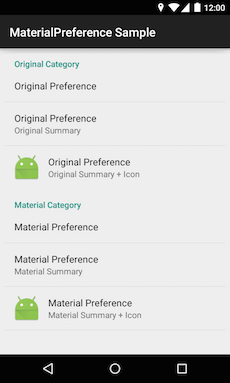
In your settings XML file that describes your preferences (must be located in res/xml/ folder)
just use the custom Preference
and PreferenceCategory like this:
<com.jenzz.materialpreference.PreferenceCategory
  android:title="Material Category">

  <com.jenzz.materialpreference.Preference
    android:title="Material Preference"
    android:summary="Material Summary" />

</com.jenzz.materialpreference.PreferenceCategory>
That's it. You can use all the attributes you know from the original preferences.
You're probably wondering why there's only a Material Design version
of Preference
and one for PreferenceCategory.
Where are ListPreference,
EditTextPreference, etc?
I don't use them. Instead I just show a simple Preference
and display a Material Design dialog when the user selects it.
I highly recommend using the material-dialogs library for that.
- On Lollipop, the preference color is derived from the
android:colorAccentattribute of your app theme. - If you're using AppCompat, it is inherited from the
colorAccentattribute. - If you want a totally different color for your preferences (why would you?), you can still override it in your app theme like this:
<style name="AppTheme" parent="Theme.AppCompat.Light.DarkActionBar">
  <item name="mp_colorAccent">#bada55</item>
</style>Check out the sample project for an example implementation.
Grab it via Gradle:
compile 'com.jenzz:materialpreference:1.1'This project is licensed under the MIT License.