UnityDecoratorAttribute is a library for adding custom actions to methods using attributes, similar to Python's @decorator. This library is implemented using Mono.Cecil.
By adding the DecoratorAttribute to a method, you can execute custom actions at the beginning and end of the method.
To use UnityDecoratorAttribute, download the package from this GitHub repository and import it into your Unity project.
UnityDecoratorAttribute comes with several predefined example attributes that you can use to add custom actions to your methods:
- IgnoreExceptionAttribute : Ignores exceptions and returns a default value when an exception is raised.
- IgnoreNullExceptionAttribute : Only ignores NullReferenceExceptions. This is an example of an attribute that inherits from IgnoreExceptionAttribute.
- ParameterLogAttribute : Logs parameter values when the method is called.
[ParameterLog]
public void TestParameterLog(int a, float b, Text text)
{
}- InstanceLogAttribute : Logs parameter values and instance.ToString() when the method is called.
[InstanceLog]
public void TestInstanceLog(int a)
{
}
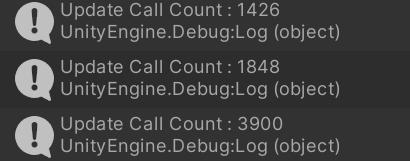
- CallCounterAttribute : Stores the number of times a method is called and returns the count using
CallCounter.GetMethodCallCount(className, methodName).
- PerformanceCheckAttribute : Stores the total execution time and count.
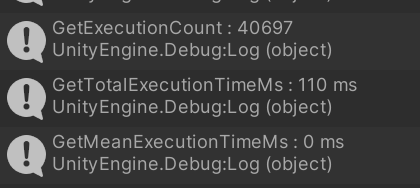
PerformanceCheck.GetExecutionCount(className, methodName): Returns the number of times the method has been executed (called).
PerformanceCheck.GetTotalExecutionTimeMs(className, methodName): Returns the total execution time of the method in milliseconds.
PerformanceCheck.GetMeanExecutionTimeMs(className, methodName): Returns the mean execution time of the method in milliseconds.
[PerformanceCheck]
public void Update()
{
    elapsedTime += Time.deltaTime;
    if (elapsedTime <= 5)
        return;

    Debug.Log($"GetExecutionCount: {PerformanceCheck.GetExecutionCount(nameof(AttributeExample), nameof(Update))}");
    Debug.Log($"GetTotalExecutionTimeMs: {PerformanceCheck.GetTotalExecutionTimeMs(nameof(AttributeExample), nameof(Update))} ms");
    Debug.Log($"GetMeanExecutionTimeMs: {PerformanceCheck.GetMeanExecutionTimeMs(nameof(AttributeExample), nameof(Update))} ms");
    elapsedTime = 0;
}
- ClampParameterAttribute : Clamps the value of the first parameter.
- ClampReturnAttribute : Clamps the return value.
To create a custom attribute, you need to inherit from UnityDecoratorAttribute.DecoratorAttribute:
c#public class ExampleAttribute : DecoratorAttribute
{
}
The PreAction method is always called when the target method is called.
To define the PreAction method in your attribute, create a static method called PreAction. If your PreAction method needs parameters, define a field called PreActionParameterTypes with the required parameter types.
public class DebugLogAttribute : DecoratorAttribute
{
    [Preserve]
    public static void PreAction(string className, string methodName)
    {
        Debug.Log($"{className}::{methodName}");
    }

    public static PreActionParameterType[] PreActionParameterTypes =>
        new[] {PreActionParameterType.ClassName, PreActionParameterType.MethodName};
}The PostAction method is called before the target method returns.
To define the PostAction method in your attribute, create a static method called PostAction. If your PostAction method needs parameters, define a field called PostActionParameterTypes with the required parameter types.
public class ClampReturnAttribute : DecoratorAttribute
{
    public ClampReturn(int min, int max)
    {
    }

    [Preserve]
    public static void PostAction(ref int @return, int min, int max)
    {
        @return = Math.Clamp(@return, min, max);
    }

    public static ParameterType[] PostActionParameterTypes =>
        new[] {ParameterType.ReturnValue, ParameterType.AttributeValues};
}
The PostAction method can take parameters of different types. You can use the ParameterType enum to specify the type of each parameter.
public enum ParameterType
{
    ClassName,
    MethodName,
    This,  // Target Method's Instance
    ParameterValues, // Target Method's Parameter Values (only for PreAction)
    ReturnValue, //  Target Method's ReturnValue (only for PostAction)
    AttributeValues, // Attribute values
}This library does not support coroutines or async methods.
This project is licensed under the MIT License - see the LICENSE file for details.