01: Introduction to Javascript Objects
In this first part of the tutorial, you will learn how to create both a digital and analogue clock using HTML, CSS, and JavaScript. We'll start by setting up the basic HTML structure and attaching the JavaScript code using an Immediately Invoked Function Expression (IIFE).
Open the file index.html. Create a js file at js/clock.js with the following skeleton code:
(function(){
console.info("Hello JS");
})();
We create the Javascript in an external file and encapsulate it within an IIFE to create a private scope and prevent variable conflicts with other scripts.
Add the script to the index.html by adding the following inside the <head> tag.
<script src="js/clock.js" defer></script>Note the use of the defer attribute that executes the script when the document has been parsed by the browser.
Save and test the file. The console message should appear in your browser's developer console.
As well editing existing elements in the DOM, we can use Javascript to add completely new elements.
To create a new DOM element use document.createElement(). This takes a parameter that is the HTML element you wish to add. With this method it is useful to store the result for easy reference. As such we'll declare a constant with the const keyword as follows:
const myNode = document.createElement("div");If you add this to your JS file, and save and test it, you won't see any change. This is because the element has been created but not yet added to the DOM.
To add the element to the DOM we need to identify where we'd like to place it. We'd like the new element adding inside of the <div id="digitalClock"> and after the <h1> inside that.
As such we could use document.getElementById() to target the element. Then we could use appendChild() which is a method of the document object that is used to add a new element as a child of the targeted one.
Add the following after the line creating the new <div>.
digitalClock.appendChild(myNode);This will have added the new element to the DOM. Use Chrome Developer tools to inspect the element and it will reveal an empty <div>.
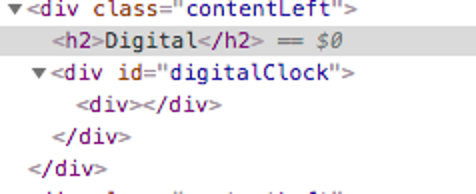
You could now use innerHTML to add some content to it eg:
myNode.innerHTML = "Welcome";However, we will be using this new node to add in a digital clock.