

Android library that can trace views to create silhouettes. Written in Kotlin.
Trace will iterate through the views in a given View hierarchy and create
silhouettes based on whether or not the View implements the interface Traceable:
-
If a View does implement
Traceable, Trace will create a silhouette from the result of thePathobject returned by theTraceable.tracecall. -
If a View does not implement the
Traceableinterface, Trace will try to use the user-providedTraceDelegate, if one was supplied. If a delegate isn't provided or ifTraceDelegate.handledoes not return true, then Trace will hand-off to theDefaultTraceDelegate. The default delegate will handle some basic views elegantly but otherwise utilizes rounded rectangles to create a silhouette based on the boundaries of the view.
If the lambda shouldExcludeView is defined and returns true for a given View, it will be
ignored and not drawn. Said lambda can be specified when calling TraceContainer.startShimmer
or when identifying the target for tracing via Trace.of.
Additionally, Trace instances can have their shimmer animations synchronized by the use of a
ShimmerSynchronizer - which can be designated either through TraceContainer.startShimmer or
Trace.syncWith.
Traceuses aPathobject with fill typeWINDING(non-zero). Thus, please consider the ramifications when creating Paths.- The default implementation of
TraceDelegatewill ignore views whose visibilities are set to eitherView.INVISIBLEorView.GONE.
Available via JitPack: https://jitpack.io/#prateem/Trace
dependencies {
    implementation "com.github.prateem:Trace:$traceVersion"
}

// in root build.gradle
allprojects {
    repositories {
        ...
        maven { url 'https://jitpack.io' }
    }
}
An example app is available that will build the following to a device:
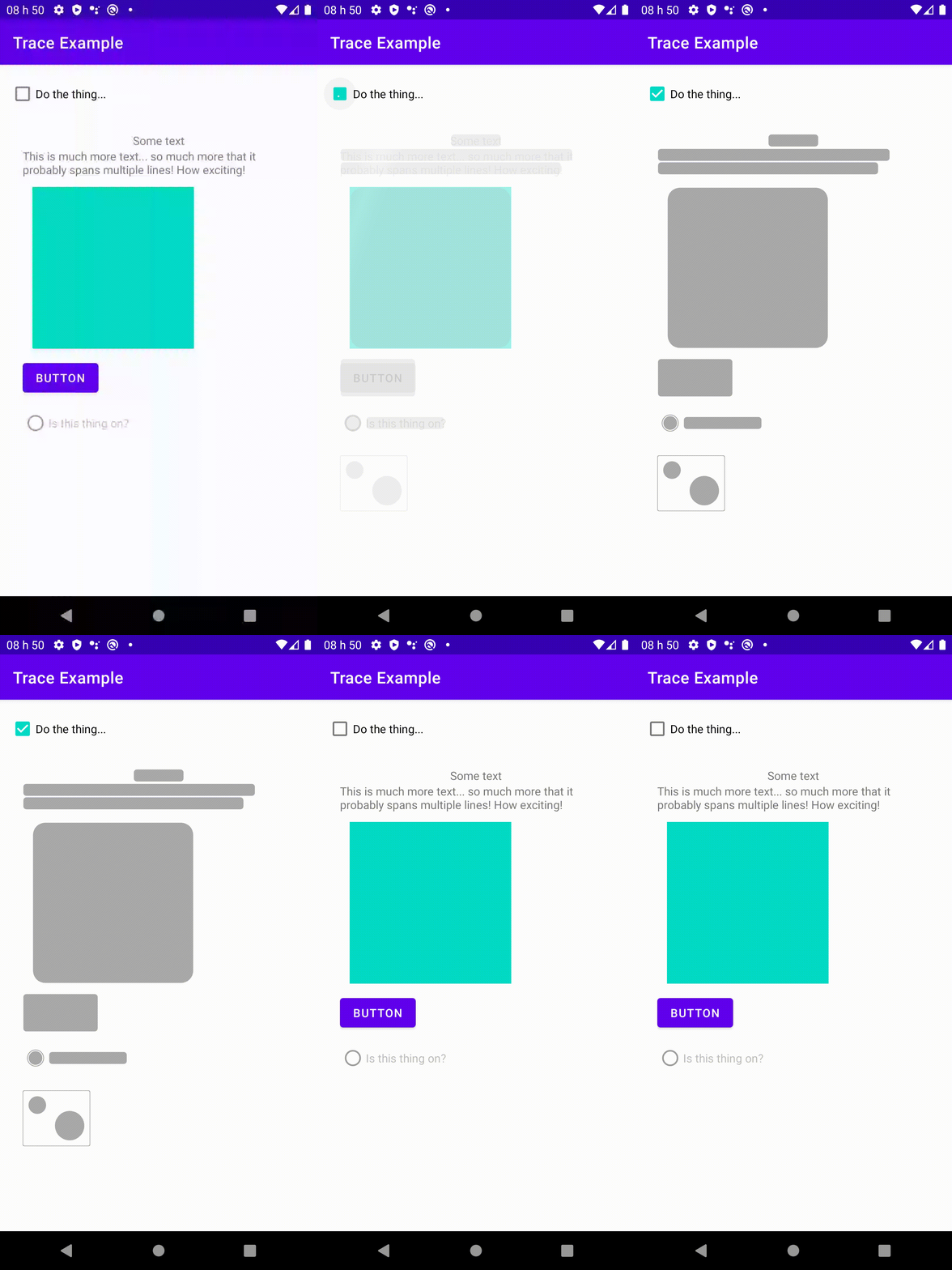
Pseudo-code is used for clarity of mapping to the visual(s) above. See activity_main.xml for full/proper xml.
<Screen>
    <Toggle />

    <TraceContainer id="traceContainer">
        <LinearLayout>
            <TextView lines="1" gravity="center" />
            <TextView lines="2" />
            <Square size="200dp" color="accent" />
            <Button />
            <RadioButton enabled="false" />

            <TraceableView
                nonTraceOutput="none"
                traceableOutput="doubleBubble" />
        </LinearLayout>
    </TraceContainer>
</Screen>class MainActivity : AppCompatActivity() {
override fun onCreate(savedInstanceState: Bundle?) {
super.onCreate(savedInstanceState)
setContentView(R.layout.activity_main)
val toggle = findViewById<Checkbox>(R.id.toggle)
val traceContainer = findViewById<TraceContainer>(R.id.traceContainer)
toggle.setOnCheckedChangeListener { _, isChecked ->
if (isChecked)
traceContainer.startShimmer()
else
traceContainer.stopShimmer()
}
// Internally, TraceContainer calls Trace with a similar setup to the following...
// (defaults shown here are for clarification only)
val trace = Trace(this) // `this` here is context, since Trace inherits from View
.of(target, delegate = null, shouldExcludeView = null)
.setColorResource(android.R.color.darker_gray) // Same as default
.setShimmerColorResource(android.R.color.white) // Same as default
.also { it.startShimmer(1200) } // Same as default
// container.addView(trace)
}
}As in the example above, Trace is most easily utilized by wrapping a ViewGroup with
a TraceContainer. Alternatively, it can be created and used manually by instantiating Trace and
calling Trace.of(). Shimmer must be controlled programmatically.
| Type | Definition |
variable |
@ColorInt traceSilhouetteColor: Int
The color of the traced silhouette.
Default: |
variable |
@ColorInt traceShimmerColor: Int
The color of the shimmer that runs across the traced silhouette.
Default: |
variable |
crossFadeEnabled: Boolean
Toggle for enabling or disabling cross-fade animation when starting or stopping shimmer. Default: |
variable |
crossFadeDuration: Long
If Default: |
function |
startShimmer(
  shimmerSpeed: Long = 1200L,
  delegate: TraceDelegate? = null,
  shouldExcludeView: ((View) -> Boolean)? = null,
  crossFade: Boolean = true,
  synchronizer: ShimmerSynchronizer? = null
): Unit
Start the shimmer animation with the given synchronizer (if provided), and with period duration for the shimmer in milliseconds. Trace will be performed with the given delegate, if provided. Views for which lambda invocations return true will be ignored during trace. |
function |
stopShimmer(crossFade: Boolean = true): Unit
Stops any active shimmer animation. |
| Type | Definition |
function |
of(
  root: View,
  delegate: TraceDelegate? = null,
  shouldExcludeView: ((View) -> Boolean)? = null
): Trace
Identify the given Views for which lambda invocations return true will be ignored during trace. |
function |
syncWith(sync: ShimmerSynchronizer?): Trace
Set the |
function |
colored(@ColorInt color: Int): TracesetColorResource(@ColorRes color: Int): Trace
Set the color for the traced silhouette segments.
Default: |
function |
shimmerColored(@ColorInt color: Int): TracesetShimmerColorResource(@ColorRes color: Int): Trace
Set the color for the shimmer that animates when
Default: |
function |
startShimmer(shimmerSpeed: Long): Unit
Start the shimmer animation over the traced silhouette. |
function |
stopShimmer(): Unit
Stop the shimmer animation over the traced silhouette. |