Janos Orquestador was born from the need to constantly execute key tasks and on that result execute some other action. Janos is made up of two parts, the "client" and "server" part.
The operation of this module is very limited to carry out a single activity but it can be modified to read any other log, event or even incorporate another type of monitoring by SNMP, SYSLOG, etc. Likewise, the functionality to send telegram messages to the designated Chat is centralized.
The DHCP Leases Monitor module client has the ability to read the log file /var/log/pihole.log of a PiHole in search of DHCPACK events and in this way identify when a host connects to the network and accepts the offered IP address.
The server exposes an enpoint in the path / monitor where it receives the ip, mac address and hostname parameters sent by the client, to perform a review in the database to identify if it is a new device or a device previously seen. At the end, send a telegram notification to report the identified activity.
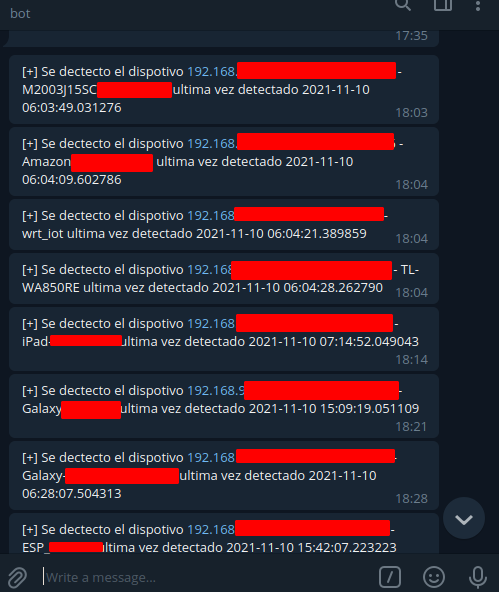
- Read logs for DHCPACK events.
- Identify if it is a new device.
- If it is a previously viewed device, identify the last date the device was viewed.
- Document the installation steps.
- Perform integration with suricata IDS.
- Perform integration with automatic consultation of electricity, water and gas bills.
- Integrate users, roles, authorization and authentication-
- Run other nerdy tasks.
- Add table of unique hosts.
- For each host add a colum with Notify Status Yes or No.
- Add the funcionality when detect a new host add the host to unique hosta table with Notify status YES.
- Add the funcionality to telgram bot to get hosts from unique host table
- Add the funcionality to telegram update Notify Status for each hosts.
git clone https://github.com/rafavg77/Janos-Orchestrator.git
cd Janos-Orchestrator.git
virtualenv venv
source venv/bin/activate
pip3 install -r requeriments.txt
cp Janos-Orchestrator/src/config/config_example.ini Janos-Orchestrator/src/config/config.ini
#edit de config.ini file with the params

cd systemd/
sudo cp bot-orchestator-telegram.service /etc/systemd/system
sudo systemctl enable bot-orchestator-telegram.service
sudo systemctl start bot-orchestator-telegram.service
sudo systemctl status bot-orchestator-telegram.service

sudo cp bot-orchestator-server.service /etc/systemd/system
sudo systemctl enable bot-orchestator-server.service
sudo systemctl start bot-orchestator-server.service
sudo systemctl status bot-orchestator-server.service
export ORCHESTRATOR_DB=/home/tota77/Developer/Janos-Orchestrator/src/server/db/orchestrator.sqlite export SNORT_CONFIG='/home/tota77/Developer/Janos-Orchestrator/src/config/config.ini'