- Download a Raspberry Pi OS image from https://www.raspberrypi.org/software/operating-systems/.
Liteversion is recommended as we won't need any window manager nor applications. - Write the image on a SD card the way you prefer :)
- Mount the SD card on your computer
- Go to the mounted
bootSD card partition and create asshfile:touch /<path_to_mounted_boot/ssh
- Create a
wpa_supplicant.confin the mountedbootfolder and fill it with the following lines:
country=COUNTRY-CODE
ctrl_interface=DIR=/var/run/wpa_supplicant GROUP=netdev
update_config=1

network={
    ssid="NETWORK-NAME"
    psk="NETWORK-PASSWORD"
}
Obviously, you need to replace NETWORK-NAME and NETWORK-PASSWORD with your wifi network credentials. COUNTRY-CODE is your country code following ISO-3166 standard.
- Insert the SD card in your Raspberry Pi and power it up.
- Identify your Raspberry PI IP address on your router once is powered up.
- Connect via SSH to its IP address
sshpi@(password israspberry` by default) - Run
raspi-config:sudo raspi-config- Change
piuser password (recommended) - Under
Interfacing options:- Enable
Camera - Enable
SSH - Enable
SPI
- Enable
- Change
You now need to wire the motors shield to the Raspberry Pi.
Image from (GPIOZero documentation)[https://gpiozero.readthedocs.io/en/stable/recipes.html#pin-numbering]
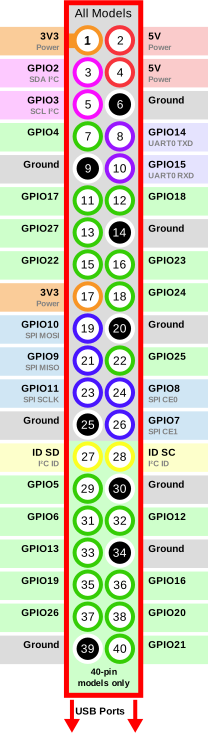
| Motors | Raspberry Pi |
|---|---|
| 5V+ | #2 |
| GND | #6 |
| IN1 | #12 (GPIO18) |
| IN2 | #13 (GPIO27) |
| IN3 | #18 (GPIO24) |
| IN4 | #19 (GPIO10) |
- Clone the
setuprepository:git clone git@github.com:raspycar/setup.git - Change current directory to the
setupdir - Install
ansible:pip install ansible