Vimliner is the simplest outliner for vim. It uses vim's existing code folding capabilities with some simple configuration. The result is a fast, powerful outliner using your favourite text editor.
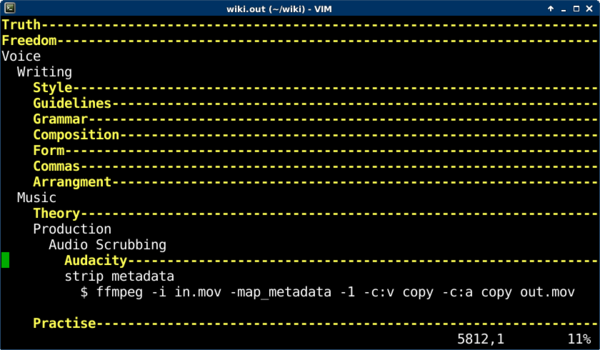
The outliner uses an indentation level of two white spaces to create new levels. You can use vim's default code folding shortcuts to move throughout your outline, or just use TAB to open and close levels.
The most frequent shortcut keys you will use are:
TAB open or close the current fold
zx close all other folds
dd to delete a fold (when it is closed)
[p to paste at the current indent level (use with dd to move outlines)
Use :help fold-commands in vim for additional shorcuts.
The fold function consumes blank lines. If you need to separate one fold from another, use a string of space characters that match the current indent level.
Install vimliner by saving vimliner.vim to $HOME/.vim/ftdetect/vimliner.vim on unix, or $HOME/vimfiles/ftdetect/vimliner.vim on Windows.
Save your outliner files with a .out extension for vimliner to be autodetected. Otherwise, use :set filetype=vimliner from within vim.
Since version 1.3, Vimliner includes the query functions below. The query results are displayed in a quickfix list in a separate tab, and you can easily jump to the matching lines by pressing Enter.
:Actionsshow a list of all current actions:Tomorrowshow a list of all tomorrow's actions:SubActionsshow a list of current actions under the fold at the cursor
Actions are defined with a priority marker and two optional fields: frequency and date of next repetition. Priority is one of the following characters: * + = - x (where * is the highest priority). Additionally, a priority of > means undecided. The priority marker can appear in the indent margin to keep text aligned. The frequency is any text string and the date is YYYYMMDD or YYYYMMDD_HHMM.
 * stretch : every day : 20241120
 * cook dinner : every day : 20241120_1900
As you complete actions, you must update the repetition date by hand (CTRL-A helps) and rerun the :Actions query.
Of course, you can use whatever tags and symbols you like for any purpose and query for those entries using :Filter and :Find.
- https://rogerkeays.com/vimliner
- https://github.com/rogerkeays/vimliner
- https://www.vim.org/scripts/script.php?script_id=5343
- 20241120_1.3 - added query functions and productivity features
- 20200430_1.2 - renamed to vimliner to avoid confusion with rival project
- 20200424_1.1 - allow lines containing only whitespace
- 20160305_1.0 - initial release
- Vimjournal: a simple text format for organising large amounts of information.
- Vimcash: an accounting system based on Vimjournal.
- More stuff you never knew you wanted.