

Bogue is an all-purpose GUI (Graphical user interface) library for
ocaml, with animations, written from scratch in
ocaml, based on SDL2.
- Can be used to add interactivity to any program.
- Can work within an already existing event loop, for instance to add GUI elements to a game.
- Uses GPU acceleration (thanks to the SDL2 renderer library), which makes it quite fast.
- Can deal with several windows.
- Bogue is themable, and does not try to look like your desktop. Instead, it will look the same on every platform.
- Graphics output is scalable (without need to recompile), and hence easily adapts to Hi-DPI displays.
- Predefined animations (slide-in, fade-in, fade-out, rotate).
- Built-in audio mixer.
- Works with mouse, touchscreen, and even TAB focusing
- Internationalization mechanism
- Low energy consumption
Programming with bogue is easy if you're used to GUIs with widgets, layouts, callbacks, and of course it has a functional flavor. It uses Threads when non-blocking reactions are needed.
open Bogue

let () =
  Widget.label "Hello world"
  |> Layout.resident
  |> Bogue.of_layout
|> Bogue.runWidgets are the building bricks, responsible for graphic elements that respond to events (mouse, touchscreen, keyboard, etc.).
For a more "functional" use, they can be "connected" instead of reacting with callbacks (see examples).
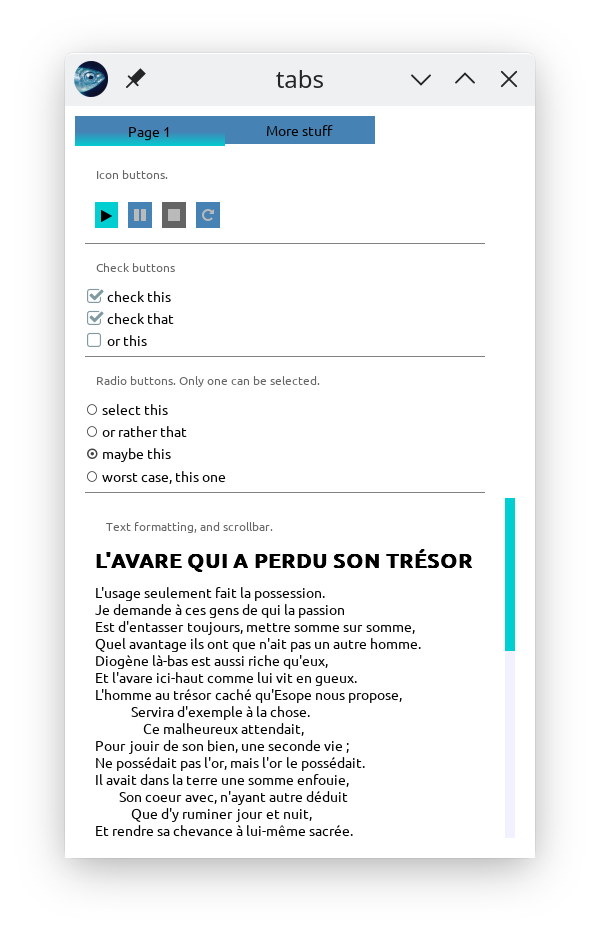
- boxes with decorations (round corner, border, shadow, gradient background, image pattern)
- check box
- push button (with labels or images)
- rich text display (bold, italics, underline), any TTF font can be used
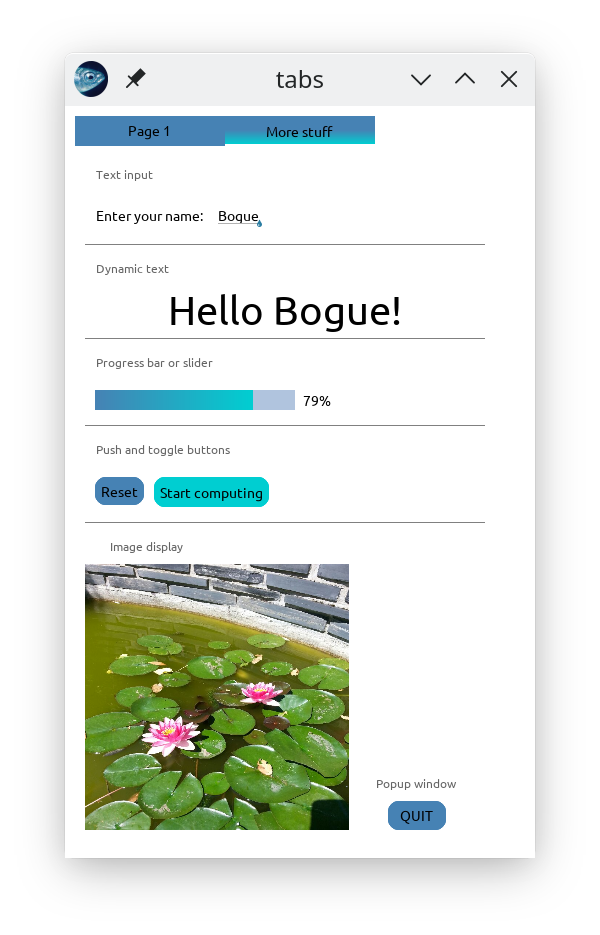
- image (all usual formats, including SVG)
- slider (horizontal, vertical, or circular)
- text input with select and copy-paste
- SDL area for free drawing with the whole SDL Renderer API
widgets can be combined in various ways into layouts. For instance, a check box followed by a text label is a common layout.
Several predefined layouts are available:
- sliders (horizontal, vertical, circular). Can be used as progress bars
- scrollable lists (that can easily handle a large number of elements, like one million)
- multi-column tables with sortable columns
- multiple tabs with slide-in animation
- modal popups
- various menus (menu bar, drop down menus with submenus)
- drop-down select lists
- radio lists
- automatic tooltips can be attached to any element
- file chooser
- text input validator
Layouts can be animated (slide-in, transparency, rotation). All layouts can be automatically resized when the user resizes the window. Timeouts are available to execute arbitrary actions after a delay.
| demo, tab1 | demo, tab2 |
|---|---|
 |
 |
See here for the source code of this demo.
(See also here.)
It's the easiest way unless you want to try out the development version.
opam install bogue
That's it. But, if you want to stay in sync with the latest developement, you can directly "pin" the github repository:
opam pin add https://github.com/sanette/bogue.git
(Then update/upgrade opam). And this can easily be undone with
opam unpin https://github.com/sanette/bogue.git
Bogue needs the SDL2 library. In general you
already have it installed, or, if everything goes smoothly, it will be
installed automatically with opam install bogue. This installs SDL2
from your package manager, and then tsdl, a library for using SDL2
with ocaml.
However, tsdl may fail to install itself if the SDL version is
too old: for instance,
tsdl1.2.0 requires SDL 2.0.22 or higher.
On the other hand, Bogue itself only uses classic SDL 2.0.0 functions,
so if your SDL2 version is old, don't worry, you just need to install
the modified tsdl from here:
opam pin https://github.com/sanette/tsdl.git
before doing opam install bogue. This modified version works with
SDL 2.0.6 or higher.
Another solution is to downgrade the official tsdl, for instance
with opam install tsdl.1.0.0, see
https://github.com/dbuenzli/tsdl/blob/master/CHANGES.md
Note that Bogue does not work with SDL3 yet. If you install SDL yourself from https://github.com/libsdl-org/SDL/releases, be sure to pick up a 2.x.x release.
Ocaml+SDL on Windows can be tricky; in case the above doesn't work for you, you can try:
opam pin https://github.com/sanette/tsdl.git
opam pin https://github.com/sanette/tsdl-ttf.git
opam pin https://github.com/sanette/tsdl-image.git
opam install bogue
(These packages are guaranteed to pass a CI test that uses, among others, Windows mingw64.)
It's good to first have a look at Bogue's general principles.
You can also directly try the tutorials.
The public API can be found here.
You should first try a minimal example.
The examples directory contains more sophisticated examples. If you
installed the bogue package with opam (as described above), these
examples are available via the boguex program. For instance, run
examples 34 and 41 by:
boguex 34 41
Type boguex -h to have the list of all examples.
See here.
-
On the user side: using Bogue should be quite energy friendly, probably more than any web-based solution. From my experience, it should be comparable to opening a folder from your local open source WM, like KDE. Athough, no serious testing have been performed yet.
-
On the dev side (I'm only speaking for myself, as the main Bogue developper): as of December, 2025, no AI whatsoever was used in the developement of Bogue, not even for getting pieces of advice. On the other hand, I did do quite a few google searches, of course.