1 player (play with a friend!)
6+ Blinks (the more the better, seriously)
Hello! As a fellow Caregiver, I would like to welcome you to the world of Blinks Terrarium! I just know you’ll enjoy nurturing life and watching it grow in your own self-contained world.
To be sure, this ain’t one of those new fangled fast action games. You won’t need quick reflexes or logical thinking. Just your curiosity, patience, and a keen desire for discovery.
Slow down. Take a load off. Carve out some “me” time and explore the world that’s waiting for you!
As a Caregiver, you gotta know the basics or else your critters ain’t gonna survive long.
Think of your tiles as little windows into your Terrarium. By itself, a single tile can’t do a lot, but get a bunch together and hoo boy you’re in for a treat! I encourage you to play with as many tiles as you can gather.
If there’s one sure thing, it’s that life needs water. Take one of your tiles and click it twice quickly. You just made what we Caregivers call a Dripper. You know it’s a Dripper because one of the faces turned light blue and now the tile is filling up with water.
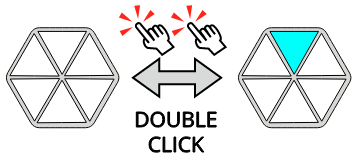
Connect a few more empty tiles beneath the Dripper and you can watch as the water falls between them. The Dripper tile also determines the direction for gravity. Try rotating the Dripper tile and watch how the water flows.
If you need even more water, you can make your Dripper tile drip faster. Click it once to cycle through three drip speeds.
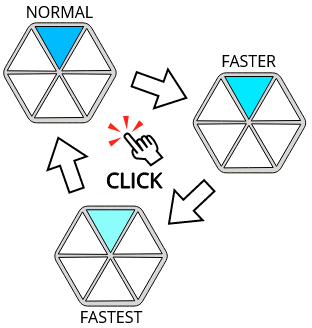
Of course, you can also make more Drippers if you need water in different places. Just be sure to keep them all pointing the same direction or else weird gravitational-type things are gonna happen. I ain’t no scientist so I can’t explain it.
To remove the Dripper entirely, double click the tile again.
You’ll need dirt if you want to grow anything. Take another of your empty tiles and click it three times quickly. Three of the faces turn brown. There’s your dirt!
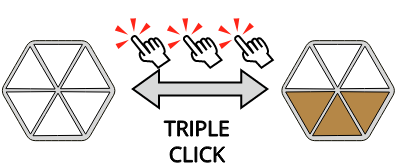
Use a Dripper together with Dirt and you might just get something to grow. Before that can happen, you’ll need to make the dirt fertile. Click your dirt tile once. You’ll see the center dirt face change from brown to green. Now you’re ready.
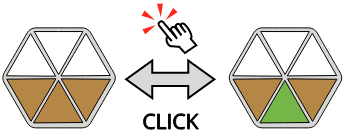
Try creating a configuration like this and wait a bit, with water slowly dripping into the dirt. You should eventually see a bud start to grow out of the dirt. Wait a bit more and it will expand into nearby tiles.

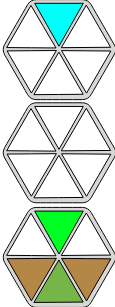

Nurture your plant. It will continue to grow. Add tiles to give it more space. Give it more water once it gets large. Don’t be afraid to rearrange your tiles at any time. The plant will show you where it is trying to grow.
There are several types of plants - each one grows differently. There are also other, non-plant, forms of life, but I’ll let you discover those on your own.
One last thing. If you ever want to clear a tile of everything, you can reset it by holding the button down for a bit. Just be sure you know what you’re doing!
Now you’re a Terrarium Caregiver!
That’s all you need to know to get started. I encourage you to explore your Terrarium by simply playing. You might be surprised by how much life you can squeeze into such a small package.
Go! Have fun and play!