Conversation


 iurimatias
force-pushed
the
spec/password_strength
branch
from
iurimatias
force-pushed
the
spec/password_strength
branch
from
1ea9be8 to
a32334a
Compare

| - So-So | ||
| - Good | ||
| - Great | ||
| - **TODO**: criteria for each category |

There was a problem hiding this comment.
Corey and co. prolly have much better ideas here, but one would be to go for:
NUM_CRITERIA = amount of criteria we have for validation
PASSWORD_CRITERIA_MATCHES = amount of matching criteria in given password

MATCHES_IN_PERCENTAGE = (PASSWORD_CRITERIA_MATCHES/NUM_CRITERIA)*100

match MATCHES_IN_PERCENTAGE:
  100 -> Great
  >= 80 -> Good
  >= 60 -> So-So
  >= 40 -> Weak
  < 40 -> Very Weak

There was a problem hiding this comment.
We can use/define an algorithm as complex or as simple as we want. I've been doing some reading on that and can share, for example, that post that explains some of the possibilities we could consider. However, based on the specs/design, I can see that we want to check pwnd and common passwords separately, so the visual indicator for these 2 factors is an error message. So it may not be necessary to include those rules in our strength's word algorithm.
The rules that I think we should define in that algorithm are:
- The password must contain a minimum of 6 characters (10 pts)
- The password should contain at least one lowercase letter (5 pts)
- The password should contain at least one uppercase letter (5 pts)
- The password should contain at least one digit (5 pts)
- The password should contain at least one symbol (10 pts)
- The password should contain at least 5 unique characters (5 pts)
So, perhaps a simple algorithm could be to give each rule a weight (some example found in the internet), then add the rules and multiply that number with the number of rules used and multiplied by a weigth and, depending on the result, apply the percentage criteria above and select the corresponding strength word.
I.e:
"password" = (5 (lower case) + 5 (5 unique chars) + 10 (more than 6 chars)) + 3 (rules used) * 10 (factor) = 45 --> Weak
"Password1234" = (5 + 5 + 5 + 5 + 10) + 5 * 10 = 80 --> Good
WDYT?
BTW, is there any restriction for using 6 characters minimum, as well as, not allowing space character? From OWASP the minimum length should be 8 and space char should be allowed to have a better strength password.

There was a problem hiding this comment.
BTW, is there any restriction for using 6 characters minimum, as well as, not allowing space character? From OWASP the minimum length should be 8 and space char should be allowed to have a better strength password.
Yes, the consensus is recent years has been that we should focus on length of the passwords, allow spaces (and if possible unicode) & avoid complex composition rules

There was a problem hiding this comment.
Also, I'd like to add an excellent article about it:
https://www.ndss-symposium.org/wp-content/uploads/2017/09/06_3_1.pdf
There was a problem hiding this comment.
As far as I know, the best algorithm for the Password Strength Estimation is Dropbox's zxcvbn.
Bitwarden is also using zxcvbn. So we should consider using it.

There was a problem hiding this comment.
As does nimbus: https://github.com/status-im/nim-zxcvbn
There was a problem hiding this comment.
As far as I know, the best algorithm for the Password Strength Estimation is Dropbox's zxcvbn.
Bitwarden is also using zxcvbn. So we should consider using it.
Yes sure ! that's what was initially suggested on the security-internal issue

|
|
||
| ## Designs | ||
|
|
||
| * [designs](https://www.figma.com/file/IPpvkpDWabBKJTeo6bFop0/Kuba%E2%8E%9CDesktop?node-id=11%3A4921) |
There was a problem hiding this comment.
It would be nice to have different userflows put into screenshots here for clarity and then have a resource section where we link the source file instead.

There was a problem hiding this comment.
@PascalPrecht ask and you shall be given ;-)
See userflow that starts here https://www.figma.com/file/IPpvkpDWabBKJTeo6bFop0/Kuba%E2%8E%9CDesktop?node-id=1940%3A215207
and also the userflow that starts here https://www.figma.com/file/IPpvkpDWabBKJTeo6bFop0/Kuba%E2%8E%9CDesktop?node-id=2201%3A235245
| 4.2 System checks if password is a common password (see Functional Requirements#password validation) and displays feedback (e.g "this pasword has been pwned and shouldn't be used") | ||
| 5. User types password again in the confirm password field | ||
| 6. System checks if password matches and displays "Passwords don't match" if they don't | ||
| 7. System checks if password matches and enables the "Create" button if they do |
There was a problem hiding this comment.
There's no "Create" button in this scenario
There was a problem hiding this comment.
Correct, in this flow the button should be "Change Password"
| - A password MUST BE at least 6 characters long. | ||
| - A password MUST BE at most 64 characters long. | ||
| - A password MUST NOT contain spaces. | ||
| - A password MAY CONTAIN any printable ascii character. |

There was a problem hiding this comment.
good question, it should and I would suggest to hint, maybe better require/suggest that from/to user.
For the emojihash feature we require 1024 hardcoded emojis to be available for the Apps, so that drastically increases the alphabet size for the user to choose a password from, therefore allows for shorter passwords with equivalent security OR ramps up the brute force resistance with equivalent length. Also I think most rainbow tables out there don't contain emoji based password hashes yet.
There was a problem hiding this comment.
the issue with supporting including emoji in a password is that we would then also have to add an additional affordance to enable users to enter emoji. This isn't needed if we restrict ourselves to characters that can be typed with a keyboard.
There was a problem hiding this comment.
I would enforce at least a minimum of 10 characters, as size matters here.
Also by forbidding 6-10 characters length, we are avoiding most (~80%) of the common & leaked passwords, what would allow to greatly optimise the check against those.
| - If a password matches a common password, it MUST BE rejected | ||
| - If a password matches a common password, it MUST BE display a warning "this pasword has been pwned and shouldn't be used" | ||
| - If the application is online, the password MAY BE checked against an online or a local database. | ||
| - If the application is offline, the password MAY BE checked against a local database. |
There was a problem hiding this comment.
What is that local database? What are "common" passwords? Is this out of band? Wonder how we can be spec compliant if we don't know what database of common passwords we should refer to...
There was a problem hiding this comment.
I don't think we should worry about performing this check if the application is offline, because these databases are huge. IMHO not worth the increase in app size, or the user bandwidth to download these databases after the app is installed. So if the application is offline, I think we can skip the 'has this password been pwned' check.
| - So-So | ||
| - Good | ||
| - Great | ||
| - **TODO**: criteria for each category |
There was a problem hiding this comment.
Corey and co. prolly have much better ideas here, but one would be to go for:
NUM_CRITERIA = amount of criteria we have for validation
PASSWORD_CRITERIA_MATCHES = amount of matching criteria in given password

MATCHES_IN_PERCENTAGE = (PASSWORD_CRITERIA_MATCHES/NUM_CRITERIA)*100

match MATCHES_IN_PERCENTAGE:
  100 -> Great
  >= 80 -> Good
  >= 60 -> So-So
  >= 40 -> Weak
  < 40 -> Very Weak

| 1. User types the current password in the current password field | ||
| 2. User types the choosen password in the new password field | ||
| 3. System displays feedback on the strength of the password | ||
| 4.1 System checks if the password fits criteria (see Functional Requirements#password criteria) and displays feedback (e.g "Password is too short") |

There was a problem hiding this comment.
Should not meeting the password criteria stop you from creating an account? or is it just informative?
There was a problem hiding this comment.
@richard-ramos the only mandatory criteria should be password length. All other criteria should be just informative.
There was a problem hiding this comment.
what drives the requirement should password length be mandatory? a 6-character password is the security equivalent of a .8-meter fence (the neat-looking wooden and nicely painted kind) and is mostly a "please-don't-look" cue.. if I'm just checking out if the app works, it's kind of annoying for no real benefit
There was a problem hiding this comment.
what drives the requirement should password length be mandatory? a 6-character password is the security equivalent of a .8-meter fence (the neat-looking wooden and nicely painted kind) and is mostly a "please-don't-look" cue.. if I'm just checking out if the app works, it's kind of annoying for no real benefit
agreed.
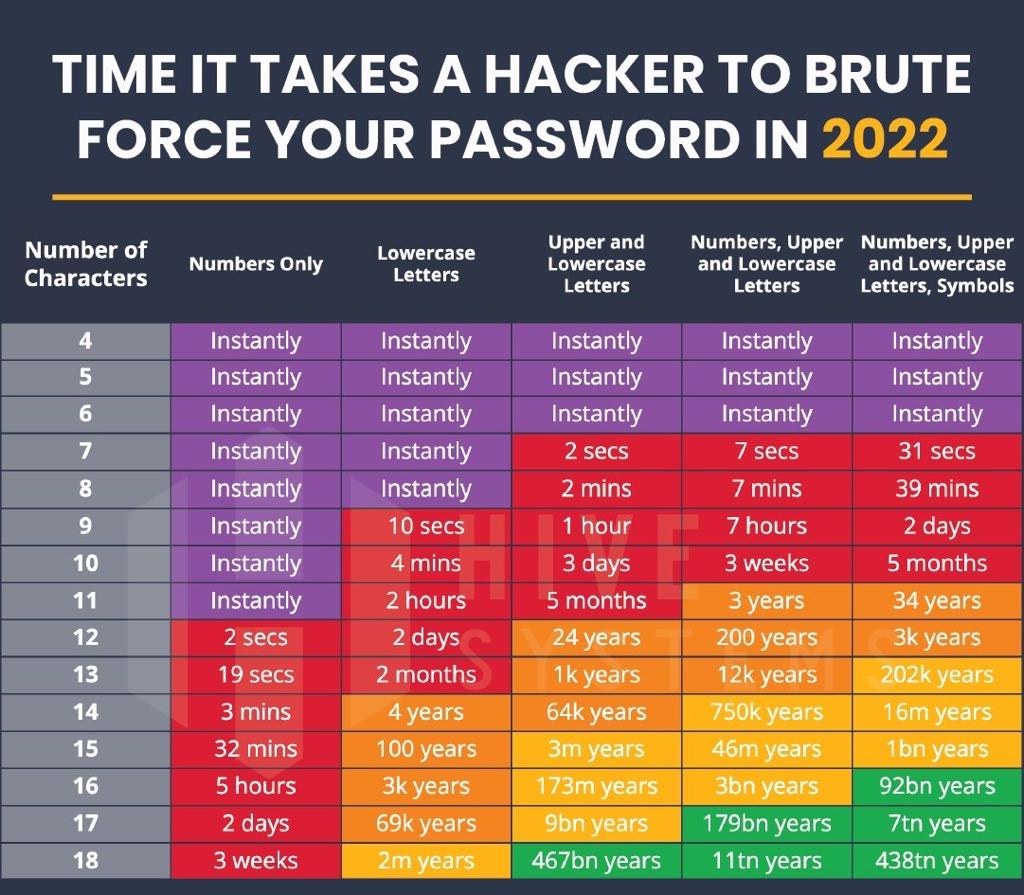
Good complexity with a reasonable length is the key to security. We need a balance in here for not to kill UX.
On the other hand, if the only mandatory criteria should be password length, you can see the table below what's going to happen.
| - A password MUST be checked against a list of common passwords | ||
| - If a password matches a common password, it MUST BE rejected | ||
| - If a password matches a common password, it MUST BE display a warning "this pasword has been pwned and shouldn't be used" | ||
| - If the application is online, the password MAY BE checked against an online or a local database. |
There was a problem hiding this comment.
Is it really necessary to check the password against an online service? It doesnt feel safe to have the password leave your device.

There was a problem hiding this comment.
A local db would indeed be better, I don't think it would take much more spaces (only text) but probably something to confirm
There was a problem hiding this comment.
Is it really necessary to check the password against an online service? It doesnt feel safe to have the password leave your device.
I guess the idea would be to fetch an online db and check against that locally. No need to send the PW over the wire
There was a problem hiding this comment.
the proposal is to use https://haveibeenpwned.com/API/v3#PwnedPasswords
offline is also ok, but can be quite limited, some of these databases are huge
There was a problem hiding this comment.
with the https://haveibeenpwned.com/API/v3#PwnedPasswords service, the password is never sent over the wire
There was a problem hiding this comment.
Checking against previously breached passwords is indeed part of the basic controls recommended by the NIST
- Passwords obtained from previous breach corpuses.
- Dictionary words.
- Repetitive or sequential characters (e.g. 'aaaaaa', '1234abcd').
- Context-specific words, such as the name of the service, the username, and derivatives thereof.
Although history has proven their recommendations should not necessarily be followed blindly, the first 3 items make a lot of sense today.
The question is should the Status app rely on a third party services for this ?
As our users machines will directly communicate with the service this should probably be an opt-in.
Also, a (weaker) alternative would be to check locally against a smaller database like https://github.com/danielmiessler/SecLists/blob/master/Passwords/Common-Credentials/10-million-password-list-top-1000000.txt

| - it MUST be possible to view the password in the password field. | ||
| - Everytime a password is created or changed, it MUST BE confirmed in a second password field. | ||
| - If the password is being changed, the current password MUST BE confirmed. | ||
|
|

There was a problem hiding this comment.
Potential addition:
- Each typed character SHOULD be displayed for a split second
This is MUST for mobile, a convenience for Desktop. Depends on whether this spec will be relayed to mobile. Don't see a reason why the spec as a whole shouldn't apply to mobile.
There was a problem hiding this comment.
agreed this is definitely a must for mobile. On desktop, the user has the option to view the password while they are typing it (this option is switched off by default)
| - Great | ||
| - **TODO**: criteria for each category | ||
|
|
||
| ### Misc functionality |
There was a problem hiding this comment.
Potential addition:
- Before confirming, user MUST be informed that password cannot be recovered
Create button should remain enabled (i.e. no explicit confirmation requested from user that they understand password cannot be recovered)
There was a problem hiding this comment.
@hesterbruikman good idea! Will get this added to the design :-)

Replaced `Create` to `Change Password` button text in Change Password specs.
Updated minimum characters long to 10 as agreed with security team.
Specified criteria for each category: Agreed with security team to use `dropbox's zxcvbn` algorithm.
Updated some typos.

|
Please @serhanwbahar, @OxFred and @iurimatias review last commit that updates the documentation according to the discussions. The most relevant changes are:
If you agree, please, approve the PR and we could merge it! Thanks!! |

As agreed with security team and from spec status-im/feature-specs#38, password length has been updated from 6 to 10.

As agreed with security team and from spec status-im/feature-specs#38, password length has been updated from 6 to 10.
11 participants


closes #15