


A comprehensive personal finance management web application built with Flask and MongoDB. Track your income and expenses, analyze your spending habits with detailed reports, set budgets, and take full control of your financial life.
Watch the Demo · Report a Bug · Request a Feature
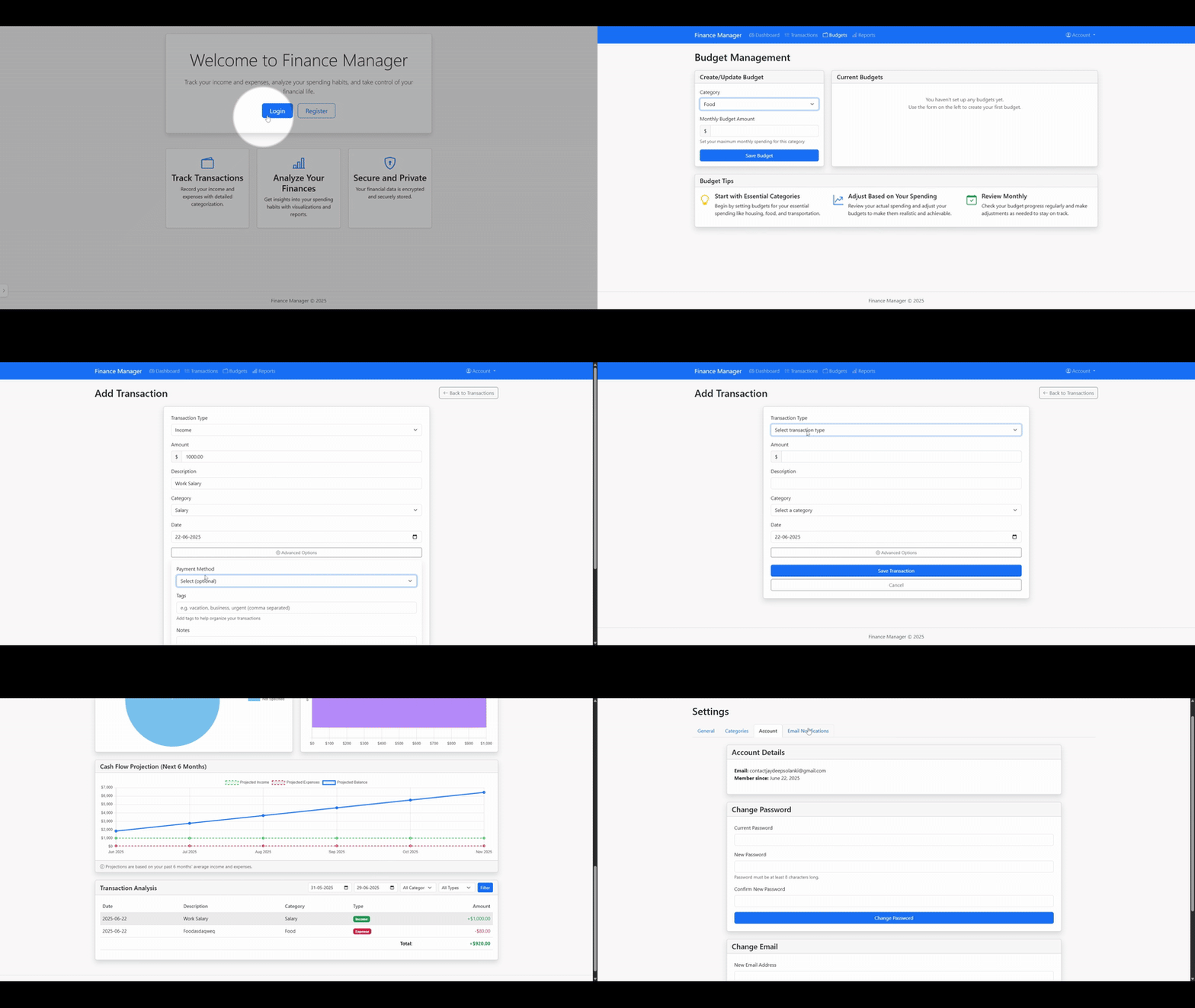
- 📊 Interactive Dashboard: Get an instant overview of your finances, including income, expenses, current balance, and recent transactions.
- 💸 Transaction Management: Easily add, edit, and delete income and expense records with details like tags and payment methods.
- 🎯 Budgeting System: Set monthly budgets for different expense categories and visually track your progress against them.
- 📈 Advanced Reporting: Visualize your financial data with dynamic charts for monthly trends, category breakdowns, payment methods, and cash flow projections.
- 🎨 Customizable Interface: Personalize your experience with theme support (light/dark mode), multiple currencies, and custom date formats.
- 📧 Email Notifications: Receive security alerts, budget warnings, and financial summaries directly to your inbox using Resend.
- 🔐 Secure Admin System: A protected area for user management (grant/revoke admin rights) and viewing system logs.
- 🐳 Dockerized: Get up and running in minutes with the provided Docker Compose setup for a smooth deployment.
Click the thumbnail below to watch a video overview of the dashboard and its features.
| Transaction Page | Budget Page | Report Page | Admin Dashboard |
|---|---|---|---|
 |
 |
 |
 |
Built with a modern and robust technology stack:
- Backend: Python, Flask
- Database: MongoDB (with PyMongo)
- Frontend: HTML, CSS, JavaScript, Bootstrap 5
- Charting: Chart.js
- WSGI Servers: Gunicorn (for Linux/macOS), Waitress (for Windows)
- Deployment: Docker
The fastest way to get the Finance Manager running is with Docker.
- Docker and Docker Compose
- Git
-
Clone the repository:
git clone [https://github.com/WhoIsJayD/Finance-Manager.git](https://github.com/WhoIsJayD/Finance-Manager.git) cd Finance-Manager -
Create your environment file: Copy the example file. On Linux/macOS, use
cp .env.example .env. On Windows, usecopy .env.example .env. -
Configure your
.envfile: Open the.envfile and set the following variables. A strongSECRET_KEYis crucial.FLASK_ENV=production SECRET_KEY=generate_a_very_secure_random_string_here RESEND_API_KEY=your_resend_api_key_for_emails ADMIN_SETUP_CODE=a_secure_random_code_for_first_admin_setup ADMIN_PASSWORD=a_strong_password_for_sensitive_admin_actions
-
Build and run the containers:
docker-compose up -d --build
-
Access the application: Open your browser and navigate to
http://localhost:5000. -
Initialize the first Admin User:
- Navigate to
http://localhost:5000/initialize-admin. - Enter the
ADMIN_SETUP_CODEfrom your.envfile. - Fill in the form to create your admin account.
- Navigate to
If you prefer a manual setup:
-
Clone the repository and create a virtual environment:
git clone [https://github.com/WhoIsJayD/Finance-Manager.git](https://github.com/WhoIsJayD/Finance-Manager.git)
cd Finance-Manager
python3 -m venv venv
source venv/bin/activate  # On Linux/macOS
# venv\Scripts\activate   # On Windows
-
Install dependencies:
pip install -r requirements.txt
-
Set up MongoDB: Ensure you have a running MongoDB instance and update the
MONGO_URIin your.envfile accordingly. -
Configure and run the application:
-
Create and fill out the
.envfile as described in the Docker setup. -
On Linux/macOS (with Gunicorn):
gunicorn --bind 0.0.0.0:5000 "app:app" -
On Windows (with Waitress):
python run_server.py
-
The application is built with security in mind:
- Password hashing with bcrypt.
- Rate limiting on login/registration routes to prevent brute-force attacks.
- Secure,
HttpOnlysession cookies. - Admin actions like toggling user privileges require password confirmation.
- Input validation and parameterized database queries to prevent injection attacks.
For production, always run behind a reverse proxy (like Nginx or Caddy) and enable HTTPS.
Contributions are what make the open-source community such an amazing place to learn, inspire, and create. Any contributions you make are greatly appreciated.
- Fork the Project.
- Create your Feature Branch (
git checkout -b feature/AmazingFeature). - Commit your Changes (
git commit -m 'Add some AmazingFeature'). - Push to the Branch (
git push origin feature/AmazingFeature). - Open a Pull Request.
Please ensure your code follows the existing style and that you add comments for complex logic.
Distributed under the MIT License. See LICENSE file for more information.