



🎯 Features · Multimodal · PDF Knowledge Base · Web Search · Code Execution · Voice Chat
🤖 Providers · OpenAI · Claude · Gemini · Mistral · Cohere · Perplexity · xAI · DeepSeek · Ollama
🛠 Built with · Ruby · Electron · Docker · PostgreSQL · WebSocket
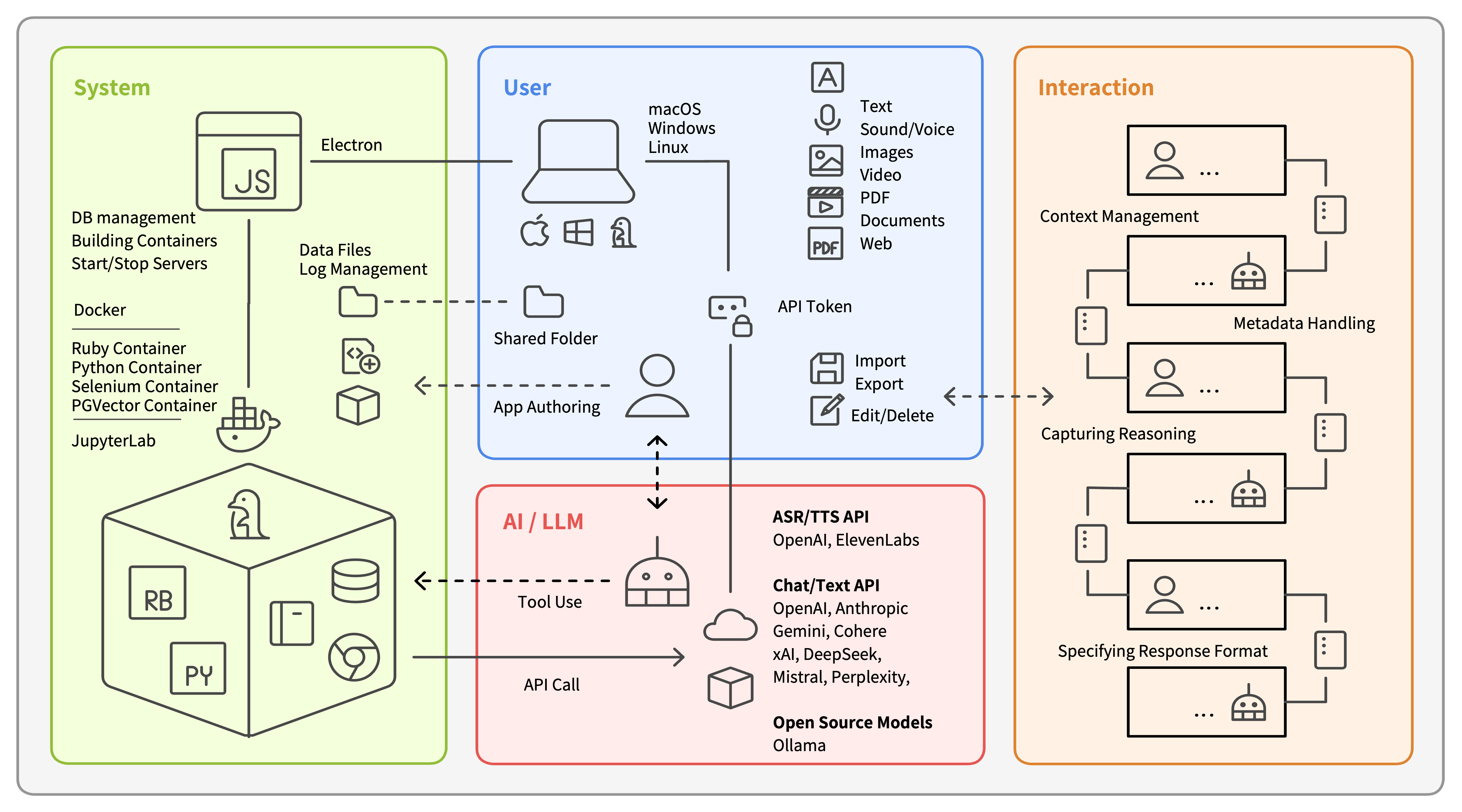
Monadic Chat is a locally hosted web application for creating and utilizing intelligent chatbots. By providing AI models with a real Linux environment through Docker, it enables advanced tasks requiring external tools. With support for voice interaction, image/video processing, and AI-to-AI conversations, Monadic Chat serves both as an AI application platform and a framework for developing AI-powered applications.
Contextual Conversations: Like monads in functional programming that wrap values with context, conversations in Monadic Chat can carry structured metadata (reasoning, topics, notes).
Conversations as Data: Your conversations are persistent, portable data you own—not ephemeral sessions locked in a web service. Edit, delete, export, and import your conversation history freely.
Available for Mac, Windows, and Linux
📖 Documentation (English/Japanese) · 📋 Changelog
-
Download the installer for your platform from Releases
- macOS:
.dmgfile (Apple Silicon) - Windows:
.exeinstaller - Linux:
.debpackage (Debian/Ubuntu)
- macOS:
-
Install and launch the application
-
Configure API keys in Settings
-
Start using built-in applications or create your own
📖 Detailed installation guide: Installation
After installation:
- Click Start to launch the Docker environment
- Select an app from the sidebar (start with Chat or Voice Chat)
- Choose your AI provider (OpenAI, Claude, Gemini, etc.)
- Start chatting!
For offline use, install Ollama and select it as your provider.
Unlike web-based AI services or IDE-integrated assistants, Monadic Chat is a locally-run AI platform that gives you:
-
Use Your Preferred Tools: Access real Docker containers to run code, install packages, and persist files.
-
Local Data Storage: Store conversations, code, and files on your local machine, not in cloud services. Work offline with Ollama.
-
Extensible Platform: Not just a chatbot—a framework for building custom AI applications with Monadic DSL.
-
Provider Independence: Switch between 9 AI providers. Choose the best model for each task.
Perfect for: Developers building AI tools, researchers needing reproducible environments, privacy-conscious teams, and anyone wanting full control over their AI infrastructure.
- 🤖 Multi-Provider Support: OpenAI, Claude, Gemini, Mistral, Cohere, Perplexity, xAI, DeepSeek, and Ollama
- 🐧 Real Linux Environment: AI agents can execute code, install packages, persist files, and maintain continuous context across turns in actual Docker containers.
- 💬 Advanced Conversation Management: Edit, export/import, and track conversation history with structured context
- 🎙️ Voice Interaction: Text-to-speech and speech-to-text with multiple providers and speaker diarization
- 🖼️ Image & Video: Generate, edit, and analyze images and videos using latest AI models, with intelligent session-based continuity for effortless iterative editing and remixing of generated content.
- 📄 PDF Knowledge Base: Store and query documents locally (PGVector) or in cloud (OpenAI Vector Store)
- 🌐 Web Search Integration: Native search in OpenAI, Claude, Gemini, Grok, and Perplexity
- 🔄 Automatic Updates: In-app notifications and seamless update downloads
Chat · Chat Plus · Code Interpreter · Coding Assistant · Research Assistant · Voice Chat · Jupyter Notebook · Auto Forge · Concept Visualizer · Syntax Tree · Video Generator · Math Tutor · PDF Navigator · Image Generator · Language Practice
📖 Full list and details: Basic Apps (31 apps total)
- Monadic DSL: Create custom applications with declarative syntax
- Docker Integration: Add your own containers and tools
- Ruby & Python: Extend functionality with familiar languages
- MCP Server: Integrate external tools and services via JSON-RPC 2.0
📖 Development guide: Advanced Topics
- 📖 Documentation (English/Japanese)
- 🚀 Getting Started
- 📚 Basic Usage
- 🐳 Docker Integration
- 💡 Advanced Topics
- 📖 Reference
- ❓ Frequently Asked Questions
Yoichiro HASEBE yohasebe@gmail.com
This software is available as open source under the terms of the Apache License 2.0.

